Set World Bounds
Learn how to define custom boundaries for the Arcade Physics world, constraining movement and collisions to a specific area smaller than the game canvas.
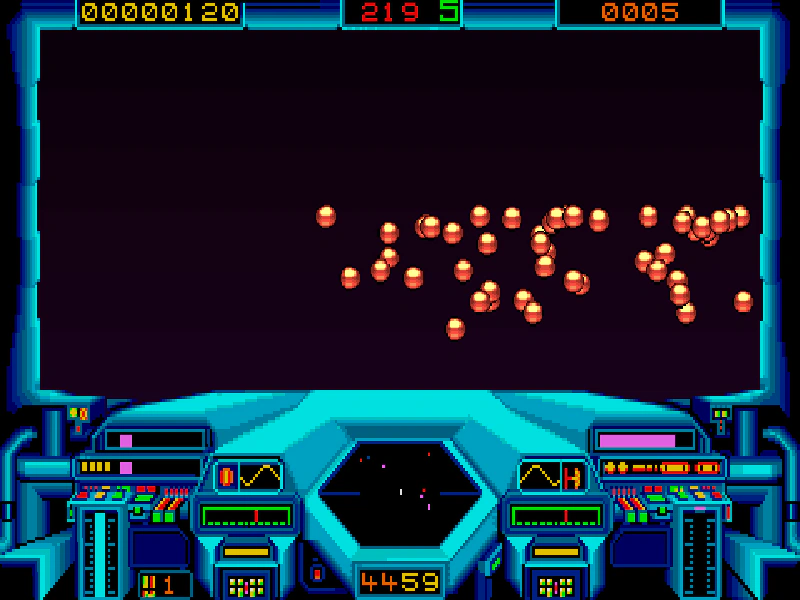
640 × 400
class Example extends Phaser.Scene
{
    preload ()
    {
        this.load.setBaseURL('https://cdn.phaserfiles.com/v410');
        this.load.image('bg', 'assets/skies/space2.png');
        this.load.image('cockpit', 'assets/pics/cockpit.png');
        this.load.spritesheet('ball', 'assets/sprites/balls.png', { frameWidth: 17, frameHeight: 17 });
    }

    create ()
    {
        this.add.image(320, 200, 'bg');
        this.add.image(320, 200, 'cockpit').setScale(2);

        this.physics.world.setBounds(32, 20, 576, 240);

        const group = this.physics.add.group({
            key: 'ball',
            frameQuantity: 48,
            bounceX: 1,
            bounceY: 1,
            collideWorldBounds: true,
            velocityX: 200,
            velocityY: 150
        });

        Phaser.Actions.RandomRectangle(group.getChildren(), this.physics.world.bounds);
    }
}

const config = {
    scale: { mode: Phaser.Scale.FIT },
    type: Phaser.AUTO,
    width: 640,
    height: 400,
    parent: 'game-container',
    pixelArt: true,
    physics: {
        default: 'arcade',
        arcade: {
            // You can also set the world bounds here:
            // x: 32, y: 20, width: 576, height: 240,
            gravity: { y: 200 }
        }
    },
    scene: Example
};

const game = new Phaser.Game(config);
More in Arcade132 examples
 Simple Arcade Physics BodyA basic demonstration of creating an Arcade Physics body with velocity, gravity, and world boundary collision.
 Simple Physics GroupDemonstrates creating an Arcade Physics Group with shared body properties such as bounce and world bounds collision, including a collider that makes group members react to one another.
 Smaller Bounding BoxDemonstrates how to resize an Arcade Physics body to be smaller than the sprite's original dimensions and center it on the object.
 Smooth StopUses Arcade Physics and SmoothStep to gradually slow down a sprite as it nears its target coordinates for a natural-looking arrival.