Custom Debug Colors
Demonstrates how to set custom debug colors for Arcade Physics bodies, both globally through the game configuration and individually for specific bodies.
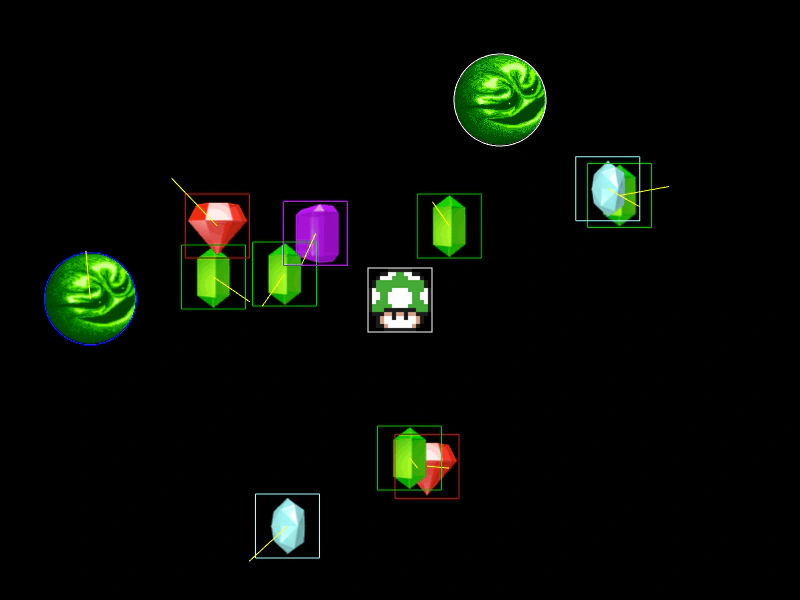
800 × 600
class Example extends Phaser.Scene
{
    preload ()
    {
        this.load.setBaseURL('https://cdn.phaserfiles.com/v410');
        this.load.atlas('gems', 'assets/tests/columns/gems.png', 'assets/tests/columns/gems.json');
        this.load.image('mushroom', 'assets/sprites/mushroom2.png');
        this.load.image('wizball', 'assets/sprites/wizball.png');
    }

    create ()
    {
        const spriteBounds = Phaser.Geom.Rectangle.Inflate(Phaser.Geom.Rectangle.Clone(this.physics.world.bounds), -100, -100);

        this.anims.create({ key: 'diamond', frames: this.anims.generateFrameNames('gems', { prefix: 'diamond_', end: 15, zeroPad: 4 }), repeat: -1 });
        this.anims.create({ key: 'prism', frames: this.anims.generateFrameNames('gems', { prefix: 'prism_', end: 6, zeroPad: 4 }), repeat: -1 });
        this.anims.create({ key: 'ruby', frames: this.anims.generateFrameNames('gems', { prefix: 'ruby_', end: 6, zeroPad: 4 }), repeat: -1 });
        this.anims.create({ key: 'square', frames: this.anims.generateFrameNames('gems', { prefix: 'square_', end: 14, zeroPad: 4 }), repeat: -1 });

        this.physics.add.staticImage(400, 300, 'mushroom');

        const anims = [ 'diamond', 'prism', 'ruby', 'square' ];

        //  Some normal dynamic bodies
        for (let i = 0; i < 10; i++)
        {
            const anim = Phaser.Utils.Array.GetRandom(anims);

            const pos = Phaser.Geom.Rectangle.Random(spriteBounds);

            const block = this.physics.add.sprite(pos.x, pos.y, 'gems');

            block.setVelocity(Phaser.Math.Between(-100, 100), Phaser.Math.Between(-100, 100));
            block.setBounce(1).setCollideWorldBounds(true);
            block.play(anim);

            //  Each type will have its own debug body color:
            if (anim === 'diamond')
            {
                block.body.debugBodyColor = 0xadfefe;
            }
            else if (anim === 'prism')
            {
                block.body.debugBodyColor = 0x09b500;
            }
            else if (anim === 'ruby')
            {
                block.body.debugBodyColor = 0xb21d0a;
            }
            else if (anim === 'square')
            {
                block.body.debugBodyColor = 0x930ebe;
            }
        }

        //  A dynamic circular body
        const ball = this.physics.add.image(100, 400, 'wizball').setCircle(46);

        ball.setVelocity(Phaser.Math.Between(-100, 100), Phaser.Math.Between(-100, 100));
        ball.setBounce(1).setCollideWorldBounds(true);

        //  A static circular body
        this.physics.add.staticImage(500, 100, 'wizball').setCircle(46);
    }
}

const config = {
    scale: { mode: Phaser.Scale.FIT },
    type: Phaser.AUTO,
    width: 800,
    height: 600,
    parent: 'game-container',
    physics: {
        default: 'arcade',
        arcade: {
            debug: true,
            debugShowBody: true,
            debugShowStaticBody: true,
            debugShowVelocity: true,
            debugVelocityColor: 0xffff00,
            debugBodyColor: 0x0000ff,
            debugStaticBodyColor: 0xffffff
        }
    },
    scene: Example
};

const game = new Phaser.Game(config);
More in Arcade132 examples
 Custom World Bounds for BodiesDemonstrates how to assign specific movement boundaries to individual Arcade Physics bodies using custom bounds rectangles, rather than using the global world bounds.
 Destroy Physics BodyDemonstrates how to remove a physics-enabled Game Object and its associated body from the simulation using the destroy method.
 Direct Control Arcade Physics BodyDemonstrates how to use setDirectControl to move a physics body via Tweens or manual coordinate changes while still allowing it to physically interact with and push other objects.
 Direct Control Follow MouseDemonstrates how to use Arcade Physics' Direct Control mode to manually position a sprite via the mouse while maintaining collision interactions with other dynamic physics bodies.