Manual Physics Update
Demonstrates how to use the 'customUpdate' setting to disable the automatic physics step, allowing for manual control of the simulation timing via the World update method.
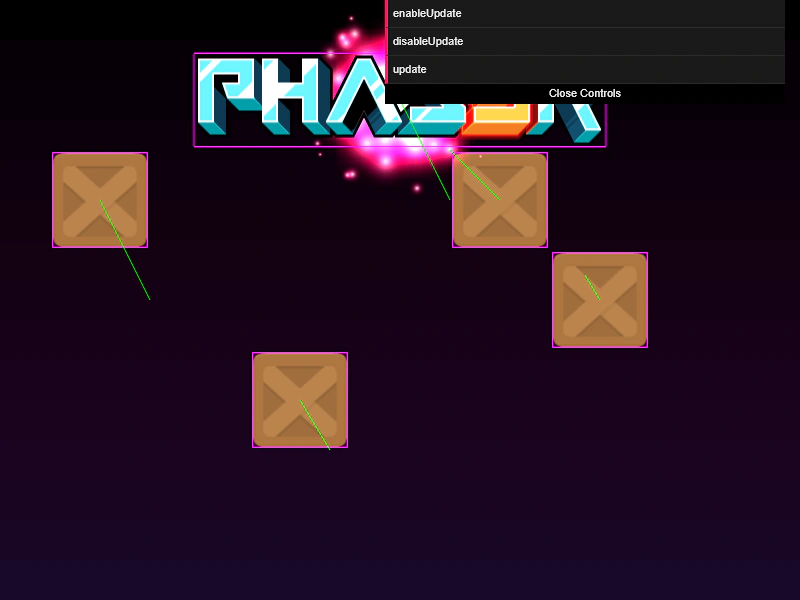
800 × 600
class Example extends Phaser.Scene
{
    constructor ()
    {
        super({
            physics: {
                arcade: {
                    customUpdate: true,
                    debug: true,
                    fixedStep: false,
                    fps: 60,
                    gravity: { y: 200 }
                }
            }
        });
    }

    preload ()
    {
        this.load.setBaseURL('https://cdn.phaserfiles.com/v410');
        this.load.image('block', 'assets/sprites/block.png');
        this.load.image('logo', 'assets/sprites/phaser3-logo.png');
        this.load.image('red', 'assets/particles/red.png');
        this.load.image('sky', 'assets/skies/space2.png');
    }

    create ()
    {
        this.add.image(400, 300, 'sky');

        const group = this.physics.add.group({
            bounceX: 1,
            bounceY: 1,
            collideWorldBounds: true
        });

        group.create(100, 200, 'block').setVelocity(100, 200);
        group.create(500, 200, 'block').setVelocity(-100, -100);
        group.create(300, 400, 'block').setVelocity(60, 100);
        group.create(600, 300, 'block').setVelocity(-30, -50);

        this.physics.add.collider(group);

        const particles = this.add.particles(0, 0, 'red', {
            speed: 100,
            scale: { start: 1, end: 0 },
            blendMode: 'ADD'
        });

        const logo = this.physics.add.image(400, 100, 'logo');

        logo.setVelocity(100, 200);
        logo.setBounce(1, 1);
        logo.setCollideWorldBounds(true);

        particles.startFollow(logo);

        const gui = new dat.GUI({ width: 400 });

        gui.add(this.physics, 'enableUpdate');
        gui.add(this.physics, 'disableUpdate');

        const { world } = this.physics;

        gui.add({ update: () => { world.update(0, world._frameTimeMS); } }, 'update');
    }
}

const gameConfig = {
    scale: { mode: Phaser.Scale.FIT },
    type: Phaser.AUTO,
    width: 800,
    height: 600,
    parent: 'game-container',
    scene: Example
};

const game = new Phaser.Game(gameConfig);
More in Arcade132 examples
 Mass and Collision MomentumDemonstrates how setting a body's mass property affects the momentum and rebound behavior when two Arcade Physics bodies collide.
 Mass Collision Performance TestA performance demonstration showing 10,000 Arcade Physics bodies colliding with a player-controlled sprite and the world bounds.
 Move and Stop at PositionDemonstrates how to move an Arcade Physics body towards a target point and stop it precisely using a distance threshold and body reset.
 Move To ObjectMove a physics-enabled sprite toward a target object at a constant speed using the Arcade Physics moveToObject method.