Camera Pan to Location
Demonstrates how to use the camera pan effect to smoothly move the viewport to specific coordinates using different durations and easing functions.
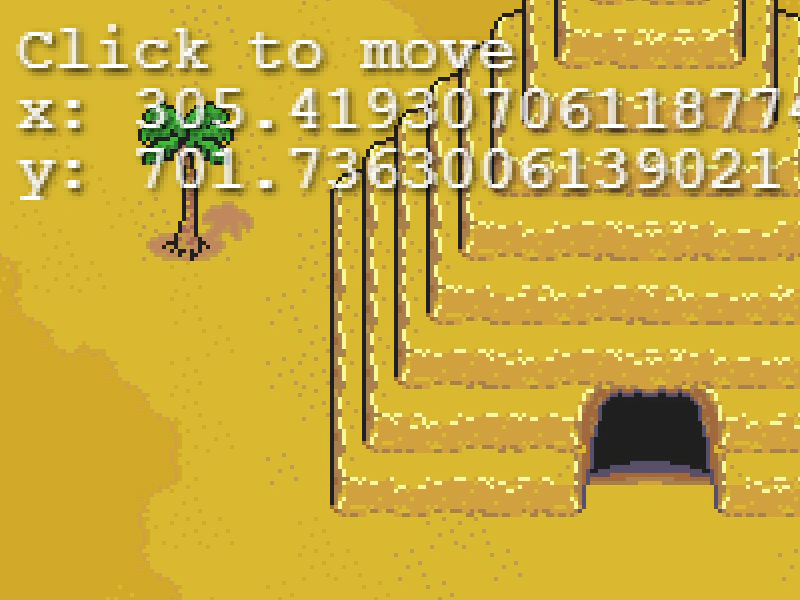
800 × 600
class Example extends Phaser.Scene
{
    constructor ()
    {
        super();
    }

    preload ()
    {
        this.load.setBaseURL('https://cdn.phaserfiles.com/v410');
        this.load.image('map', 'assets/tests/camera/earthbound-scarab.png');
    }

    create ()
    {
        this.cameras.main.setBounds(0, 0, 1024, 2048);

        this.add.image(0, 0, 'map').setOrigin(0);

        this.cameras.main.setZoom(4);
        this.cameras.main.centerOn(0, 0);

        console.log(this.cameras.main.getScroll(767, 1096));

        this.text = this.add.text(304, 230).setText('Click to move').setScrollFactor(0);
        this.text.setShadow(1, 1, '#000000', 2);

        let pos = 0;

        this.input.on('pointerdown', function () {

            const cam = this.cameras.main;

            if (pos === 0)
            {
                cam.pan(767, 1096, 2000, 'Power2');
                pos++;
            }
            else if (pos === 1)
            {
                cam.pan(703, 1621, 2000, 'Elastic');
                pos++;
            }
            else if (pos === 2)
            {
                cam.pan(256, 623, 2000, 'Sine.easeInOut');
                pos++;
            }
            else if (pos === 3)
            {
                cam.pan(166, 304, 2000);
                pos++;
            }
            else if (pos === 4)
            {
                cam.pan(624, 158, 2000);
                pos++;
            }
            else if (pos === 5)
            {
                cam.pan(680, 330, 2000);
                pos++;
            }
            else if (pos === 6)
            {
                cam.pan(748, 488, 2000);
                pos++;
            }
            else if (pos === 7)
            {
                cam.pan(1003, 1719, 2000);
                pos = 0;
            }

        }, this);
    }

    update ()
    {
        const cam = this.cameras.main;
        this.text.setText(['Click to move', 'x: ' + cam.scrollX, 'y: ' + cam.scrollY ]);
    }
}

const config = {
    scale: { mode: Phaser.Scale.FIT },
    type: Phaser.AUTO,
    parent: 'game-container',
    width: 800,
    height: 600,
    pixelArt: true,
    physics: {
        default: 'arcade',
    },
    scene: Example
};

const game = new Phaser.Game(config);
More in Camera68 examples
 Camera Plasma Shader FilterApply a dynamic plasma shader effect to the main camera view while using smoothed keyboard controls to navigate.
 Camera Post-Processing Shader EffectDemonstrates applying a full-screen post-processing shader filter to a camera, creating a visual wave distortion effect over the entire game scene.
 Camera Post-Processing Shader FilterDemonstrates applying a custom shader filter to the entire camera view. The post-processing effect is applied to all rendered objects, including background elements and sprites with fixed scroll factors.
 Camera Shader FilterApply an external shader filter to a camera to process its entire rendered output, featuring a hue rotation effect and smooth camera controls.