Camera Ignore Game Objects
Demonstrates how to use the Camera ignore method to prevent specific Game Objects from rendering in a particular camera view.
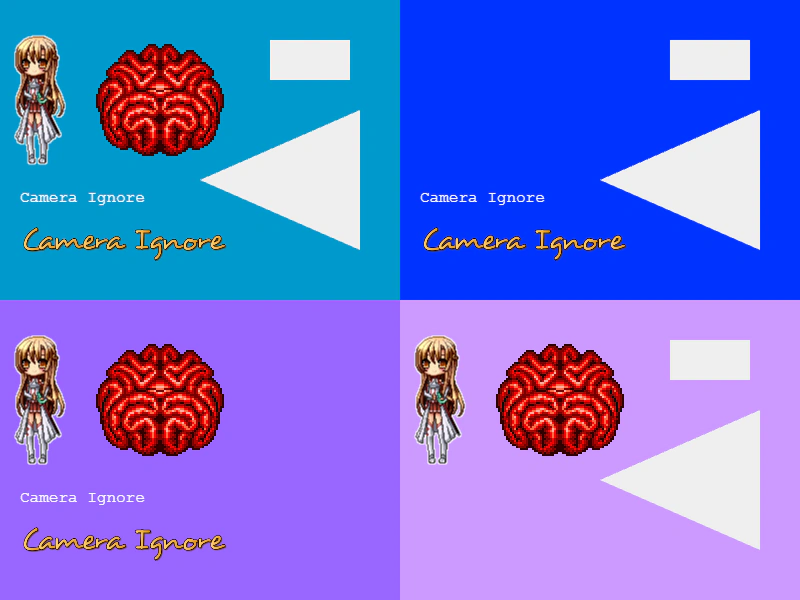
800 × 600
class Example extends Phaser.Scene
{
    constructor ()
    {
        super();
    }

    preload ()
    {
        this.load.setBaseURL('https://cdn.phaserfiles.com/v410');
        this.load.image('asuna', 'assets/sprites/asuna_by_vali233.png');
        this.load.image('brain', 'assets/sprites/brain.png');
        this.load.bitmapFont('desyrel', 'assets/fonts/bitmap/desyrel.png', 'assets/fonts/bitmap/desyrel.xml');
    }

    create ()
    {
        //  We'll have 4 cameras in a quad arrangement
        const cam1 = this.cameras.main.setViewport(0, 0, 400, 300).setBackgroundColor(0x0099cc);
        const cam2 = this.cameras.add(400, 0, 400, 300).setBackgroundColor(0x0033ff);
        const cam3 = this.cameras.add(0, 300, 400, 300).setBackgroundColor(0x9966ff);
        const cam4 = this.cameras.add(400, 300, 400, 300).setBackgroundColor(0xcc99ff);

        //  Now create a few Game Objects
        const image1 = this.add.image(40, 100, 'asuna');
        const image2 = this.add.image(160, 100, 'brain');
        const text1 = this.add.text(20, 190, 'Camera Ignore', { fill: '#ffffff' });
        const text2 = this.add.bitmapText(20, 220, 'desyrel', 'Camera Ignore', 32);
        const graphics = this.add.graphics().fillStyle(0xefefef, 1).fillRect(270, 40, 80, 40).fillTriangle(200, 180, 360, 110, 360, 250);

        //  Camera 1 will render everything

        //  Camera 2 will ignore the images
        cam2.ignore([ image1, image2 ]);

        //  Camera 3 will ignore the Graphics
        cam3.ignore(graphics);

        //  Camera 4 will ignore the text
        cam4.ignore([ text1, text2 ]);
    }
}

const config = {
    scale: { mode: Phaser.Scale.FIT },
    type: Phaser.AUTO,
    parent: 'game-container',
    width: 800,
    height: 600,
    scene: Example
};

const game = new Phaser.Game(config);
More in Camera68 examples
 Camera Ignore Group ChildrenLearn how to exclude specific Game Objects or entire Group contents from being rendered by a Camera to create isolated UI layers.
 Camera OverlapDemonstrates creating a secondary camera that overlaps the main view to display a specific, independently scrolling area of the scene.
 Camera Pan to LocationDemonstrates how to use the camera pan effect to smoothly move the viewport to specific coordinates using different durations and easing functions.
 Camera Plasma Shader FilterApply a dynamic plasma shader effect to the main camera view while using smoothed keyboard controls to navigate.