Set Colliding Tiles
Demonstrates multiple ways to enable tilemap collisions using setCollision, setCollisionBetween, and arrays, while visualizing the results with debug rendering.
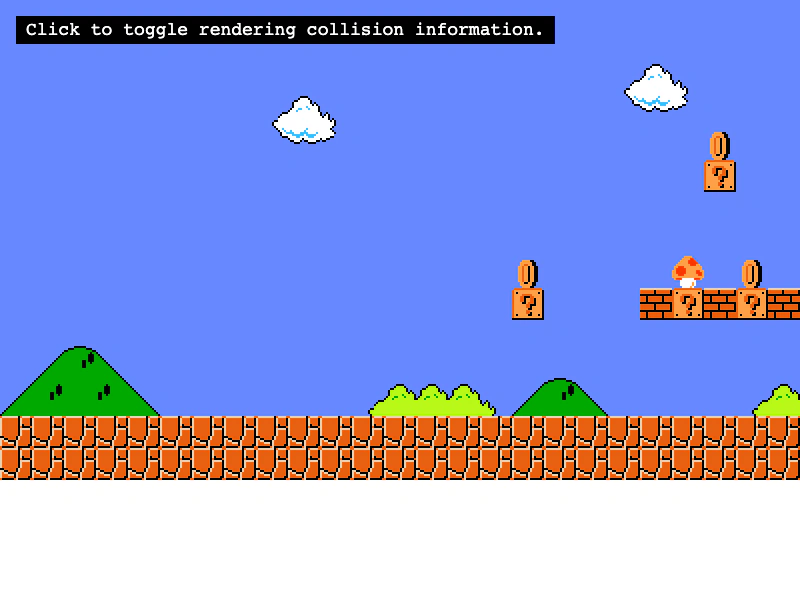
800 × 600
class Example extends Phaser.Scene
{
    map;
    controls;

    preload ()
    {
        this.load.setBaseURL('https://cdn.phaserfiles.com/v410');
        this.load.tilemapTiledJSON('map', 'assets/tilemaps/maps/super-mario.json');
        this.load.image('SuperMarioBros-World1-1', 'assets/tilemaps/tiles/super-mario.png');
        this.load.bitmapFont('gothic', 'assets/fonts/bitmap/gothic.png', 'assets/fonts/bitmap/gothic.xml');
    }

    create ()
    {
        this.map = this.make.tilemap({ key: 'map' });
        const tileset = this.map.addTilesetImage('SuperMarioBros-World1-1');
        const layer = this.map.createLayer('World1', tileset, 0, 0);
        layer.setScale(2);

        // You can set collision on one tile index (11 = coin)
        this.map.setCollision(11);

        // Or, you can set collision on tiles with an index between two values (14 - 16 are blocks)
        this.map.setCollisionBetween(14, 16);

        // Or, you can set collision on all indexes within an array
        this.map.setCollision([ 20, 21, 22, 23, 24, 25, 27, 28, 29, 33, 39, 40 ]);

        // Or, you can set collision on everything in the map EXCEPT the indexes specified
        // map.setCollisionByExclusion([ 1, 2, 3, 4, 5, 6, 7, 8, 9 ]);

        // Visualize the colliding tiles
        const debugGraphics = this.add.graphics();
        debugGraphics.setScale(2);
        this.map.renderDebug(debugGraphics);

        this.input.on('pointerdown', () =>
        {
            debugGraphics.visible = !debugGraphics.visible;
        });

        const help = this.add.text(16, 16, 'Click to toggle rendering collision information.', {
            fontSize: '18px',
            padding: { x: 10, y: 5 },
            backgroundColor: '#000000',
            fill: '#ffffff'
        });
        help.setScrollFactor(0);

        const cursors = this.input.keyboard.createCursorKeys();
        const controlConfig = {
            camera: this.cameras.main,
            left: cursors.left,
            right: cursors.right,
            speed: 0.5
        };

        this.controls = new Phaser.Cameras.Controls.FixedKeyControl(controlConfig);
    }

    update (time, delta)
    {
        this.controls.update(delta);
    }
}

const config = {
    scale: { mode: Phaser.Scale.FIT },
    type: Phaser.AUTO,
    width: 800,
    height: 600,
    backgroundColor: '#ffffff',
    parent: 'game-container',
    pixelArt: true,
    scene: Example
};

const game = new Phaser.Game(config);
More in Tilemap48 examples
 Set Tilemap Collision by PropertyEnable collision for tiles based on custom data properties defined in Tiled, rather than using specific tile IDs or ranges.
 Set Tilemap Layer WidthDemonstrates how to programmatically adjust the width of a tilemap layer to clip its visible rendering area.
 Shuffle TilesDemonstrates how to use the shuffle method to randomly rearrange a specific rectangular area of tiles within a tilemap layer.
 Swap Tile IndicesUse swapByIndex to find all instances of a specific tile across the map and swap them with a different tile index.