Tilemap Collision From Tiled Shapes
Enable collisions on a Tilemap layer using the collision shapes defined in the Tiled editor via setCollisionFromCollisionGroup, with Matter.js physics integration.
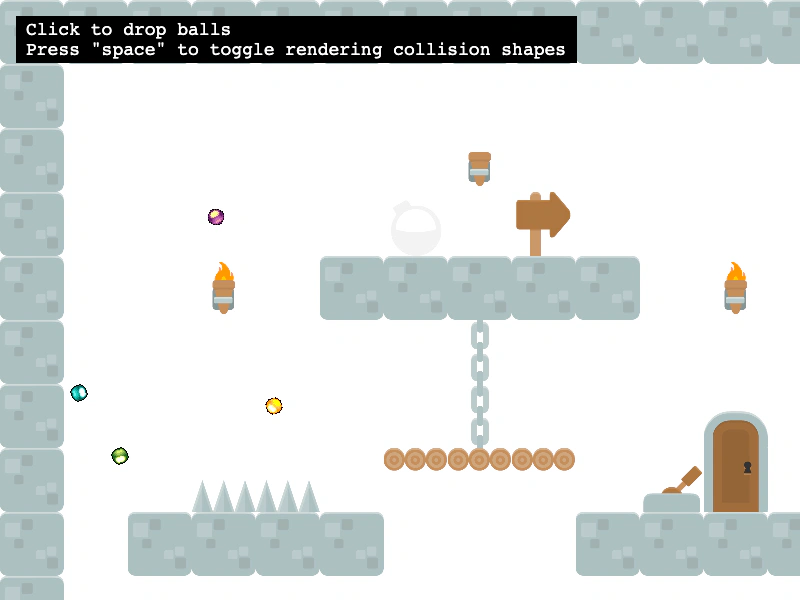
800 × 600
class Example extends Phaser.Scene
{
    layer;
    shapeGraphics;
    debugGraphics;
    controls;

    preload ()
    {
        this.load.setBaseURL('https://cdn.phaserfiles.com/v410');
        this.load.spritesheet('balls', 'assets/sprites/balls.png', { frameWidth: 17, frameHeight: 17 });

        // this.load.tilemapTiledJSON('map', 'assets/tilemaps/maps/tileset-collision-shapes.json');
        this.load.tilemapTiledJSON('map', 'assets/tilemaps/maps/tileset-collision-shapes-v12.json');
        this.load.image('kenny_platformer_64x64', 'assets/tilemaps/tiles/kenny_platformer_64x64.png');
    }

    create ()
    {
        const map = this.make.tilemap({ key: 'map' });
        const tileset = map.addTilesetImage('kenny_platformer_64x64');
        this.layer = map.createLayer(0, tileset, 0, 0);

        // Instead of setting collision by index, you can set any tile that has collision data to
        // collide. Typically, this is done in the Tiled collision editor. All tiles in this layer have
        // collision shapes.
        this.layer.setCollisionFromCollisionGroup();

        this.shapeGraphics = this.add.graphics();
        this.drawCollisionShapes(this.shapeGraphics);

        this.matter.world.convertTilemapLayer(this.layer);
        this.matter.world.setBounds(map.widthInPixels, map.heightInPixels);

        // Drop bouncy, Matter balls on pointer down
        this.input.on('pointerdown', function ()
        {
            const worldPoint = this.input.activePointer.positionToCamera(this.cameras.main);
            for (let i = 0; i < 4; i++)
            {
                const x = worldPoint.x + Phaser.Math.RND.integerInRange(-5, 5);
                const y = worldPoint.y + Phaser.Math.RND.integerInRange(-5, 5);
                const frame = Phaser.Math.RND.integerInRange(0, 5);
                this.matter.add.image(x, y, 'balls', frame, { restitution: 1 });
            }
        }, this);

        this.input.keyboard.on('keydown-SPACE', event =>
        {
            // shapeGraphics.visible = !shapeGraphics.visible;
        });

        const help = this.add.text(16, 16, 'Click to drop balls\nPress "space" to toggle rendering collision shapes', {
            fontSize: '18px',
            padding: { x: 10, y: 5 },
            backgroundColor: '#000000',
            fill: '#ffffff'
        });
        help.setScrollFactor(0);

        const cursors = this.input.keyboard.createCursorKeys();
        const controlConfig = {
            camera: this.cameras.main,
            left: cursors.left,
            right: cursors.right,
            up: cursors.up,
            down: cursors.down,
            speed: 0.5
        };

        this.controls = new Phaser.Cameras.Controls.FixedKeyControl(controlConfig);
    }

    update (time, delta)
    {
        this.controls.update(delta);
    }

    drawCollisionShapes (graphics)
    {
        graphics.clear();

        // Loop over each tile and visualize its collision shape (if it has one)
        this.layer.forEachTile(tile =>
        {
            const tileWorldX = tile.getLeft();
            const tileWorldY = tile.getTop();
            const collisionGroup = tile.getCollisionGroup();

            // console.log(collisionGroup);

            if (!collisionGroup || collisionGroup.objects.length === 0) { return; }

            // The group will have an array of objects - these are the individual collision shapes
            const objects = collisionGroup.objects;

            for (let i = 0; i < objects.length; i++)
            {
                const object = objects[i];
                const objectX = tileWorldX + object.x;
                const objectY = tileWorldY + object.y;

                // When objects are parsed by Phaser, they will be guaranteed to have one of the
                // following properties if they are a rectangle/ellipse/polygon/polyline.
                if (object.rectangle)
                {
                    graphics.strokeRect(objectX, objectY, object.width, object.height);
                }
                else if (object.ellipse)
                {
                    // Ellipses in Tiled have a top-left origin, while ellipses in Phaser have a center
                    // origin
                    graphics.strokeEllipse(
                        objectX + object.width / 2, objectY + object.height / 2,
                        object.width, object.height
                    );
                }
                else if (object.polygon || object.polyline)
                {
                    const originalPoints = object.polygon ? object.polygon : object.polyline;
                    const points = [];
                    for (let j = 0; j < originalPoints.length; j++)
                    {
                        const point = originalPoints[j];
                        points.push({
                            x: objectX + point.x,
                            y: objectY + point.y
                        });
                    }
                    graphics.strokePoints(points);
                }
            }
        });
    }
}

const config = {
    scale: { mode: Phaser.Scale.FIT },
    type: Phaser.AUTO,
    width: 800,
    height: 600,
    backgroundColor: '#ffffff',
    parent: 'game-container',
    pixelArt: true,
    physics: {
        default: 'matter',
        matter: {
            gravity: { y: 1 },
            enableSleep: true
        }
    },
    scene: Example
};

const game = new Phaser.Game(config);
More in Tilemap48 examples
 Tilemap Layer CollisionDemonstrates how to enable collision between a physics-enabled sprite and specific tile indices within a Tilemap layer.
 Tilemap Layer FilterDemonstrates how to apply a custom shader filter to a specific Tilemap layer while performing tile-based collision detection.
 Tilemap Layer SizeDemonstrates how to manually adjust the width of a tilemap layer to clip its rendering area and position multiple layers from different tilemaps within the same scene.
 Tilemap Layer Width and Camera BoundsDemonstrates how to modify the width of a Tilemap Layer and adjust camera bounds to match the new dimensions.