Drawing a Tilemap Layer to a Render Texture
Demonstrates how to draw a hidden Tilemap Layer multiple times into a Render Texture while applying transformations like rotation through the Render Texture's internal camera.
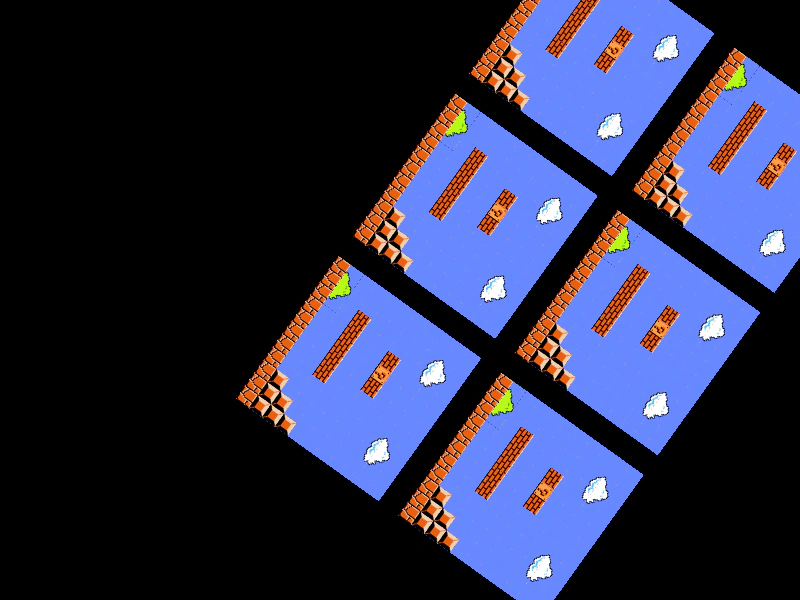
800 × 600
class Example extends Phaser.Scene
{
    layer;
    rt;

    preload ()
    {
        this.load.setBaseURL('https://cdn.phaserfiles.com/v410');
        this.load.image('mario-tiles', 'assets/tilemaps/tiles/super-mario.png');
    }

    create ()
    {
        //  Load a map from a 2D array of tile indices
        const level = [
            [ 0, 0, 0, 0, 0, 0, 0, 0, 0, 0, 0 ],
            [ 0, 1, 2, 3, 0, 0, 0, 1, 2, 3, 0 ],
            [ 0, 5, 6, 7, 0, 0, 0, 5, 6, 7, 0 ],
            [ 0, 0, 0, 0, 0, 0, 0, 0, 0, 0, 0 ],
            [ 0, 0, 0, 14, 13, 14, 0, 0, 0, 0, 0 ],
            [ 0, 0, 0, 0, 0, 0, 0, 0, 0, 0, 0 ],
            [ 0, 0, 0, 0, 0, 0, 0, 0, 0, 0, 0 ],
            [ 0, 0, 14, 14, 14, 14, 14, 0, 0, 0, 15 ],
            [ 0, 0, 0, 0, 0, 0, 0, 0, 0, 15, 15 ],
            [ 35, 36, 37, 0, 0, 0, 0, 0, 15, 15, 15 ],
            [ 39, 39, 39, 39, 39, 39, 39, 39, 39, 39, 39 ]
        ];

        //  When loading from an array, make sure to specify the tileWidth and tileHeight
        const map = this.make.tilemap({ data: level, tileWidth: 16, tileHeight: 16 });

        const tiles = map.addTilesetImage('mario-tiles');

        this.layer = map.createLayer(0, tiles, 0, 0).setVisible(false);

        this.rt = this.add.renderTexture(400, 300, 800, 600);
    }

    update ()
    {
        this.rt.camera.rotation -= 0.01;

        this.rt.clear();

        this.rt.draw(this.layer, 0, 0);
        this.rt.draw(this.layer, 200, 0);
        this.rt.draw(this.layer, 400, 0);
        this.rt.draw(this.layer, 0, 200);
        this.rt.draw(this.layer, 200, 200);
        this.rt.draw(this.layer, 400, 200);

        this.rt.render();
    }
}

const config = {
    scale: { mode: Phaser.Scale.FIT },
    type: Phaser.AUTO,
    parent: 'game-container',
    width: 800,
    height: 600,
    scene: Example
};

const game = new Phaser.Game(config);
More in Render Texture45 examples
 Drawing Bitmap Text to a Render TextureLearn how to draw a hidden BitmapText object onto a Render Texture and apply rotations using the Render Texture's internal camera.
 Drawing Dynamic Bitmap Text to a Render TextureLearn how to draw a Dynamic Bitmap Text object onto a Render Texture. This example includes a character jitter effect using a display callback and demonstrates rotating the Render Texture's internal camera.
 Drawing Graphics to a Render TextureDemonstrates how to draw a hidden Graphics object onto a Render Texture and manipulate the output using the RenderTexture's internal camera rotation.
 Drawing Sprites to a Render TextureDemonstrates how to draw multiple Game Objects into a Render Texture at specific coordinates and render the result.