Render Texture as Viewport
Use RenderTextures as secondary cameras to display scene content with unique transformations, tints, rotations, and post-processing filters applied to each view.
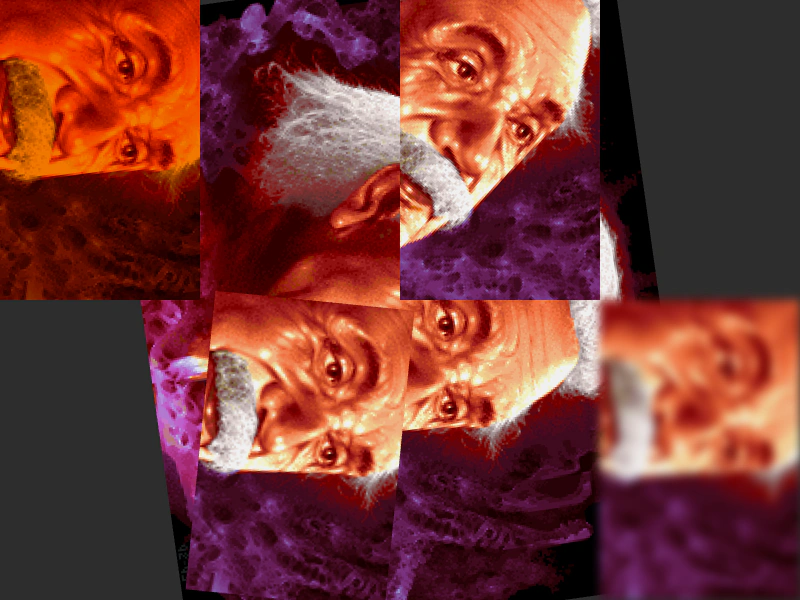
800 × 600
class Example extends Phaser.Scene
{
    image;
    screen1;

    preload ()
    {
        this.load.setBaseURL('https://cdn.phaserfiles.com/v410');
        this.load.image('einstein', 'assets/pics/ra-einstein.png');
    }

    create ()
    {
        this.image = this.add.image(400, 300, 'einstein');

        // Create render textures to capture key elements of the scene.
        this.screen1 = this.add.renderTexture(100, 150, 200, 300);
        this.screen2 = this.add.renderTexture(300, 450, 200, 300);
        this.screen3 = this.add.renderTexture(500, 150, 200, 300);
        this.screen4 = this.add.renderTexture(700, 450, 200, 300);

        // Change the view of the render texture cameras.
        // This is half the resolution of the target image.
        this.screen1.camera.setScroll(320, 257);
        this.screen2.camera.setScroll(320, 257);
        this.screen3.camera.setScroll(320, 257);
        this.screen4.camera.setScroll(320, 257);

        // Do things that regular cameras can't do.
        this.screen1.setTint(0xff7f00);
        this.screen2.setRotation(0.1);
        this.screen4.enableFilters();
        const blur = this.screen4.filters.internal.addBlur();
        blur.setPaddingOverride(null);
    }

    update ()
    {
        this.image.rotation += 0.01;

        this.screen3.camera.rotation -= 0.005;

        this.screen1.draw(this.image).render();
        this.screen2.draw(this.image).render();
        this.screen3.draw(this.image).render();
        this.screen4.draw(this.image).render();
    }
}

const config = {
    scale: { mode: Phaser.Scale.FIT },
    type: Phaser.WEBGL,
    width: 800,
    height: 600,
    backgroundColor: '#2d2d2d',
    parent: 'game-container',
    scene: Example
};

const game = new Phaser.Game(config);
More in Render Texture45 examples
 Render Texture Brute ForceDemonstrates high-volume drawing by stamping numerous sprite frames onto a single Render Texture every frame.
 Render Texture Camera TransformationsDemonstrates how to use the internal camera property of a Render Texture to apply rotation, zoom, and positioning when stamping textures.
 Render Texture Drawing TrailDemonstrates how to create a persistent motion trail by drawing a sprite to a Render Texture every frame without clearing it.
 Render Texture Frame FillDemonstrates how to fill a Render Texture with a repeating texture pattern using the repeat method.