Matter JS World Bodies and Camera Navigation
Create a large Matter JS physics world populated with random polygons and rectangles. This example demonstrates world bounds, mouse interaction via mouseSpring, and camera navigation including panning, zooming, and rotation.
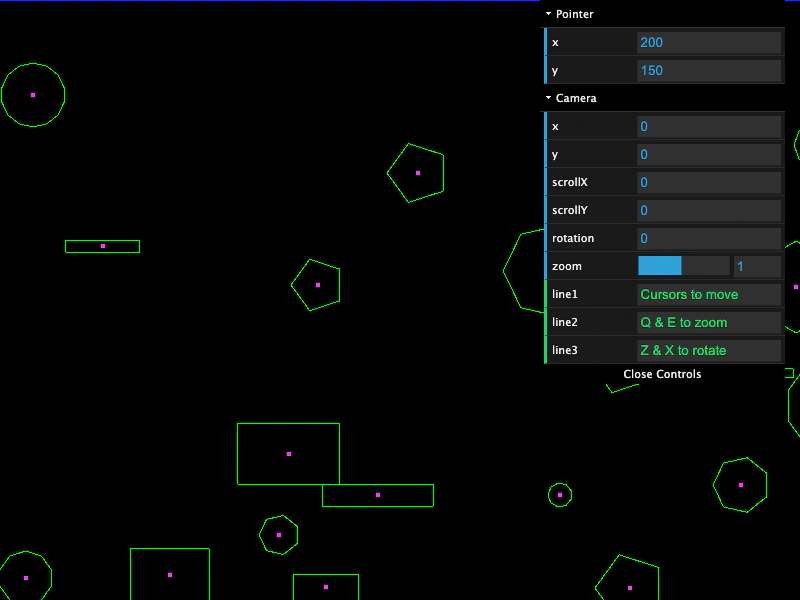
800 × 600
class Example extends Phaser.Scene
{
    controls;

    create ()
    {
        const worldWidth = 1600;
        const worldHeight = 1200;

        this.matter.world.setBounds(0, 0, worldWidth, worldHeight);

        //  Create loads of random bodies
        for (let i = 0; i < 100; i++)
        {
            const x = Phaser.Math.Between(0, worldWidth);
            const y = Phaser.Math.Between(0, worldHeight);

            if (Math.random() < 0.7)
            {
                const sides = Phaser.Math.Between(3, 14);
                const radius = Phaser.Math.Between(8, 50);

                this.matter.add.polygon(x, y, sides, radius, { restitution: 0.9 });
            }
            else
            {
                const width = Phaser.Math.Between(16, 128);
                const height = Phaser.Math.Between(8, 64);

                this.matter.add.rectangle(x, y, width, height, { restitution: 0.9 });
            }
        }

        this.matter.add.mouseSpring();

        const cursors = this.input.keyboard.createCursorKeys();

        const controlConfig = {
            camera: this.cameras.main,
            left: cursors.left,
            right: cursors.right,
            up: cursors.up,
            down: cursors.down,
            zoomIn: this.input.keyboard.addKey(Phaser.Input.Keyboard.KeyCodes.Q),
            zoomOut: this.input.keyboard.addKey(Phaser.Input.Keyboard.KeyCodes.E),
            acceleration: 0.06,
            drag: 0.0005,
            maxSpeed: 1.0
        };

        this.controls = new Phaser.Cameras.Controls.SmoothedKeyControl(controlConfig);

        this.input.keyboard.on('KEY_DOWN_Z', function (event)
        {

            this.cameras.main.rotation += 0.01;

        }, 0, this);

        this.input.keyboard.on('KEY_DOWN_X', function (event)
        {

            this.cameras.main.rotation -= 0.01;

        }, 0, this);

        const cam = this.cameras.main;

        const gui = new dat.GUI();

        const p1 = gui.addFolder('Pointer');
        p1.add(this.input, 'x').listen();
        p1.add(this.input, 'y').listen();
        p1.open();

        const help = {
            line1: 'Cursors to move',
            line2: 'Q & E to zoom',
            line3: 'Z & X to rotate'
        };

        const f1 = gui.addFolder('Camera');
        f1.add(cam, 'x').listen();
        f1.add(cam, 'y').listen();
        f1.add(cam, 'scrollX').listen();
        f1.add(cam, 'scrollY').listen();
        f1.add(cam, 'rotation').min(0).step(0.01).listen();
        f1.add(cam, 'zoom', 0.1, 2).step(0.1).listen();
        f1.add(help, 'line1');
        f1.add(help, 'line2');
        f1.add(help, 'line3');
        f1.open();

    }

    update (time, delta)
    {
        this.controls.update(delta);
    }
}

const config = {
    scale: { mode: Phaser.Scale.FIT },
    type: Phaser.WEBGL,
    width: 800,
    height: 600,
    parent: 'game-container',
    pixelArt: true,
    physics: {
        default: 'matter',
        matter: {
            gravity: {
                y: 0
            },
            debug: true
        }
    },
    scene: Example
};

const game = new Phaser.Game(config);
More in Matterjs67 examples
 Matter No GravityDemonstrates how to configure the Matter.js world with zero gravity so that physics bodies remain stationary by default.
 Matter Physics BallsCreate multiple circular physics bodies with Matter.js, demonstrating how to set world boundaries, friction, and restitution (bounce) properties.
 Matter Physics Bullet PoolLearn how to manage a pool of projectiles in Matter Physics by cycling active states and manually adding or removing bodies from the physics world.
 Matter Physics Circle BodyThis example shows how to change a Matter.js physics body from a default rectangle to a circle with a specific radius and apply velocity and bounce properties.