Get Pixel Under Pointer
Demonstrates how to retrieve color data from a specific texture at a given coordinate in real-time as the pointer moves.
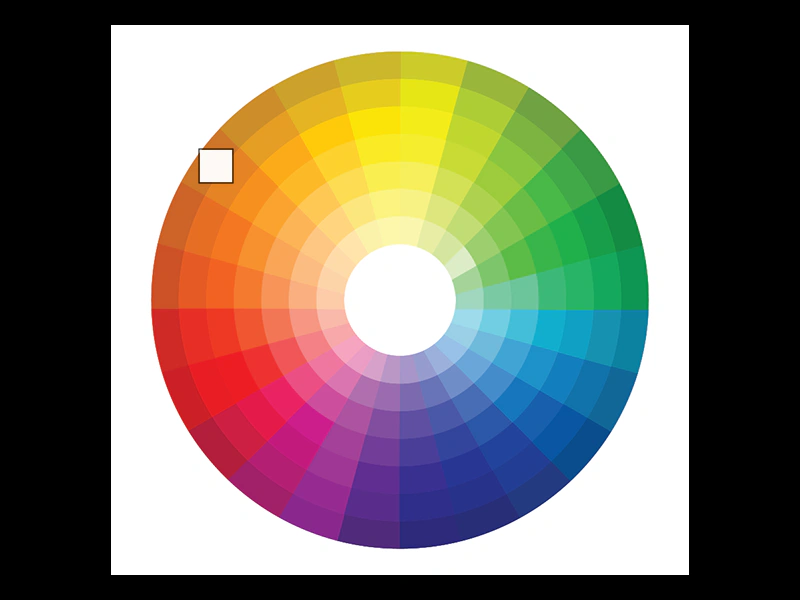
800 × 600
class Example extends Phaser.Scene
{
    preload ()
    {
        this.load.setBaseURL('https://cdn.phaserfiles.com/v410');
        this.load.image('wheel', 'assets/pics/color-wheel.png');
    }

    create ()
    {
        //  578 x 550 (289 x 275)
        this.add.image(400, 300, 'wheel');

        const graphics = this.add.graphics({ x: 0, y: 0 });

        const _this = this;

        this.input.on('pointermove', pointer =>
        {

            const color = _this.textures.getPixel(pointer.x - 111, pointer.y - 25, 'wheel');

            graphics.clear();

            if (color)
            {
                graphics.lineStyle(1, 0x000000, 1);
                graphics.strokeRect(pointer.x - 1, pointer.y - 1, 34, 34);

                graphics.fillStyle(color.color, 1);
                graphics.fillRect(pointer.x, pointer.y, 32, 32);
            }
        });
    }
}

const config = {
    scale: { mode: Phaser.Scale.FIT },
    type: Phaser.WEBGL,
    parent: 'game-container',
    width: 800,
    height: 600,
    scene: Example
};

const game = new Phaser.Game(config);
More in Textures36 examples
 Get Texture PixelsDemonstrates how to read color data from an image by drawing it to a CanvasTexture and using the getPixel method to iterate through its individual pixels.
 Multi-AtlasDemonstrates how to load and display frames from a multi-page texture atlas where a single JSON manifest manages multiple image files.
 Set Mipmap FilterConfigure the global mipmap filter via the Game Config to improve visual quality when textures are rendered at smaller scales.
 Set Texture SourceDemonstrates how to change the underlying source data of a Texture at runtime, which automatically updates any Game Objects currently using that texture.