Pause and Resume
Demonstrates how to pause a running Scene, launch a second Scene on top, and then resume the original Scene while preserving its state and animations.
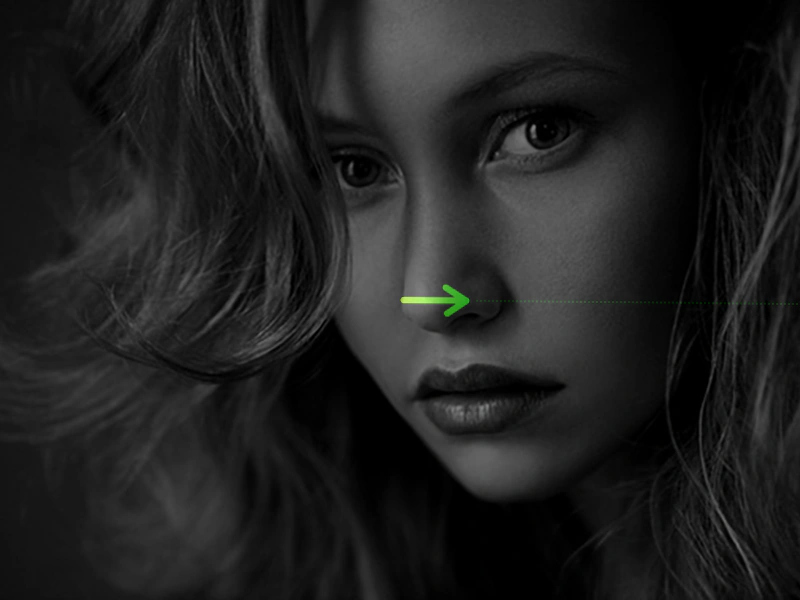
800 × 600
class SceneA extends Phaser.Scene
{
    constructor ()
    {
        super({ key: 'sceneA' });

        this.pic;
    }

    preload ()
    {
        this.load.setBaseURL('https://cdn.phaserfiles.com/v410');
        this.load.image('arrow', 'assets/sprites/longarrow.png');
    }

    create ()
    {
        this.pic = this.add.image(400, 300, 'arrow').setOrigin(0, 0.5);

        this.input.once('pointerup', function ()
        {

            this.scene.pause();
            this.scene.launch('sceneB');

        }, this);

        this.events.on('pause', () =>
        {
            console.log('Scene A paused');
        });

        this.events.on('resume', () =>
        {
            console.log('Scene A resumed');
        });
    }

    update (time, delta)
    {
        this.pic.rotation += 0.01;
    }
}

class SceneB extends Phaser.Scene
{
    constructor ()
    {
        super({ key: 'sceneB' });
    }

    preload ()
    {
        this.load.setBaseURL('https://cdn.phaserfiles.com/v410');
        this.load.image('face', 'assets/pics/bw-face.png');
    }

    create ()
    {
        this.add.image(400, 300, 'face').setAlpha(0.5);

        this.input.once('pointerdown', function ()
        {

            this.scene.resume('sceneA');

        }, this);
    }
}

const config = {
    scale: { mode: Phaser.Scale.FIT },
    type: Phaser.AUTO,
    width: 800,
    height: 600,
    backgroundColor: '#000000',
    parent: 'game-container',
    scene: [ SceneA, SceneB ]
};

const game = new Phaser.Game(config);
More in Scenes52 examples
 Registry Data ExchangeLearn how to use the global Registry to share data between scenes and listen for data change events to sync UI elements across different active scenes.
 Registry Data ExchangeDemonstrates how to use the global Game Registry to share and synchronize data between multiple scenes, allowing a UI scene to automatically update when values change in the game scene.
 Restart a SceneDemonstrates how to reset a Scene using the restart method, triggered here by a camera fade completion event.
 Scene AddDemonstrates how to manually add and automatically start a Scene class using the Scene Manager after the game instance has been created.