Scene Layering and Management
This example demonstrates how to manage multiple active scenes simultaneously. It shows how to toggle scene visibility and active states, and how to manipulate rendering order using bringToTop, moveUp, and moveDown.
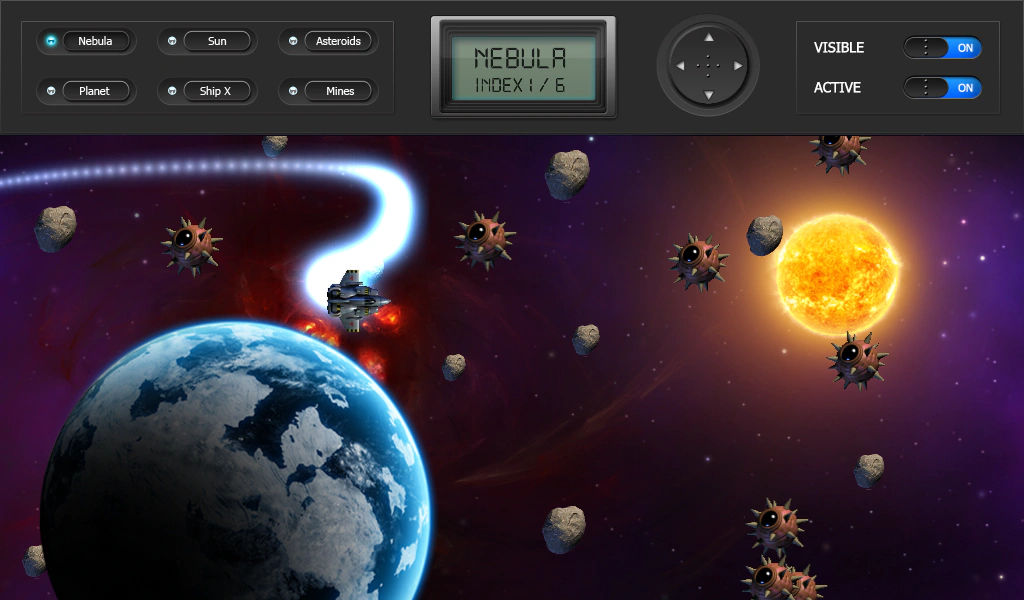
1024 × 768
let config = {
    scale: { mode: Phaser.Scale.FIT },
    type: Phaser.AUTO,
    width: 1024,
    height: 600,
    parent: 'game-container',
    backgroundColor: '#000000',
    scene: [ Controller, SceneA, SceneB, SceneC, SceneD, SceneE, SceneF ]
};

let game = new Phaser.Game(config);
More in Scenes52 examples
 Scene Transition BasicsLearn how to use scene transitions to move between Scenes. This example demonstrates passing data, using transition update callbacks for custom animations, and handling transition events.
 Scene Transitions with Layering and EventsDemonstrates switching between scenes using the transition method, featuring scene layering control (moveAbove/moveBehind), event-driven animations (transitionstart, transitionout), and synchronizing object movement via transition progress callbacks.
 Send Scene to BackDemonstrates how to move a specific Scene to the bottom of the display list, causing it to render behind all other active Scenes.
 Sleep and Wake ScenesDemonstrates how to switch between scenes using scene.switch(), which puts a scene to sleep and wakes another, preserving its state and using the WAKE event to re-enable input.