Card Flip Texture Swap
Demonstrates how to create a card flipping effect by synchronizing a texture change with a scale tween.
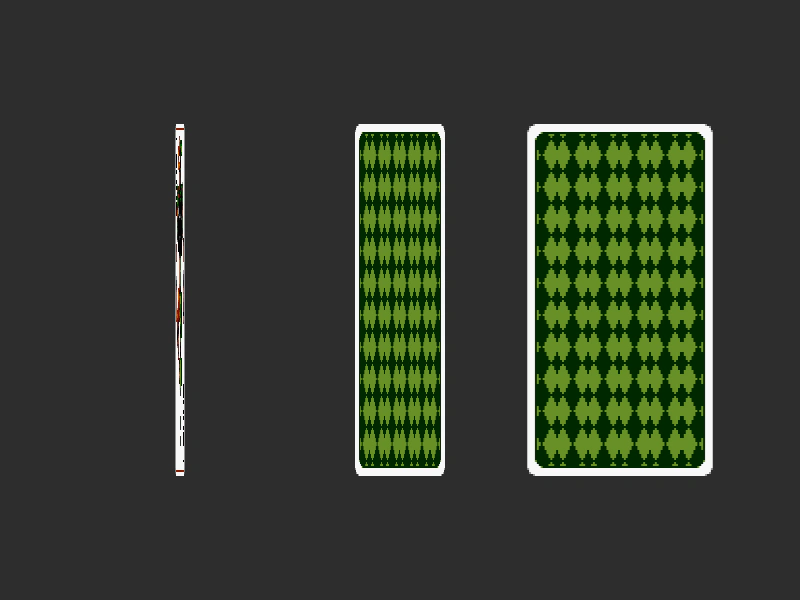
800 × 600
class Example extends Phaser.Scene
{
    constructor ()
    {
        super();
    }

    preload ()
    {
        this.load.setBaseURL('https://cdn.phaserfiles.com/v410');
        this.load.image('back', 'assets/tweens/cardback.png');
        this.load.image('front', 'assets/tweens/cardfront.png');
    }

    create ()
    {
        const card1 = this.add.image(180, 300, 'back');
        const card2 = this.add.image(400, 300, 'back');
        const card3 = this.add.image(620, 300, 'back');

        //  Scale the card horizontally to zero (which takes 1 second)
        //  Then change the texture to the front of the card
        //  The 'yoyo' in the scaleX will reverse it back again

        this.tweens.add({
            targets: card1,
            props: {
                scaleX: { value: 0, duration: 1000, yoyo: true },
                texture: { value: 'front', duration: 0, delay: 1000 }
            },
            ease: 'Linear'
        });

        this.tweens.add({
            targets: card2,
            props: {
                scaleX: { value: 0, duration: 1000, yoyo: true },
                texture: { value: 'front', duration: 0, delay: 1500 }
            },
            ease: 'Linear',
            delay: 500
        });

        this.tweens.add({
            targets: card3,
            props: {
                scaleX: { value: 0, duration: 1000, yoyo: true },
                texture: { value: 'front', duration: 0, delay: 2000 }
            },
            ease: 'Linear',
            delay: 1000
        });
    }
}

const config = {
    scale: { mode: Phaser.Scale.FIT },
    type: Phaser.AUTO,
    width: 800,
    height: 600,
    backgroundColor: '#2d2d2d',
    parent: 'game-container',
    scene: Example
};

const game = new Phaser.Game(config);
More in Tweens58 examples
 Change Texture FrameDemonstrates how to change a Game Object's texture frame as part of a tween, combined with other property changes like position and scale.
 Checkerboard Grid AnimationAligns a group of sprites into a grid and applies staggered scaling tweens to create a row-based wave animation effect.
 Checkerboard Grid RotationDemonstrates rotating a grid of sprites using tweens with random delays and dynamic rotation values calculated via getEnd and getStart callbacks.
 Counter TweenDemonstrates how to use a counter tween to interpolate between two numeric values and update a text display, including how to dynamically update the tween target value while it is still playing.