Shine Effect Options
Demonstrates how to apply and customize the shine effect using Phaser.Actions.AddEffectShine, including adjustments for direction, radius, custom color bands, animation easing, and reveal modes.
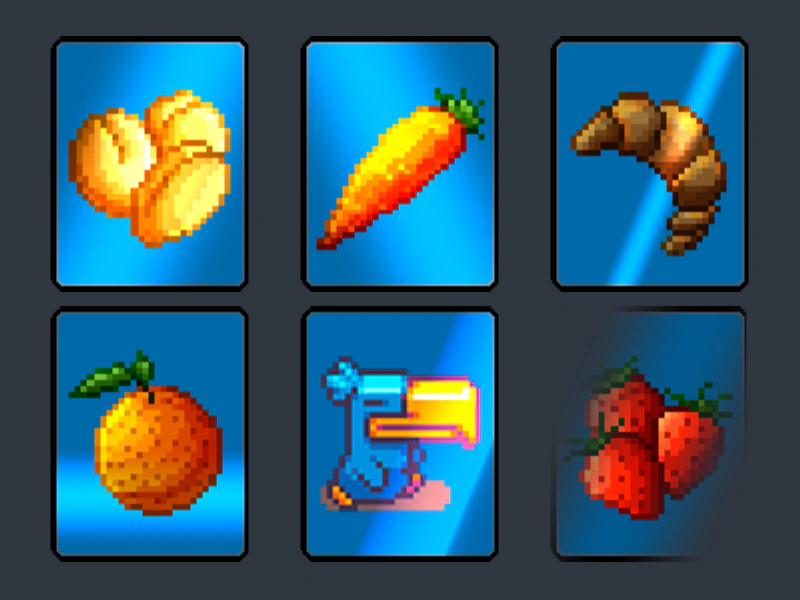
800 × 600
class Example extends Phaser.Scene
{
    preload ()
    {
        this.load.setBaseURL('https://cdn.phaserfiles.com/v410');
        this.load.image('card0', 'assets/games/card-memory-game/cards/card-0.png');
        this.load.image('card1', 'assets/games/card-memory-game/cards/card-1.png');
        this.load.image('card2', 'assets/games/card-memory-game/cards/card-2.png');
        this.load.image('card3', 'assets/games/card-memory-game/cards/card-3.png');
        this.load.image('card4', 'assets/games/card-memory-game/cards/card-4.png');
        this.load.image('card5', 'assets/games/card-memory-game/cards/card-5.png');
    }

    create ()
    {
        const cards = [];

        for (let i = 0; i < 6; i++)
        {
            const card = this.add.image(this.sys.scale.width / 2, this.sys.scale.height / 2, 'card' + i);
            card.setScale(2);
            cards.push(card);
        }

        Phaser.Actions.GridAlign(cards, {
            width: 3,
            height: 2,
            cellWidth: 250,
            cellHeight: 270,
            x: 100,
            y: 100
        });

        // Default shine.
        Phaser.Actions.AddEffectShine(cards[0]);

        // Shine from a different angle. Appears in a different corner.
        Phaser.Actions.AddEffectShine(cards[1], { direction: -0.5 });

        // Shine with different radius.
        Phaser.Actions.AddEffectShine(cards[2], { radius: 0.1 });

        // Shine with custom color and animation.
        Phaser.Actions.AddEffectShine(cards[3], {
            radius: 0.2,
            colorFactor: [ 0, 1, 1.5, 1 ],
            direction: Math.PI / 2, // Down
            ease: 'Quad.inout',
            scale: 1, // Shorter travel distance
            yoyo: true
        });

        // Shine with custom gradient.
        // Note that the gradient is in triangular repeat mode, so the gradient is reflected.
        Phaser.Actions.AddEffectShine(cards[4], {
            bands: [
                {
                    colorStart: [ 1, 0, 0, 0 ],
                    colorEnd: [ 1, 1, 1, 1 ],
                    start: 0.2,
                    size: 0.1,
                    interpolation: 4
                },
                {
                    colorStart: [ 1, 1, 1, 1 ],
                    colorEnd: [ 0, 0, 1, 0 ],
                    size: 0.2,
                    interpolation: 4
                }
            ],
            ease: 'Cubic.inout',
            yoyo: true
        });

        // Shine with reveal.
        Phaser.Actions.AddEffectShine(cards[5], { reveal: true });
    }
}

const config = {
    scale: { mode: Phaser.Scale.FIT },
    type: Phaser.AUTO,
    width: 800,
    height: 600,
    backgroundColor: '#2f3640',
    parent: 'game-container',
    scene: Example
};

const game = new Phaser.Game(config);
More in Actions49 examples
 Soft Mask Shape ActionDemonstrates how to apply a mask with soft, blurred edges to a Game Object using the AddMaskShape action with blur radius and padding.
 Spread ActionDemonstrates how to use the Spread action to evenly distribute a property value, such as alpha, across a collection of Game Objects.
 Wrap in Camera BoundsDemonstrates how to use the WrapInRectangle action to wrap a collection of objects around the screen when they exit the camera's viewport.
 Wrap In RectangleDemonstrates how to keep a group of moving sprites within a specific rectangular area using the WrapInRectangle action.