Triangle Hit Area
Demonstrates how to define a custom triangular hit area for a sprite using a geometric shape and a custom callback.
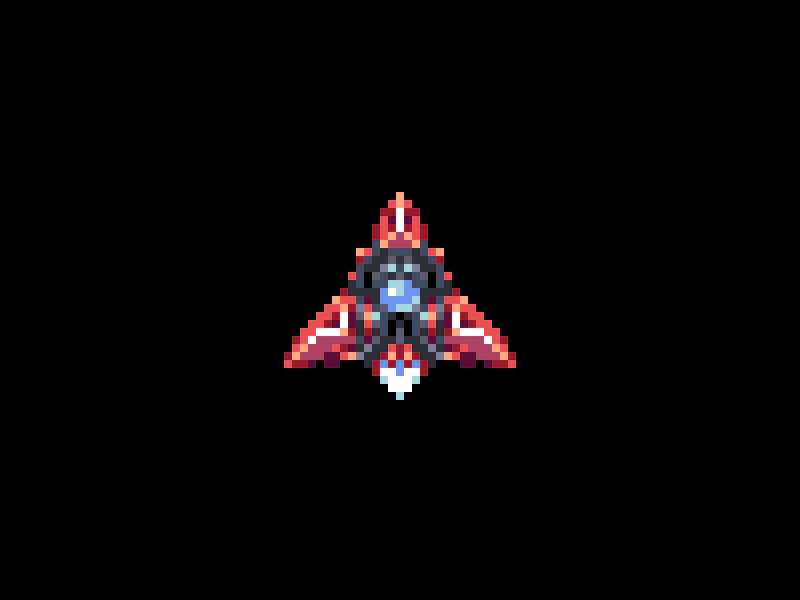
800 × 600
class Example extends Phaser.Scene
{
    preload ()
    {
        this.load.setBaseURL('https://cdn.phaserfiles.com/v410');
        this.load.image('ship', 'assets/sprites/thrust_ship2.png');
    }

    create ()
    {
        const sprite = this.add.sprite(400, 300, 'ship').setScale(8);

        const shape = new Phaser.Geom.Triangle.BuildEquilateral(16, 0, 30);

        sprite.setInteractive(shape, Phaser.Geom.Triangle.Contains);

        //  Input Event listeners

        sprite.on('pointerover', function ()
        {

            this.setTint(0x7878ff);

        });

        sprite.on('pointerout', function ()
        {

            this.clearTint();

        });
    }
}

const config = {
    scale: { mode: Phaser.Scale.FIT },
    type: Phaser.WEBGL,
    parent: 'game-container',
    pixelArt: true,
    width: 800,
    height: 600,
    scene: Example
};

const game = new Phaser.Game(config);
More in Mouse25 examples
 Check Button ReleasedDetect which specific mouse button (left, right, middle, back, or forward) was released using pointer helper methods like leftButtonReleased and rightButtonReleased.
 Circle Hit AreaLearn how to define a circular interactive hit area for a Sprite using a Geometric Circle shape and custom input callbacks.
 Click SpriteEnable input on a sprite to detect pointer events and change its visual state using tints during interactions.
 Continuous Input PollingDemonstrates how to use setPollAlways to trigger interaction events, like pointer over and out, even when the mouse is stationary but the object is moving.