Get Random Point on a Line
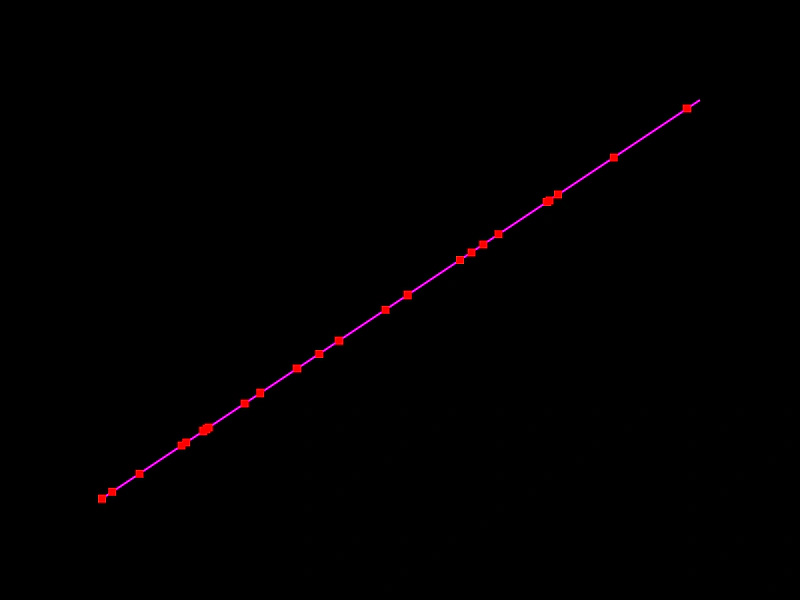
Demonstrates how to use the getRandomPoint method to retrieve random coordinates along a Line geometry object, either by creating new Point instances or updating existing ones.
800 × 600
class Example extends Phaser.Scene
{
    index = 0;
    points;
    graphics;
    line;

    create ()
    {
        this.line = new Phaser.Geom.Line(100, 500, 700, 100);

        this.graphics = this.add.graphics({ lineStyle: { width: 2, color: 0xff00ff }, fillStyle: { color: 0xff0000 }});

        this.points = [];

        for (let i = 0; i < 25; i++)
        {
            // if we omit a parameter, new Point instance will be created and returned
            this.points.push(this.line.getRandomPoint());
        }
    }

    update ()
    {
        this.index = ++this.index % 25;

        // we can also supply an instance of Point that will be modified
        this.line.getRandomPoint(this.points[this.index]);

        this.graphics.clear();
        this.graphics.strokeLineShape(this.line);

        for (let i = 0; i < 25; i++)
        {
            const p = this.points[i];
            this.graphics.fillRect(p.x - 4, p.y - 4, 8, 8);
        }
    }
}

const config = {
    scale: { mode: Phaser.Scale.FIT },
    width: 800,
    height: 600,
    type: Phaser.AUTO,
    parent: 'game-container',
    scene: Example
};

const game = new Phaser.Game(config);
More in Line31 examples
 Inverse Line GeometryDemonstrates how to flip a line's direction by rotating it 180 degrees around its starting point using the RotateAroundPoint method.
 Line AngleCalculate and display the angle of a rotating Line geometry object using the Line.Angle method.
 Line Center OnDemonstrates how to reposition a Line geometry so that its midpoint is at specific coordinates, while the line is continuously rotating.
 Line Copy FromDemonstrates how to duplicate properties from one Line geometry object to another using the CopyFrom method to create a trailing line effect.