Shader Render to Texture
Demonstrates how to render a GLSL shader to a texture and then use that texture across multiple Game Objects simultaneously.
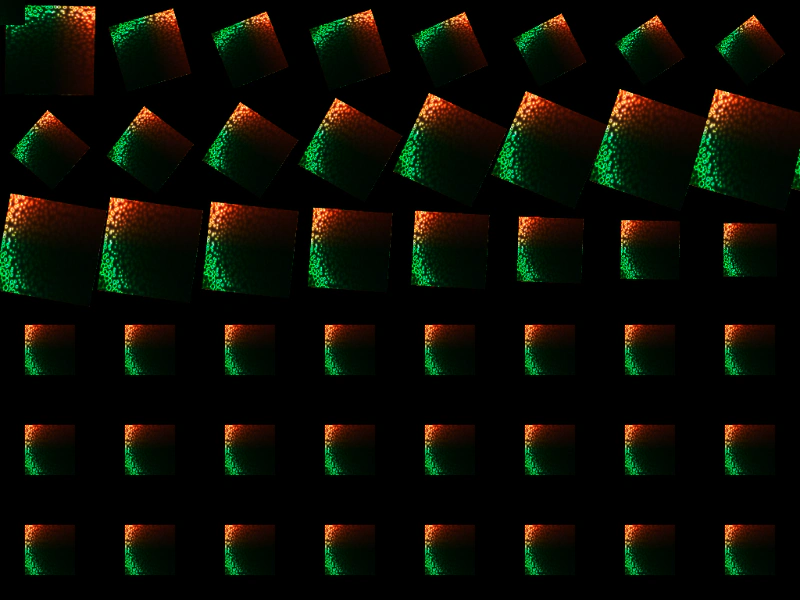
1024 × 768
class Example extends Phaser.Scene
{
    preload ()
    {
        this.load.setBaseURL('https://cdn.phaserfiles.com/v410');
        this.load.glsl('Colorful Voronoi', 'assets/shaders/colorful-voronoi.frag');
    }

    create ()
    {
        const shader = this.add.shader({
            name: 'Colorful Voronoi',
            fragmentKey: 'Colorful Voronoi',
            initialUniforms: {
                resolution: [this.scale.width, this.scale.height]
            },
            setupUniforms: (setUniform, drawingContext) => {
                setUniform('time', this.game.loop.getDuration());
            }
        }, 0, 0, 128, 128);

        shader.setRenderToTexture('wibble');

        const blocks = this.add.group({ key: 'wibble', repeat: 63, setScale: { x: 0.5, y: 0.5 } });

        Phaser.Actions.GridAlign(blocks.getChildren(), {
            width: 9,
            height: 7,
            cellWidth: 128,
            cellHeight: 128,
            x: 0,
            y: 0
        });

        let i = 0;

        blocks.children.forEach(function (child)
        {

            this.tweens.add({
                targets: child,
                props: {
                    scale: { value: 1, duration: 500 },
                    angle: { value: 360, duration: 4000 }
                },
                ease: 'Sine.easeInOut',
                delay: i * 50,
                repeat: -1,
                yoyo: true
            });

            i++;

            if (i % 10 === 0)
            {
                // i = 0;
            }

        }, this);
    }
}

const config = {
    scale: { mode: Phaser.Scale.FIT },
    type: Phaser.WEBGL,
    parent: 'game-container',
    width: 1024,
    height: 768,
    scene: Example
};

const game = new Phaser.Game(config);
More in Shaders15 examples
 Shader Render-to-Texture FeedbackDemonstrates how to create a feedback loop between multiple shaders by rendering each to a texture and passing those textures as sampler inputs to one another.
 Shader SandboxDemonstrates layering multiple shaders with standard images and animating shader uniforms using the Tween Manager.
 Shader TransformsLearn how to manipulate a Shader Game Object using standard properties such as scale, rotation, and position, including how to apply tweens to them.
 Shader Using an Updating Dynamic TextureThis example demonstrates how to use a Dynamic Texture as a sampler input for a fragment shader, allowing you to feed live-rendered graphics directly into a shader effect.