Input Overlap with Top-Only Disabled
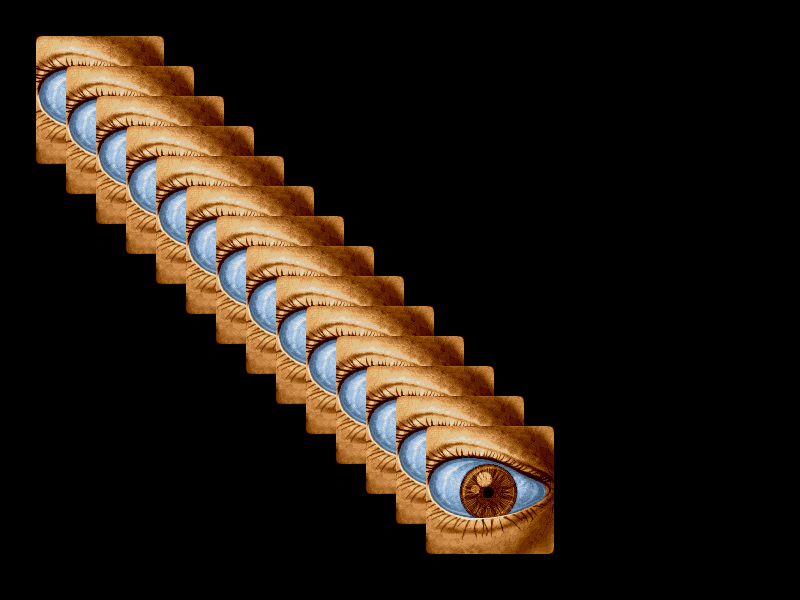
Demonstrates how to trigger input events for every overlapping Game Object under the pointer, rather than just the top-most one, by setting input.setTopOnly to false.
800 × 600
class Example extends Phaser.Scene
{
    preload ()
    {
        this.load.setBaseURL('https://cdn.phaserfiles.com/v410');
        this.load.image('eye', 'assets/pics/lance-overdose-loader-eye.png');
    }

    create ()
    {
        for (let i = 0; i < 14; i++)
        {
            const s = this.add.sprite(100 + i * 30, 100 + i * 30, 'eye').setInteractive().setName('eye ' + i);

            s.on('pointerdown', () =>
            {
                console.log(s.name, s.x, s.y);

            });
        }

        //  If you disable topOnly it will fire events for all objects the pointer is over
        //  regardless of their place on the display list
        this.input.setTopOnly(false);

        //  Events

        this.input.on('gameobjectdown', (pointer, gameObject) =>
        {
            // console.log(gameObject.name, gameObject.x, gameObject.y);

            gameObject.setTint(0x00ff00);

        });

        this.input.on('gameobjectout', (pointer, gameObject) =>
        {
            gameObject.clearTint();
        });

        this.input.on('gameobjectup', (pointer, gameObject) =>
        {
            gameObject.clearTint();
        });
    }
}

const config = {
    scale: { mode: Phaser.Scale.FIT },
    type: Phaser.WEBGL,
    parent: 'game-container',
    width: 800,
    height: 600,
    scene: Example
};

const game = new Phaser.Game(config);
More in Game Object19 examples
 Interactive Graphics ObjectThis example demonstrates how to make a Graphics object interactive by assigning a geometric hit area and responding to pointer events.
 Interactive Hand CursorDemonstrates how to change the mouse cursor to a 'pointer' (hand icon) when hovering over an interactive Game Object.
 Multiple Game Object UpDemonstrates how to use the gameobjectup event to handle pointer release actions on multiple interactive Game Objects.
 Multiple Object Input EventsDemonstrates how to handle pointer down and up events across a large grid of interactive GameObjects using scene-level input listeners.