Particle Property Interpolation
Demonstrates how to use linear, bezier, and Catmull-Rom interpolation to calculate particle property values from an array of coordinates over time.
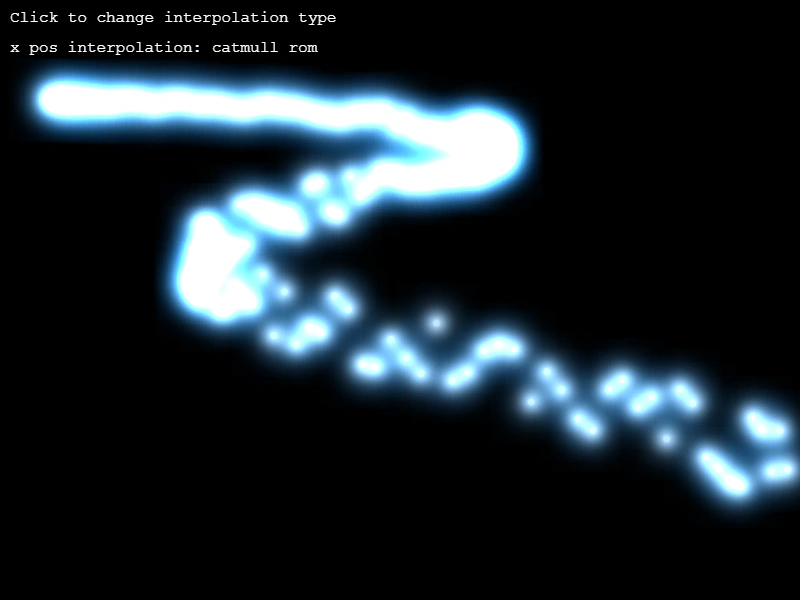
800 × 600
class Example extends Phaser.Scene
{
    preload ()
    {
        this.load.setBaseURL('https://cdn.phaserfiles.com/v410');
        this.load.image('red', 'assets/particles/red.png');
        this.load.image('green', 'assets/particles/green.png');
        this.load.image('blue', 'assets/particles/blue.png');
    }

    create ()
    {
        let i = 0;

        this.linear = this.add.particles(0, 100, 'red', {
            x: { values: [ 50, 500, 200, 800 ], interpolation: 'linear' },
            lifespan: 2500,
            gravityY: 120,
            speed: 16,
            scale: 0.65,
            blendMode: 'ADD'
        });

        this.bezier = this.add.particles(0, 100, 'green', {
            x: { values: [ 50, 500, 200, 800 ], interpolation: 'bezier' },
            lifespan: 2500,
            gravityY: 120,
            speed: 16,
            scale: 0.65,
            emitting: false,
            blendMode: 'ADD'
        });

        this.catmull = this.add.particles(0, 100, 'blue', {
            x: { values: [ 50, 500, 200, 800 ], interpolation: 'catmull' },
            lifespan: 2500,
            gravityY: 120,
            speed: 16,
            scale: 0.65,
            emitting: false,
            blendMode: 'ADD'
        });

        this.add.text(10, 10, 'Click to change interpolation type');

        const type = this.add.text(10, 40, 'x pos interpolation: linear');

        this.input.on('pointerdown', () => {

            i++;

            if (i === 1)
            {
                this.linear.emitting = false;
                this.bezier.emitting = true;
                type.setText('x pos interpolation: bezier');
            }
            else if (i === 2)
            {
                this.bezier.emitting = false;
                this.catmull.emitting = true;
                type.setText('x pos interpolation: catmull rom');
            }
            else if (i === 3)
            {
                this.catmull.emitting = false;
                this.linear.emitting = true;
                type.setText('x pos interpolation: linear');
                i = 0;
            }

        });
    }
}

const config = {
    scale: { mode: Phaser.Scale.FIT },
    type: Phaser.AUTO,
    width: 800,
    height: 600,
    backgroundColor: '#000',
    parent: 'game-container',
    scene: Example
};

const game = new Phaser.Game(config);
More in Particle Emitter44 examples
 Random Particle PropertyDemonstrates how to use the random configuration object to assign a random value from a specified range to a particle property, such as its starting X position.
 Random Particle TintDemonstrates how to apply a random color to each particle by passing an array of hex colors to the emitter's tint property.
 Random Position ArrayUse an array of values to define multiple specific spawn points for a single particle emitter.
 Set Emitter Zone By InstanceDemonstrates how to dynamically switch a particle emitter's active emission zone by passing specific EdgeZone instances during pointer events.