Fire and Smoke Particle Effects
Demonstrates how to create fire, magical wisp, and smoky flame effects using particle color arrays, easing, and the advance property.
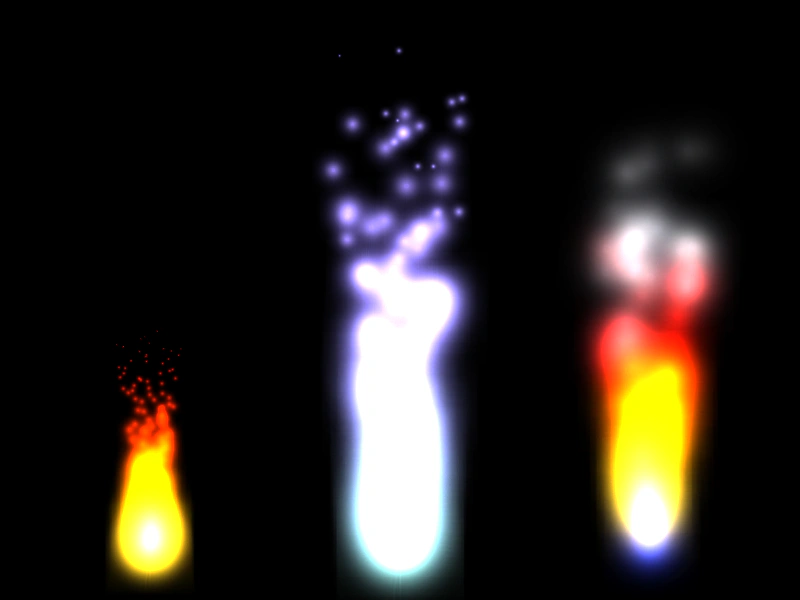
800 × 600
class Example extends Phaser.Scene
{
    preload ()
    {
        this.load.setBaseURL('https://cdn.phaserfiles.com/v410');
        this.load.atlas('flares', 'assets/particles/flares.png', 'assets/particles/flares.json');
    }

    create ()
    {
        const flame = this.add.particles(150, 550, 'flares',
        {
            frame: 'white',
            color: [ 0xfacc22, 0xf89800, 0xf83600, 0x9f0404 ],
            colorEase: 'quad.out',
            lifespan: 2400,
            angle: { min: -100, max: -80 },
            scale: { start: 0.70, end: 0, ease: 'sine.out' },
            speed: 100,
            advance: 2000,
            blendMode: 'ADD'
        });

        const wisp = this.add.particles(400, 550, 'flares',
        {
            frame: 'white',
            color: [ 0x96e0da, 0x937ef3 ],
            colorEase: 'quart.out',
            lifespan: 1500,
            angle: { min: -100, max: -80 },
            scale: { start: 1, end: 0, ease: 'sine.in' },
            speed: { min: 250, max: 350 },
            advance: 2000,
            blendMode: 'ADD'
        });

        const smokey = this.add.particles(650, 550, 'flares',
        {
            frame: 'white',
            color: [ 0x040d61, 0xfacc22, 0xf89800, 0xf83600, 0x9f0404, 0x4b4a4f, 0x353438, 0x040404 ],
            lifespan: 1500,
            angle: { min: -100, max: -80 },
            scale: 0.75,
            speed: { min: 200, max: 300 },
            advance: 2000,
            blendMode: 'ADD'
        });
    }
}

const config = {
    scale: { mode: Phaser.Scale.FIT },
    type: Phaser.AUTO,
    width: 800,
    height: 600,
    backgroundColor: '#000',
    parent: 'game-container',
    scene: Example
};

const game = new Phaser.Game(config);
More in Particle Emitter44 examples
 Get Particle BoundsDemonstrates how to retrieve the bounding box of individual particles using the getBounds method and iterate through active particles with forEachAlive.
 Get Particle Emitter BoundsDemonstrates how to calculate the bounding rectangle of a particle emitter, including both current active particle bounds and pre-calculating bounds over a specific time duration.
 Hold ParticleDemonstrates the hold property in a particle emitter, allowing particles to remain visible for a set duration after their active lifespan has completed.
 Move Particles to Dynamic TargetDemonstrates how to use onUpdate callbacks with particle moveTo properties to make particles track a moving target like the mouse pointer.