Line Rendering with Graphics
Demonstrates how to use the Graphics object to draw geometric shapes and custom paths with specific line and fill styles, while applying real-time rotation and scaling.
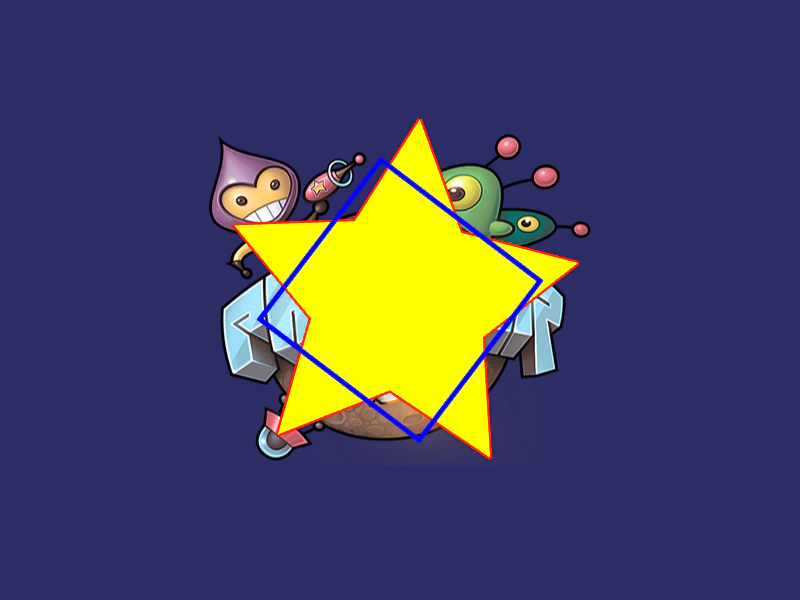
800 × 600
class Example extends Phaser.Scene
{
    lineRectangle;
    starGraphics;

    preload ()
    {
        this.load.setBaseURL('https://cdn.phaserfiles.com/v410');
        this.load.image('pic', 'assets/sprites/phaser2.png');
    }

    create ()
    {

        this.add.image(400, 300, 'pic');

        this.starGraphics = this.add.graphics({x: 400, y: 300});
        this.drawStar(this.starGraphics, 0, 0, 5, 200, 100, 0xFFFF00, 0xFF0000);
        this.starGraphics.rotation = Math.random();
        this.lineRectangle = this.add.graphics({x: 400, y: 300});
        this.lineRectangle.lineStyle(5, 0x0000FF, 1.0);
        this.lineRectangle.fillStyle(0x0000FF, 1.0);
        this.lineRectangle.strokeRect(-100, -100, 200, 200);
    }

    update ()
    {
        this.lineRectangle.rotation += 0.01;
        this.starGraphics.rotation -= 0.01;
        this.starGraphics.scaleX = 0.8 + Math.abs(Math.sin(this.starGraphics.rotation));
        this.starGraphics.scaleY = 0.8 + Math.abs(Math.sin(this.starGraphics.rotation));
    }

    drawStar (graphics, cx, cy, spikes, outerRadius, innerRadius, color, lineColor)
    {
        let rot = Math.PI / 2 * 3;
        let x = cx;
        let y = cy;
        const step = Math.PI / spikes;
        graphics.lineStyle(5, lineColor, 1.0);
        graphics.fillStyle(color, 1.0);
        graphics.beginPath();
        graphics.moveTo(cx, cy - outerRadius);
        for (let i = 0; i < spikes; i++)
        {
            x = cx + Math.cos(rot) * outerRadius;
            y = cy + Math.sin(rot) * outerRadius;
            graphics.lineTo(x, y);
            rot += step;

            x = cx + Math.cos(rot) * innerRadius;
            y = cy + Math.sin(rot) * innerRadius;
            graphics.lineTo(x, y);
            rot += step;
        }
        graphics.lineTo(cx, cy - outerRadius);
        graphics.closePath();
        graphics.strokePath();
        graphics.fillPath();
    }
}

const config = {
    scale: { mode: Phaser.Scale.FIT },
    type: Phaser.WEBGL,
    parent: 'game-container',
    backgroundColor: '#2d2d66',
    width: 800,
    height: 600,
    scene: Example
};

const game = new Phaser.Game(config);
More in Graphics40 examples
 Line ThicknessLearn how to define the width and color of strokes when drawing rectangles, circles, and custom paths using the Graphics object.
 Many StarsDemonstrates rendering and animating a large number of individual Graphics objects, featuring procedurally drawn stars with updating rotation and scale.
 Motion Trail with GraphicsCreate a colorful motion trail effect by storing a history of coordinates and drawing them sequentially using a Graphics object and an HSV color wheel.
 Mouse Trail with GraphicsCreate a dynamic, multi-colored mouse trail using a Graphics object by drawing a continuous path through a history of pointer positions with varying line thickness and color.