Arc Stroke
Demonstrates how to draw and stroke circular arcs using Graphics, including setting line widths, colors, and arc directions.
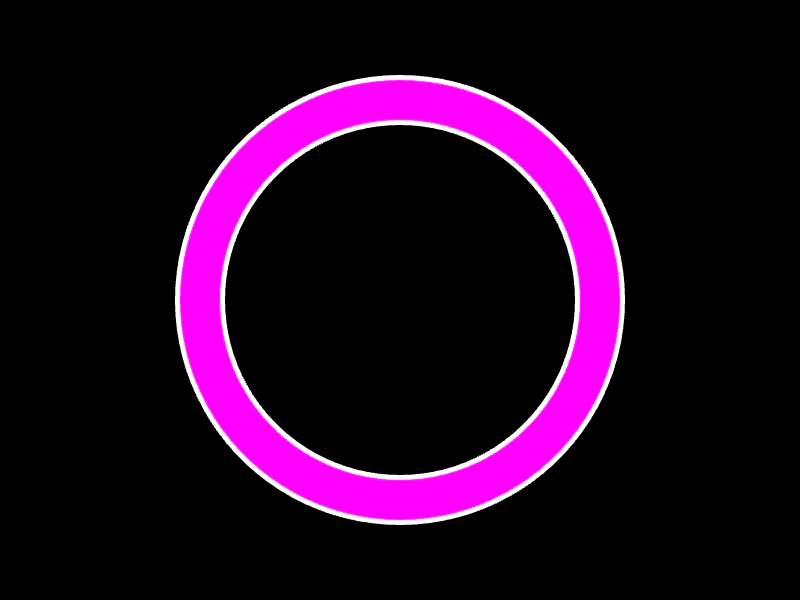
800 × 600
class Example extends Phaser.Scene
{
    create ()
    {
        const graphics = this.add.graphics();

        graphics.lineStyle(50, 0xffffff);

        graphics.beginPath();
        graphics.arc(400, 300, 200, Phaser.Math.DegToRad(0), Phaser.Math.DegToRad(360), false, 0.02);
        graphics.strokePath();
        graphics.closePath();

        graphics.beginPath();
        graphics.lineStyle(40, 0xff00ff);
        graphics.arc(400, 300, 200, Phaser.Math.DegToRad(0), Phaser.Math.DegToRad(360), true, 0.02);
        graphics.strokePath();
        graphics.closePath();
    }
}

const config = {
    scale: { mode: Phaser.Scale.FIT },
    width: 800,
    height: 600,
    type: Phaser.AUTO,
    parent: 'game-container',
    scene: Example
};

const game = new Phaser.Game(config);
More in Graphics40 examples
 Atari Graphics LinesDemonstrates drawing complex vector shapes and stylized outlines using Graphics path commands like beginPath, moveTo, lineTo, and strokePath.
 Circle OverlapLearn how to create and animate multiple Graphics objects containing concentric circles to produce a dynamic overlapping visual effect.
 Drawing Filled Shapes with GraphicsDemonstrates how to use the Graphics object to draw solid and semi-transparent rectangles and triangles.
 Drawing Star ShapesDemonstrates how to use the Graphics object to procedurally draw star shapes by calculating vertex positions based on points, radii, and line styles.