Multiple Scene Drag
Learn how to implement independent drag-and-drop interactions for game objects across multiple concurrently active scenes.
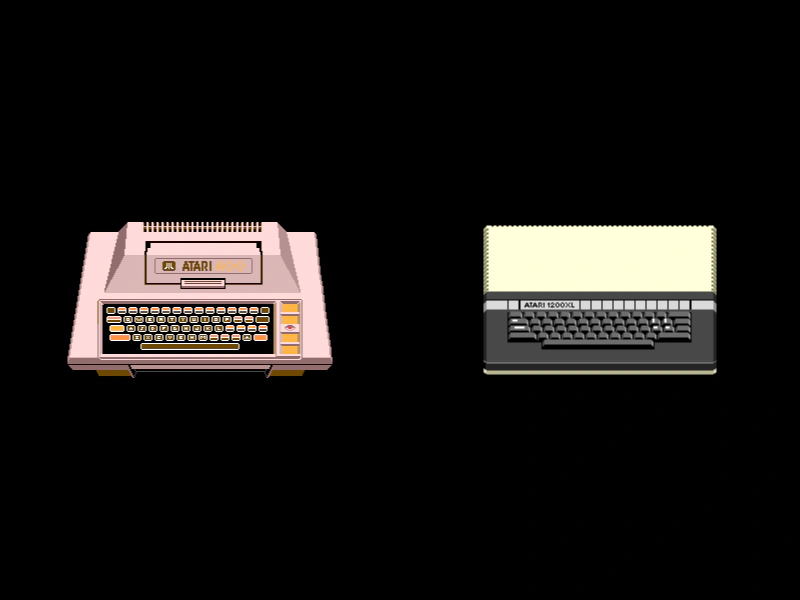
800 × 600
class Boot extends Phaser.Scene
{
    constructor ()
    {
        super({ key: 'boot', active: true });
    }

    preload ()
    {
        this.load.setBaseURL('https://cdn.phaserfiles.com/v410');
        this.load.image('atari1', 'assets/sprites/atari400.png');
        this.load.image('atari2', 'assets/sprites/atari1200xl.png');
    }

    create ()
    {
        this.scene.start('sceneA');
        this.scene.launch('sceneB');
    }
}

class SceneA extends Phaser.Scene
{
    constructor ()
    {
        super({ key: 'sceneA' });
    }

    create ()
    {
        const image = this.add.sprite(200, 300, 'atari1').setInteractive();

        this.input.setDraggable(image);

        image.on('dragstart', function (pointer)
        {

            this.setTint(0xff0000);

        });

        image.on('drag', function (pointer, dragX, dragY)
        {

            this.x = dragX;
            this.y = dragY;

        });

        image.on('dragend', function (pointer)
        {

            this.clearTint();

        });
    }
}

class SceneB extends Phaser.Scene
{
    constructor ()
    {
        super({ key: 'sceneB' });
    }

    create ()
    {
        const image = this.add.sprite(600, 300, 'atari2').setInteractive();

        this.input.setDraggable(image);

        image.on('dragstart', function (pointer)
        {

            this.setTint(0xff0000);

        });

        image.on('drag', function (pointer, dragX, dragY)
        {

            this.x = dragX;
            this.y = dragY;

        });

        image.on('dragend', function (pointer)
        {

            this.clearTint();

        });
    }
}

const config = {
    scale: { mode: Phaser.Scale.FIT },
    type: Phaser.AUTO,
    parent: 'game-container',
    width: 800,
    height: 600,
    scene: [ Boot, SceneA, SceneB ]
};

const game = new Phaser.Game(config);
More in Dragging22 examples
 Retain Index After DragDemonstrates how to temporarily bring a Game Object to the top of the display list during a drag event and restore its original depth index once released.
 Scale During DragDemonstrates how to dynamically adjust the scale of a Game Object based on its vertical position while it is being dragged across the screen.
 Scrolling Text BoxDemonstrates how to create a scrollable text area using a Geometry Mask and pointer velocity to drag text within a specific zone.
 Simple Sprite DraggingDemonstrates how to make a sprite interactive, enable it for dragging, and use the drag event to update its position as the pointer moves.