Multiple Rotated and Scaled Draggable Objects
Demonstrates dragging multiple Game Objects that have been randomly scaled and rotated. It includes bringing the active object to the top of the display list upon dragging.
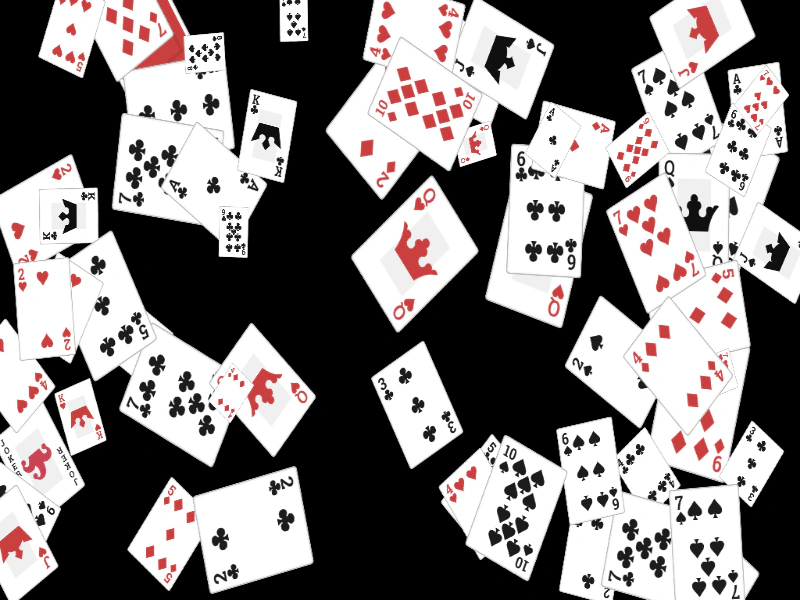
1024 × 600
class Example extends Phaser.Scene
{
    cards;

    preload ()
    {
        this.load.setBaseURL('https://cdn.phaserfiles.com/v410');
        this.load.atlas('cards', 'assets/atlas/cards.png', 'assets/atlas/cards.json');
    }

    create ()
    {
        //  Create a stack of random cards
        this.cards = this.add.group();

        const frames = this.textures.get('cards').getFrameNames();

        for (let i = 0; i < 64; i++)
        {
            const x = Phaser.Math.Between(0, 1024);
            const y = Phaser.Math.Between(0, 600);

            const image = this.add.image(x, y, 'cards', Phaser.Math.RND.pick(frames));

            image.setInteractive();

            image.setScale(Phaser.Math.FloatBetween(0.25, 0.75));

            image.setAngle(Phaser.Math.Between(0, 359));

            this.input.setDraggable(image);

            this.cards.add(image);
        }

        const _this = this;

        this.input.on('dragstart', function (pointer, gameObject)
        {

            this.children.bringToTop(gameObject);

        }, this);

        this.input.on('drag', (pointer, gameObject, dragX, dragY) =>
        {

            gameObject.x = dragX;
            gameObject.y = dragY;

        });
    }

    update ()
    {
        Phaser.Actions.Rotate(this.cards.getChildren(), 0.01);
    }
}

const config = {
    scale: { mode: Phaser.Scale.FIT },
    type: Phaser.WEBGL,
    parent: 'game-container',
    width: 1024,
    height: 600,
    scene: Example
};

const game = new Phaser.Game(config);
More in Dragging22 examples
 Multiple Scene DragLearn how to implement independent drag-and-drop interactions for game objects across multiple concurrently active scenes.
 Retain Index After DragDemonstrates how to temporarily bring a Game Object to the top of the display list during a drag event and restore its original depth index once released.
 Scale During DragDemonstrates how to dynamically adjust the scale of a Game Object based on its vertical position while it is being dragged across the screen.
 Scrolling Text BoxDemonstrates how to create a scrollable text area using a Geometry Mask and pointer velocity to drag text within a specific zone.