Video Transition
Demonstrates how to use a transparent WebM video as a transition layer to swap visibility between two game objects (a shader and another video) at a specific point in the playback.
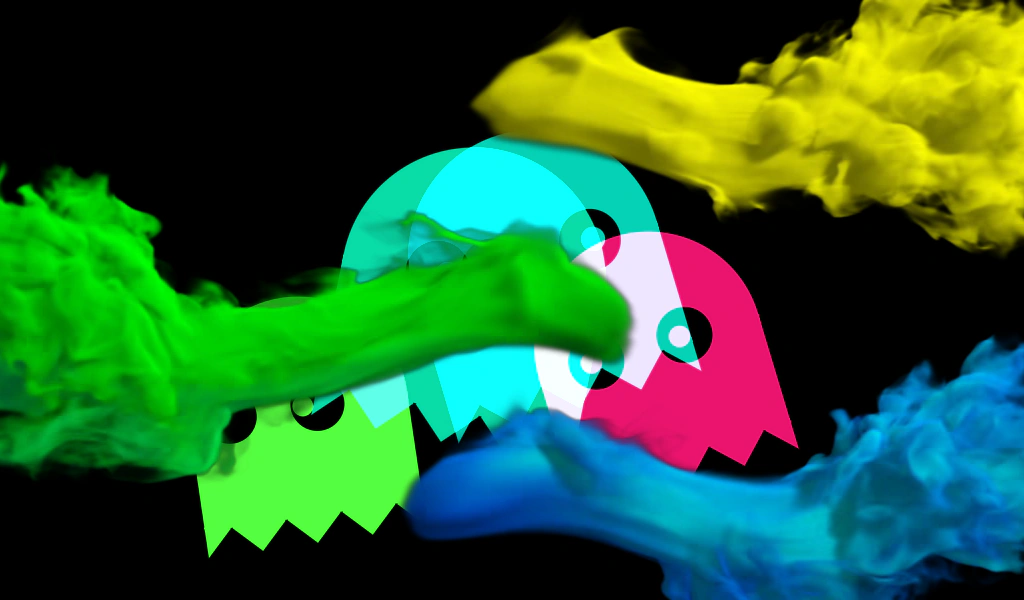
1024 × 600
class Example extends Phaser.Scene
{
    constructor ()
    {
        super();

        this.effect1;
        this.effect2;

        this.transition;
        this.transitionIn = false;
    }

    preload ()
    {
        this.load.setBaseURL('https://cdn.phaserfiles.com/v410');
        this.load.video('fireworks', 'assets/video/fireworks.mp4', true);
        this.load.video('transition', 'assets/video/colorful-smoke-transition.webm', true);
        this.load.glsl('Ghosts', 'assets/shaders/ghosts.frag');
    }

    create ()
    {
        //  Our two effects - a shader and a video

        this.effect1 = this.add.shader({
            name: 'Ghosts',
            fragmentKey: 'Ghosts',
            initialUniforms: {
                resolution: [ 1024, 600 ]
            },
            setupUniforms: (setUniform, drawingContext) => {
                setUniform('time', this.game.loop.getDuration());
            }
        }, 512, 300, 1024, 600);
        this.effect2 = this.add.video(512, 300, 'fireworks').play(true).setVisible(false);

        //  The transition video, it's a transparent WebM, so will only work in browsers that support this

        this.transition = this.add.video(512, 300, 'transition');

        let startTransition = () => {

            this.time.addEvent({
                delay: 3000,
                callback: () => {
                    this.transitionIn = true;
                    this.transition.play();
                }
            });

        };

        this.transition.on('complete', startTransition);

        startTransition();
    }

    update ()
    {
        //  In the video the transition is fully covering the screen at 50% through,
        //  so at that point, we swap the two effects over:

        if (this.transitionIn && this.transition.getProgress() >= 0.5)
        {
            if (!this.effect1.visible)
            {
                this.effect1.setVisible(true);
                this.effect2.setVisible(false);
            }
            else
            {
                this.effect1.setVisible(false);
                this.effect2.setVisible(true);
            }

            this.transitionIn = false;
        }
    }
}

const config = {
    scale: { mode: Phaser.Scale.FIT },
    type: Phaser.AUTO,
    width: 1024,
    height: 600,
    backgroundColor: '#000000',
    parent: 'game-container',
    scene: Example
};

let game = new Phaser.Game(config);
More in Video17 examples
 Change Video SourceDemonstrates how to dynamically switch the source of a Video Game Object between different preloaded video assets during runtime.
 Get First Video FrameDemonstrates how to use the getFirstFrame method to display the initial frame of a video as a static preview before playback starts.
 Load Video From URLDemonstrates how to create a Video Game Object and load a video file directly via a URL at runtime instead of using the preloader.
 Loop VideoThis example demonstrates how to play a video on a continuous loop, handle browser autoplay restrictions, and listen for the 'loop' event to track repetitions.