Arc Shape Game Object
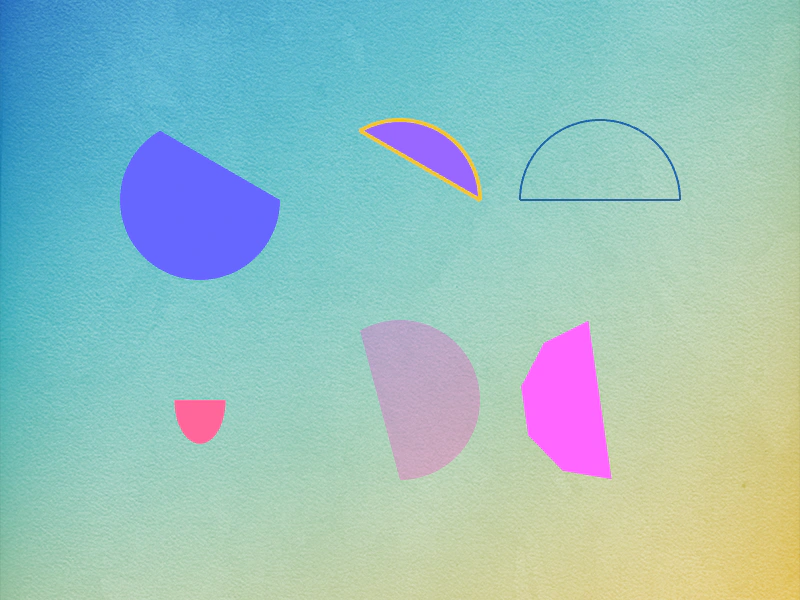
Demonstrates creating Arc shape game objects with various start and end angles, fill colors, strokes, and rendering iterations.
800 × 600
class Example extends Phaser.Scene
{
    preload ()
    {
        this.load.setBaseURL('https://cdn.phaserfiles.com/v410');
        this.load.image('bg', 'assets/skies/background1.png');
    }

    create ()
    {
        this.add.image(400, 300, 'bg');

        const r1 = this.add.arc(200, 200, 80, 0, 240, false, 0x6666ff);

        const r2 = this.add.arc(400, 200, 80, 240, 360, false, 0x9966ff);

        r2.setStrokeStyle(4, 0xefc53f);

        const r3 = this.add.arc(600, 200, 80, 180, 360, false);

        r3.setStrokeStyle(2, 0x1a65ac);

        const r4 = this.add.arc(200, 400, 80, 0, 180, false, 0xff6699);

        const r5 = this.add.arc(400, 400, 80, 90, 240, true, 0xff33cc);

        const r6 = this.add.arc(600, 400, 80, 0, 180, false, 0xff66ff);

        //  WebGL only
        r6.setIterations(0.2);

        this.tweens.add({

            targets: r4,
            scaleX: 0.25,
            scaleY: 0.5,
            yoyo: true,
            repeat: -1,
            ease: 'Sine.easeInOut'

        });

        this.tweens.add({

            targets: r5,
            alpha: 0.2,
            yoyo: true,
            repeat: -1,
            ease: 'Sine.easeInOut'

        });

        this.tweens.add({

            targets: r6,
            angle: 90,
            yoyo: true,
            repeat: -1,
            ease: 'Sine.easeInOut'

        });
    }
}

const config = {
    scale: { mode: Phaser.Scale.FIT },
    type: Phaser.AUTO,
    parent: 'game-container',
    width: 800,
    height: 600,
    scene: Example
};

const game = new Phaser.Game(config);
More in Shapes24 examples
 Circle Shape Game ObjectDemonstrates how to create and style Circle Shape Game Objects with fill colors, stroke styles, and animations.
 Curve ShapeDemonstrates how to create a Shape Game Object using a Cubic Bezier curve, including how to define control points, apply fill and stroke styles, and manipulate its position.
 Grid ShapeDemonstrates creating Grid Shape Game Objects with custom cell sizes, alternating fill colors, and outlines, as well as animating their dimensions and rotation.
 Interactive Shape Drawing ToolDemonstrates how to dynamically create and resize Shape Game Objects (Circles, Rectangles, Ellipses, Stars, and Lines) using pointer input and color picking from a texture palette.