Point Light with Camera Zoom
Demonstrates how to maintain a consistent Point Light visual size during camera zooming and movement, featuring interactive color cycling, attenuation controls, and pointer tracking.
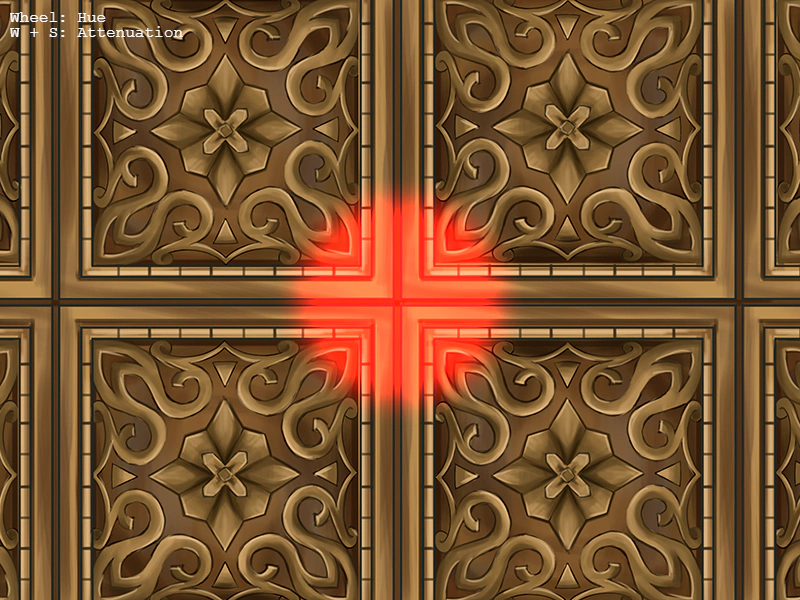
800 × 600
class Example extends Phaser.Scene
{
    constructor ()
    {
        super();
    }

    preload ()
    {
        this.load.setBaseURL('https://cdn.phaserfiles.com/v410');
        this.load.image('bg', 'assets/textures/gold.png');
    }

    create ()
    {
        this.add.image(400, 300, 'bg');
        this.add.text(10, 10, 'Wheel: Hue\nW + S: Attenuation');

        let colorIndex = 0;
        const spectrum = Phaser.Display.Color.ColorSpectrum(128);

        this.spotlight = this.add.pointlight(400, 300, 0, 128, 1);

        let color = spectrum[colorIndex];

        this.spotlight.color.setTo(color.r, color.g, color.b);

        colorIndex++;

        this.input.on('pointermove', pointer => {

            this.spotlight.x = pointer.worldX;
            this.spotlight.y = pointer.worldY;

        });

        this.input.on('wheel', (pointer, over, deltaX, deltaY, deltaZ) => {

            if (deltaY < 0)
            {
                colorIndex--;
            }
            else if (deltaY > 0)
            {
                colorIndex++;
            }

            if (colorIndex === spectrum.length)
            {
                colorIndex = 0;
            }
            else if (colorIndex < 0)
            {
                colorIndex = spectrum.length - 1;
            }

            color = spectrum[colorIndex];

            this.spotlight.color.setTo(color.r, color.g, color.b);

        });

        this.input.keyboard.on('keydown-W', () => {

            this.spotlight.attenuation += 0.01;

        });

        this.input.keyboard.on('keydown-S', () => {

            this.spotlight.attenuation -= 0.01;

        });

        const cursors = this.input.keyboard.createCursorKeys();

        const controlConfig = {
            camera: this.cameras.main,
            left: cursors.left,
            right: cursors.right,
            up: cursors.up,
            down: cursors.down,
            zoomIn: this.input.keyboard.addKey(Phaser.Input.Keyboard.KeyCodes.Q),
            zoomOut: this.input.keyboard.addKey(Phaser.Input.Keyboard.KeyCodes.E),
            acceleration: 0.06,
            drag: 0.0005,
            maxSpeed: 1.0
        };

        this.controls = new Phaser.Cameras.Controls.SmoothedKeyControl(controlConfig);
    }

    update (time, delta)
    {
        this.controls.update(delta);

        //  128 is the size we wish to keep the light at, no matter what the camera zoom level is
        this.spotlight.radius = (1 / this.cameras.main.zoom) * 128;
    }
}

const config = {
    scale: { mode: Phaser.Scale.FIT },
    type: Phaser.AUTO,
    width: 800,
    height: 600,
    backgroundColor: '#000000',
    parent: 'game-container',
    scene: Example
};

const game = new Phaser.Game(config);
More in Lights20 examples
 Point Lights and Normal MapsDemonstrates the dynamic lighting system using normal-mapped textures, interactive spotlights, camera zooming, and multiple Point Light game objects.
 Render Texture LightingDemonstrates how to enable the 2D lighting system on a RenderTexture, allowing drawn textures to react to scene lights using normal maps.
 Rotated Sprite with 2D LightingDemonstrates how a sprite using a normal map correctly reacts to 2D lights while it is rotating.
 Single Point LightDemonstrates how to enable the 2D lighting system, use a normal-mapped texture, and add an animated point light to a scene.