Keyboard Event Listeners and Propagation
Demonstrates three ways to detect a single key press: via a Key object listener, a specific keycode global event, and a generic keyboard event, while showing how stopPropagation controls the flow between them.
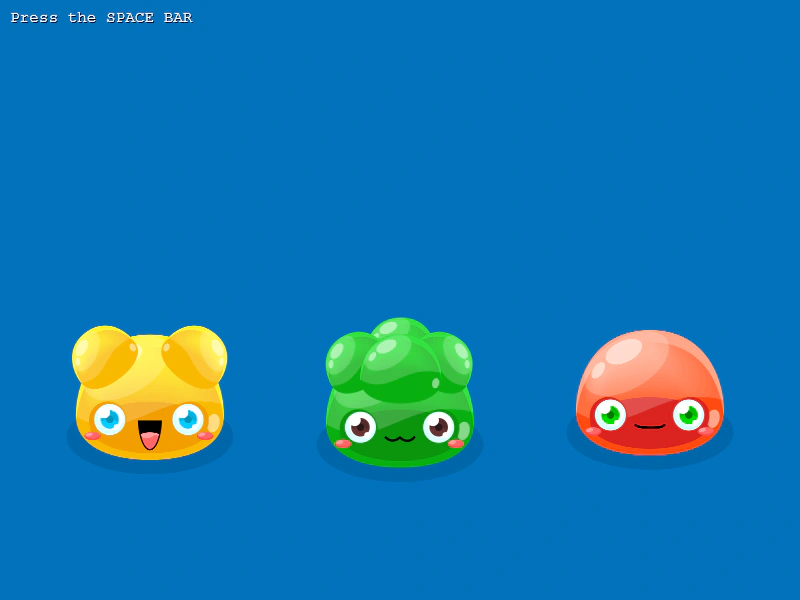
800 × 600
class Example extends Phaser.Scene
{
    preload ()
    {
        this.load.setBaseURL('https://cdn.phaserfiles.com/v410');
        this.load.atlas('jellies', 'assets/atlas/jellies.png', 'assets/atlas/jellies.json');
    }

    create ()
    {
        const jelly1 = this.add.image(150, 400, 'jellies', 'WithShadow/Jelly1').setScale(0.5);
        const jelly2 = this.add.image(400, 400, 'jellies', 'WithShadow/Jelly2').setScale(0.5);
        const jelly3 = this.add.image(650, 400, 'jellies', 'WithShadow/Jelly3').setScale(0.5);

        const bubble1 = this.createSpeechBubble(20, 180, 220, 80, 'Global Handler!');
        const bubble2 = this.createSpeechBubble(290, 180, 220, 80, 'Global Key Code!');
        const bubble3 = this.createSpeechBubble(560, 180, 220, 80, 'Local Handler!');

        bubble1.setVisible(false);
        bubble2.setVisible(false);
        bubble3.setVisible(false);

        this.add.text(10, 10, 'Press the SPACE BAR', { font: '16px Courier', fill: '#ffffff' }).setShadow(1, 1);

        const spaceKey = this.input.keyboard.addKey(Phaser.Input.Keyboard.KeyCodes.SPACE);

        //  Phase 1: Key event.
        //  Emits only when the SPACE BAR is pressed down, and dispatches from the local Key object.
        //  You can call stopPropagation at this level, which will stop it reaching both listeners below.

        spaceKey.on('down', (key, event) =>
        {

            // event.stopPropagation();

            bubble3.setVisible(true);

        });

        //  Phase 2: Global keydown + keycode handler.
        //  Emits only on the SPACE BAR keycode event, but dispatches globally.
        //  You can call stopPropagation at this level, which will stop it reaching the listener below.

        this.input.keyboard.on('keydown-SPACE', event =>
        {

            event.stopPropagation();

            bubble2.setVisible(true);

        });

        //  Phase 3: Global keydown handler.
        //  Fires on ANY key press, so we need to check the keyCode internally.

        this.input.keyboard.on('keydown', event =>
        {

            if (event.keyCode === Phaser.Input.Keyboard.KeyCodes.SPACE)
            {
                bubble1.setVisible(true);
            }

        });
    }

    createSpeechBubble (x, y, width, height, quote)
    {
        const bubbleWidth = width;
        const bubbleHeight = height;
        const bubblePadding = 10;
        const arrowHeight = bubbleHeight / 3;

        const bubble = this.add.graphics({ x: x, y: y });

        //  Bubble shadow
        bubble.fillStyle(0x222222, 0.5);
        bubble.fillRoundedRect(6, 6, bubbleWidth, bubbleHeight, 16);

        //  Bubble color
        bubble.fillStyle(0xffffff, 1);

        //  Bubble outline line style
        bubble.lineStyle(4, 0x565656, 1);

        //  Bubble shape and outline
        bubble.strokeRoundedRect(0, 0, bubbleWidth, bubbleHeight, 16);
        bubble.fillRoundedRect(0, 0, bubbleWidth, bubbleHeight, 16);

        //  Calculate arrow coordinates
        const point1X = Math.floor(bubbleWidth / 4);
        const point1Y = bubbleHeight;
        const point2X = Math.floor((bubbleWidth / 4) * 1.4);
        const point2Y = bubbleHeight;
        const point3X = Math.floor(bubbleWidth / 4);
        const point3Y = Math.floor(bubbleHeight + arrowHeight);

        //  Bubble arrow shadow
        bubble.lineStyle(4, 0x222222, 0.5);
        bubble.lineBetween(point2X - 1, point2Y + 6, point3X + 2, point3Y);

        //  Bubble arrow fill
        bubble.fillTriangle(point1X, point1Y, point2X, point2Y, point3X, point3Y);
        bubble.lineStyle(2, 0x565656, 1);
        bubble.lineBetween(point2X, point2Y, point3X, point3Y);
        bubble.lineBetween(point1X, point1Y, point3X, point3Y);

        const content = this.add.text(0, 0, quote, { fontFamily: 'Arial', fontSize: 20, color: '#000000', align: 'center', wordWrap: { width: bubbleWidth - (bubblePadding * 2) } });

        const b = content.getBounds();

        content.setPosition(bubble.x + (bubbleWidth / 2) - (b.width / 2), bubble.y + (bubbleHeight / 2) - (b.height / 2));

        const container = this.add.container();

        container.add([ bubble, content ]);

        return container;
    }
}

const config = {
    scale: { mode: Phaser.Scale.FIT },
    type: Phaser.AUTO,
    width: 800,
    height: 600,
    parent: 'game-container',
    backgroundColor: '#0072bc',
    scene: Example
};

const game = new Phaser.Game(config);
More in Keyboard22 examples
 Keyboard Events and PollingDemonstrates different ways to handle keyboard input: using global event listeners, specific key-down and key-up events, and creating Key objects for direct polling in the update loop.
 Konami Code Key ComboDetect a specific sequence of key presses using the Keyboard Key Combo system and trigger an event when the sequence is completed.
 Multi-Scene Keyboard EventsDemonstrates how to handle keyboard input across different scenes, showing how input listeners function when scenes are paused, resumed, or running concurrently.
 Numpad InputListen for specific keydown events from the numeric keypad (numpad) to trigger actions in your game.