Graphics Hit Testing with Camera
Demonstrates how to use getWorldPoint to map screen coordinates into world space for accurate hit testing against geometric shapes, even when the camera is zoomed or rotated.
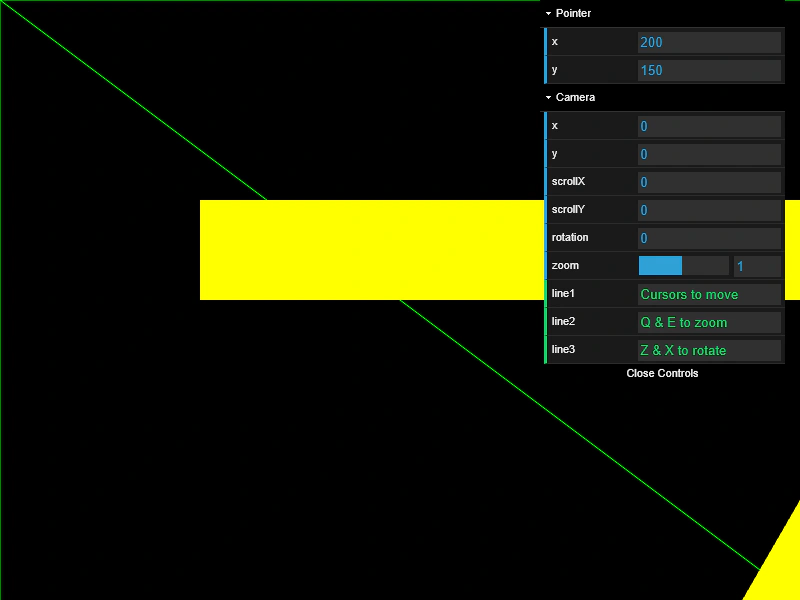
800 × 600
class Example extends Phaser.Scene
{
    hitShape = null;
    py;
    px;
    triangle1;
    circle2;
    circle1;
    rect2;
    rect1;
    bounds;
    graphics;
    controls;
    gui;

    create ()
    {
        this.graphics = this.add.graphics();

        this.bounds = new Phaser.Geom.Rectangle(0, 0, 1600, 1200);
        this.rect1 = new Phaser.Geom.Rectangle(200, 200, 600, 100);
        this.rect2 = new Phaser.Geom.Rectangle(1010, 800, 60, 300);
        this.circle1 = new Phaser.Geom.Circle(1200, 200, 160);
        this.circle2 = new Phaser.Geom.Circle(400, 900, 80);
        this.triangle1 = new Phaser.Geom.Triangle.BuildEquilateral(800, 500, 200);

        this.drawScene();

        this.input.on('pointermove', function (pointer)
        {

            const p = this.cameras.main.getWorldPoint(pointer.x, pointer.y);

            this.px = p.x;
            this.py = p.y;

            this.hitShape = null;

            if (this.rect1.contains(this.px, this.py))
            {
                this.hitShape = this.rect1;
            }
            else if (this.rect2.contains(this.px, this.py))
            {
                this.hitShape = this.rect2;
            }
            else if (this.circle1.contains(this.px, this.py))
            {
                this.hitShape = this.circle1;
            }
            else if (this.circle2.contains(this.px, this.py))
            {
                this.hitShape = this.circle2;
            }
            else if (this.triangle1.contains(this.px, this.py))
            {
                this.hitShape = this.triangle1;
            }

            this.drawScene();

        }, this);

        const cursors = this.input.keyboard.createCursorKeys();

        const controlConfig = {
            camera: this.cameras.main,
            left: cursors.left,
            right: cursors.right,
            up: cursors.up,
            down: cursors.down,
            zoomIn: this.input.keyboard.addKey(Phaser.Input.Keyboard.KeyCodes.Q),
            zoomOut: this.input.keyboard.addKey(Phaser.Input.Keyboard.KeyCodes.E),
            acceleration: 0.06,
            drag: 0.0005,
            maxSpeed: 1.0
        };

        this.controls = (Phaser.Cameras.Controls.Smoothed) ? new Phaser.Cameras.Controls.SmoothedKeyControl(controlConfig) : new Phaser.Cameras.Controls.SmoothedKeyControl(controlConfig);

        this.input.keyboard.on('keydown_Z', function (event)
        {

            this.cameras.main.rotation += 0.01;

        }, this);

        this.input.keyboard.on('keydown_X', function (event)
        {

            this.cameras.main.rotation -= 0.01;

        }, this);

        const cam = this.cameras.main;

        this.gui = new dat.GUI();

        const p1 = this.gui.addFolder('Pointer');
        p1.add(this.input, 'x').listen();
        p1.add(this.input, 'y').listen();
        p1.open();

        const help = {
            line1: 'Cursors to move',
            line2: 'Q & E to zoom',
            line3: 'Z & X to rotate'
        };

        const f1 = this.gui.addFolder('Camera');
        f1.add(cam, 'x').listen();
        f1.add(cam, 'y').listen();
        f1.add(cam, 'scrollX').listen();
        f1.add(cam, 'scrollY').listen();
        f1.add(cam, 'rotation').min(0).step(0.01).listen();
        f1.add(cam, 'zoom', 0.1, 2).step(0.1).listen();
        f1.add(help, 'line1');
        f1.add(help, 'line2');
        f1.add(help, 'line3');
        f1.open();
    }

    update (time, delta)
    {
        this.controls.update(delta);
    }

    drawScene ()
    {
        this.graphics.clear();

        //  camera marker
        this.graphics.lineStyle(1, 0x00ff00);
        this.graphics.strokeRectShape(this.bounds);
        this.graphics.lineBetween(0, 0, 1600, 1200);
        this.graphics.lineBetween(1600, 0, 0, 1200);

        //  shapes

        if (this.hitShape === this.rect1)
        {
            this.graphics.fillStyle(0xff0000);
            this.graphics.fillRectShape(this.rect1);
        }
        else
        {
            this.graphics.fillStyle(0xffff00);
            this.graphics.fillRectShape(this.rect1);
        }

        if (this.hitShape === this.rect2)
        {
            this.graphics.fillStyle(0xff0000);
            this.graphics.fillRectShape(this.rect2);
        }
        else
        {
            this.graphics.fillStyle(0xffff00);
            this.graphics.fillRectShape(this.rect2);
        }

        if (this.hitShape === this.circle1)
        {
            this.graphics.fillStyle(0xff0000);
            this.graphics.fillCircleShape(this.circle1);
        }
        else
        {
            this.graphics.fillStyle(0xffff00);
            this.graphics.fillCircleShape(this.circle1);
        }

        if (this.hitShape === this.circle2)
        {
            this.graphics.fillStyle(0xff0000);
            this.graphics.fillCircleShape(this.circle2);
        }
        else
        {
            this.graphics.fillStyle(0xffff00);
            this.graphics.fillCircleShape(this.circle2);
        }

        if (this.hitShape === this.triangle1)
        {
            this.graphics.fillStyle(0xff0000);
            this.graphics.fillTriangleShape(this.triangle1);
        }
        else
        {
            this.graphics.fillStyle(0xffff00);
            this.graphics.fillTriangleShape(this.triangle1);
        }
    }
}

const config = {
    scale: { mode: Phaser.Scale.FIT },
    type: Phaser.WEBGL,
    parent: 'game-container',
    width: 800,
    height: 600,
    backgroundColor: '#000000',
    scene: Example
};

const game = new Phaser.Game(config);
More in Camera7 examples
 Large World Camera with Smoothed ControlsNavigate a massive 10,000x10,000 pixel world using SmoothedKeyControl and interactive sprites, featuring high-resolution support and camera boundaries.
 Multi-Camera Sprite InputDemonstrates how interactive sprites correctly handle pointer events across four independent cameras, each with unique viewports, scroll positions, zoom levels, and rotations.
 Stacked Camera InputDemonstrates how pointer input interacts with multiple layered cameras, showing how to detect which specific camera triggered an object interaction.
 World CoordinatesLearn how to track the mouse pointer's position relative to the game world versus the screen viewport while a camera is scrolling.