Shader Bilinear Gradient Displacement
Create complex background effects by combining modular shader additions, render-to-texture, and displacement filters using bilinear and linear gradients.
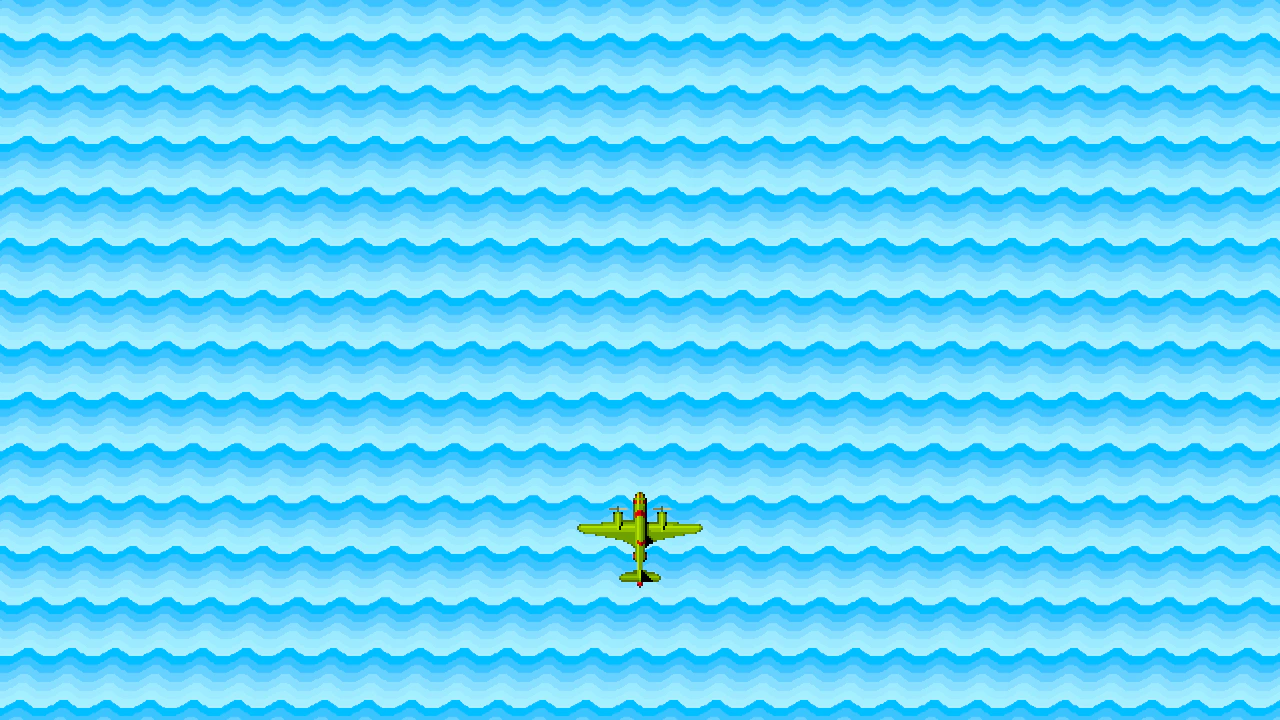
1280 × 720
class Example extends Phaser.Scene
{
    preload ()
    {
        this.load.setBaseURL('https://cdn.phaserfiles.com/v410');
        this.load.image('plane', 'assets/sprites/ww2plane.png');

        this.load.glsl('gradient-color', 'assets/shaders/gradients/gradient-color.glsl');
        this.load.glsl('gradient-process', 'assets/shaders/gradients/gradient-process.glsl');
        this.load.glsl('srgb', 'assets/shaders/gradients/srgb-color.glsl');
        this.load.glsl('value-linear', 'assets/shaders/gradients/value-linear.glsl');
        this.load.glsl('value-bilinear', 'assets/shaders/gradients/value-bilinear.glsl');
    }

    create ()
    {
        const getSource = (key) => this.cache.shader.get(key).glsl;

        // This addition defines standard gradient functionality.
        const standardGradientAddition = {
            name: 'STANDARD',
            additions: {
                fragmentHeader: [
                    getSource('srgb'),
                    getSource('gradient-color')
                ].join('\n'),
                fragmentProcess: getSource('gradient-process')
            }
        };

        const bilinearGradientShader = this.add.shader(
            {
                name: 'Gradient',
                shaderAdditions: [
                    // This addition controls a bilinear gradient.
                    // It must be defined in the shader before the gradient function is called.
                    {
                        name: 'BILINEAR',
                        additions: { fragmentHeader: getSource('value-bilinear') }
                    },
                    standardGradientAddition
                ],
                setupUniforms: (setUniform) => {
                    setUniform('positionFrom', [0, 0]);
                    setUniform('positionTo', [1.1, 0.11]);
                    setUniform('color1', [0, 0, 0, 0]);
                    setUniform('color2', [0, 1, 0, 1]);
                    setUniform('steps', 16);
                    setUniform('repeat', 32);
                }
            }, 640, 360, 1280, 720)
            .setRenderToTexture('bilinear');

        const linearGradientShader = this.add.shader(
            {
                name: 'Gradient',
                shaderAdditions: [
                    // This addition controls a linear gradient.
                    // It must be defined in the shader before the gradient function is called.
                    {
                        name: 'LINEAR',
                        additions: { fragmentHeader: getSource('value-linear') }
                    },
                    standardGradientAddition
                ],
                setupUniforms: (setUniform) => {
                    setUniform('positionFrom', [0, 0]);
                    setUniform('positionTo', [0, 1]);
                    setUniform('color1', [0, 0.1, 1, 1]);
                    setUniform('color2', [0.05, 0.3, 1, 1]);
                    setUniform('steps', 6);
                    setUniform('repeat', 16);
                    setUniform('offset', (this.game.loop.time / 3000) % (1 / 16));
                }
            }, 640, 360, 1280 + 100, 720 + 100);

        // Use the bilinear gradient to displace the linear gradient.
        linearGradientShader.enableFilters().filters.internal.addDisplacement('bilinear', 0, 0.01);

        const sprite = this.add.image(640, 720 * 3 / 4, 'plane').setScale(2);
    }
}

const config = {
    scale: { mode: Phaser.Scale.FIT },
    type: Phaser.AUTO,
    width: 1280,
    height: 720,
    backgroundColor: '#000000',
    parent: 'game-container',
    scene: Example,
    pixelArt: true
};

const game = new Phaser.Game(config);
More in Shader9 examples
 Custom Shader Texture CoordinatesDemonstrates how to apply a custom shader to a specific frame from a texture atlas using setTextureCoordinatesFromFrame and building shaders using modular additions.
 Gradient Circle Wipe MaskDemonstrates creating a radial transition between two images by using a dynamic shader as a mask, with the circle's radius controlled by the distance of the pointer from the center.
 Gradient Linear Wipe MaskDemonstrates how to use a shader-generated linear gradient as a dynamic mask to create a smooth transition between two images controlled by the pointer.
 Gradient Ripple ReflectionDemonstrates how to use a procedurally generated gradient shader as a displacement map to create a dynamic water ripple effect on a reflected scene.