Perlin Noise Custom Shader Displacement
Demonstrates how to inject custom GLSL code into a shader using shader additions to generate Perlin noise. The resulting shader is rendered to a texture and applied as a real-time displacement filter to an image.
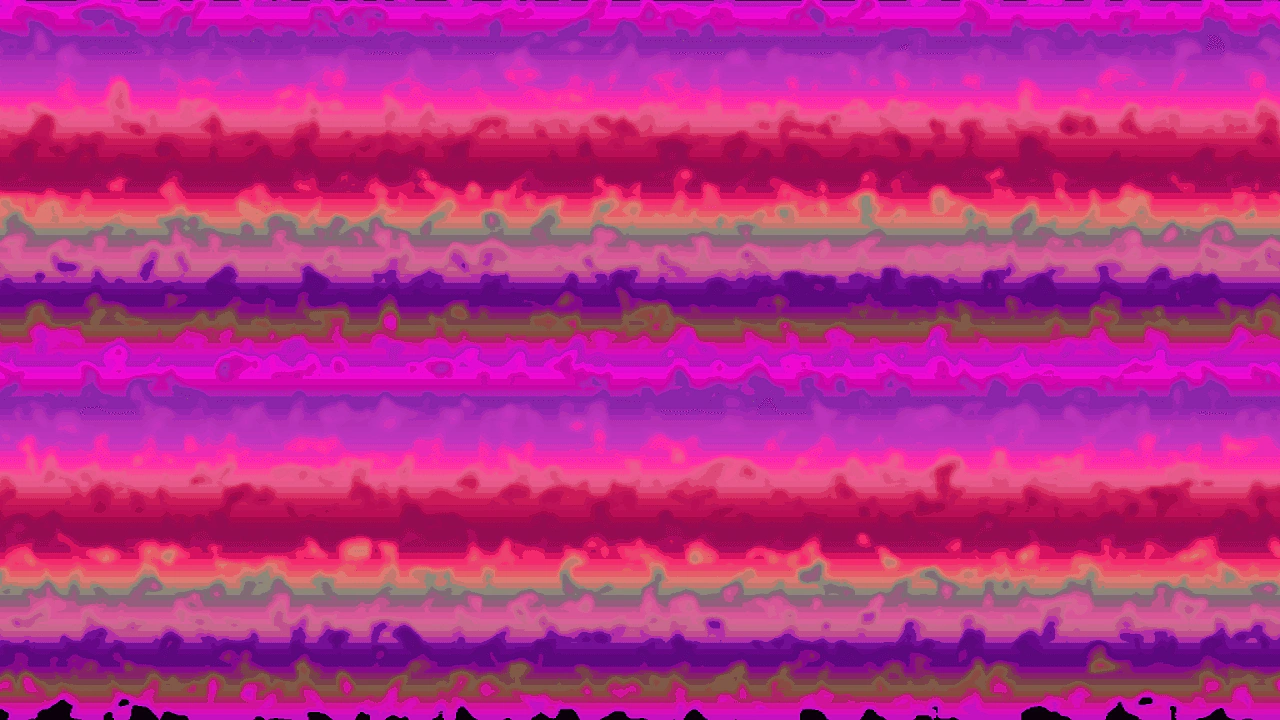
1280 × 720
const perlinNoiseFunction = `
// Assign this snippet to \`fragmentHeader\` in the shader config.
// This places it above the \`main\` function in the fragment shader.

// We declare this here so it can be used in the fragment process.
uniform float time;

vec2 rand2 (vec2 co) {
    co = vec2(dot(co, vec2(127.1, 311.7)), dot(co, vec2(269.5, 183.3)));
    return fract(sin(co) * 43758.5453);
}

float perlinNoise (vec2 uv)
{
    vec2 i = floor(uv);
    vec2 f = fract(uv);
    return mix(mix(dot(rand2(i + vec2(0.0, 0.0)), f - vec2(0.0, 0.0)),
                dot(rand2(i + vec2(1.0, 0.0)), f - vec2(1.0, 0.0)), f.x),
            mix(dot(rand2(i + vec2(0.0, 1.0)), f - vec2(0.0, 1.0)),
                dot(rand2(i + vec2(1.0, 1.0)), f - vec2(1.0, 1.0)), f.x), f.y) * 0.5 + 0.5;
}
`;

const waveProcess = `
// Assign this snippet to \`fragmentProcess\` in the shader config.
// This places it within the \`main\` function in the fragment shader.
// The \`fragColor\` variable is defined above this, and output below this.

// Direct the noise down the screen.
vec2 timeOffset = vec2(0.0, time);

// Base frequency, to match screen aspect ratio of this example.
// Change this or set it as a uniform to match your game.
vec2 frequency = vec2(16, 9);

// Accumulate noise from three different frequencies.
float noise0 = perlinNoise(outTexCoord * frequency * 3.0 + timeOffset * 2.0);
float noise1 = perlinNoise(outTexCoord * frequency * 5.0 + timeOffset / 1.345);
float noise2 = perlinNoise(outTexCoord * frequency * 7.0 + timeOffset / 2.1);
float sum = noise0 * 0.5 + noise1 * 0.3 + noise2 * 0.2;

// Round the sum up to 0.5 if below, to create flat areas.
sum = max(sum, 0.5);

fragColor = vec4(vec3(sum), 1.0);
`;

class Example extends Phaser.Scene
{
    constructor()
    {
        super();
    }

    preload()
    {
        this.load.setBaseURL('https://cdn.phaserfiles.com/v410');
        this.load.image('bg', 'assets/pics/purple-bars.jpg');
    }

    create()
    {
        const shaderConfig = {
            name: 'Noise',
            // By omitting `fragmentSource`, the default fragment shader is used.
            // It has template points for accepting additions.
            shaderAdditions: [
                {
                    name: 'PerlinNoise',
                    additions: {
                        fragmentHeader: perlinNoiseFunction,
                        fragmentProcess: waveProcess
                    }
                }
            ],
            setupUniforms: (setUniform, drawingContext) => {
                // Don't let time grow too large, or it will lose precision.
                setUniform('time', (this.game.loop.time % 1000000) / 500);
            }
        };

        const shader = this.add.shader(shaderConfig, 640, 360, 1280, 720);
        shader.setRenderToTexture('ooze');

        const bg = this.add.image(640, 360, 'bg')
            .enableFilters()
            .setDisplaySize(1280, 720);

        bg.filters.internal.addDisplacement('ooze', 0, 0.5);
    }
}

const config = {
    scale: { mode: Phaser.Scale.FIT },
    type: Phaser.WEBGL,
    parent: 'game-container',
    width: 1280,
    height: 720,
    scene: Example
};

const game = new Phaser.Game(config);
More in Shader9 examples
 Random Noise Shader AdditionsDemonstrates how to use the shaderAdditions property to inject custom GLSL code into the default fragment shader, creating dynamic noise effects with time-based uniforms.
 Shader Bilinear Gradient DisplacementCreate complex background effects by combining modular shader additions, render-to-texture, and displacement filters using bilinear and linear gradients.
 Custom Shader Texture CoordinatesDemonstrates how to apply a custom shader to a specific frame from a texture atlas using setTextureCoordinatesFromFrame and building shaders using modular additions.
 Gradient Circle Wipe MaskDemonstrates creating a radial transition between two images by using a dynamic shader as a mask, with the circle's radius controlled by the distance of the pointer from the center.