Single Sprite
A basic example showing how to load an image and display it as a Sprite game object at a specific coordinate.

1024 × 768
class Example extends Phaser.Scene
{
    preload ()
    {
        this.load.setBaseURL('https://cdn.phaserfiles.com/v410');
        this.load.image('bunny', 'assets/sprites/bunny.png');
    }

    create ()
    {
        this.add.sprite(400, 300, 'bunny');
    }
}

const config = {
    scale: { mode: Phaser.Scale.FIT },
    type: Phaser.AUTO,
    backgroundColor: '#2d2d2d',
    parent: 'game-container',
    scene: Example
};

const game = new Phaser.Game(config);
More in Sprites9 examples
 Sprite AlphaSet the transparency of a Sprite using the alpha property.
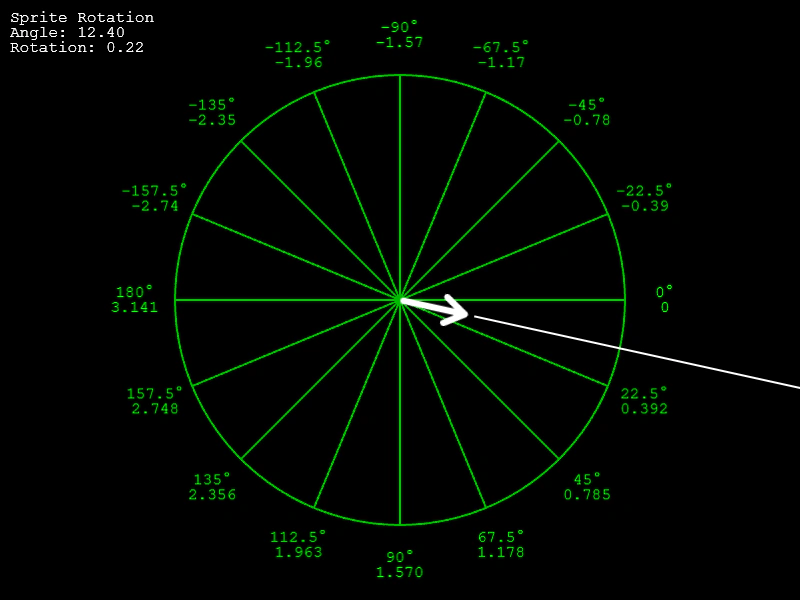 Sprite RotationDemonstrates the difference between the angle (degrees) and rotation (radians) properties of a Sprite, featuring a visual guide of Phaser's circular coordinate system.
 Create Sprites from ConfigDemonstrates creating sprites using configuration objects, featuring dynamic value assignment through random integers, floats, arrays, and custom functions.
 Custom Sprite ClassDemonstrates how to extend the Sprite class using ES6 syntax to create custom game objects with their own internal logic and preUpdate lifecycle methods.