Graphics Triangle with Gradient Fill
Demonstrates how to apply multi-color gradients to triangle primitives using the fillGradientStyle method on a Graphics object.
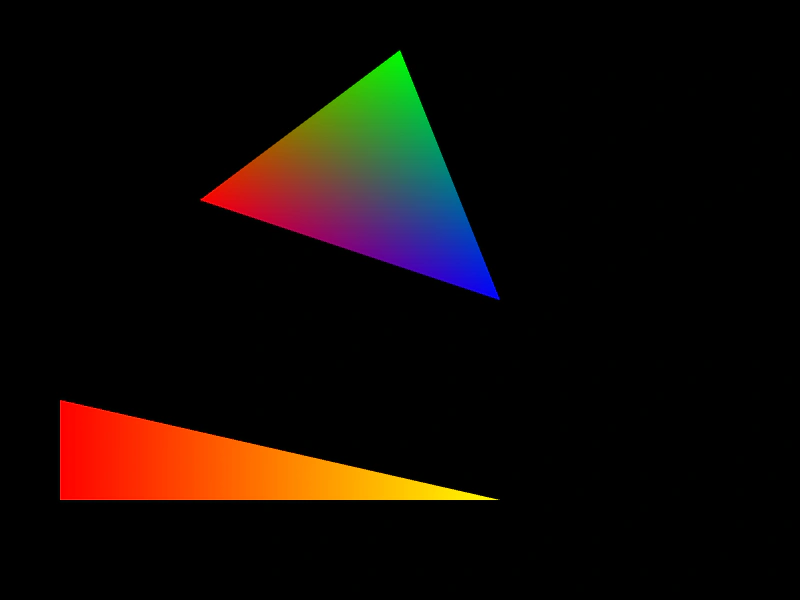
800 × 600
class Example extends Phaser.Scene
{
    create ()
    {
        const graphics = this.add.graphics();

        graphics.fillGradientStyle(0xff0000, 0x00ff00, 0x0000ff, 0xffff00, 1);
        graphics.fillTriangle(200, 200, 400, 50, 500, 300);

        graphics.fillGradientStyle(0xff0000, 0xff0000, 0xffff00, 0xffff00, 1);
        graphics.fillTriangle(60, 500, 60, 400, 500, 500);
    }
}

const config = {
    scale: { mode: Phaser.Scale.FIT },
    width: 800,
    height: 600,
    type: Phaser.WEBGL,
    parent: 'game-container',
    scene: Example
};

const game = new Phaser.Game(config);
More in Primitives17 examples
 Line BetweenDemonstrates how to draw a single straight line between two specific coordinates using Graphics.
 Line BetweenDemonstrates how to draw a straight line between two points with a custom thickness and color using the Graphics object.
 Line Gradient StrokeDemonstrates how to draw a line between two points with a multi-color gradient stroke using the Graphics object.
 Multi-Scene Graphics RenderingDemonstrates rendering Graphics objects and images across multiple simultaneous scenes, showing scene stacking and the use of custom viewports.