Tilemap World to Tile Coordinates
Demonstrates how to convert pointer coordinates to tile positions across multiple layers, handling layer switching and tilesets of different sizes.
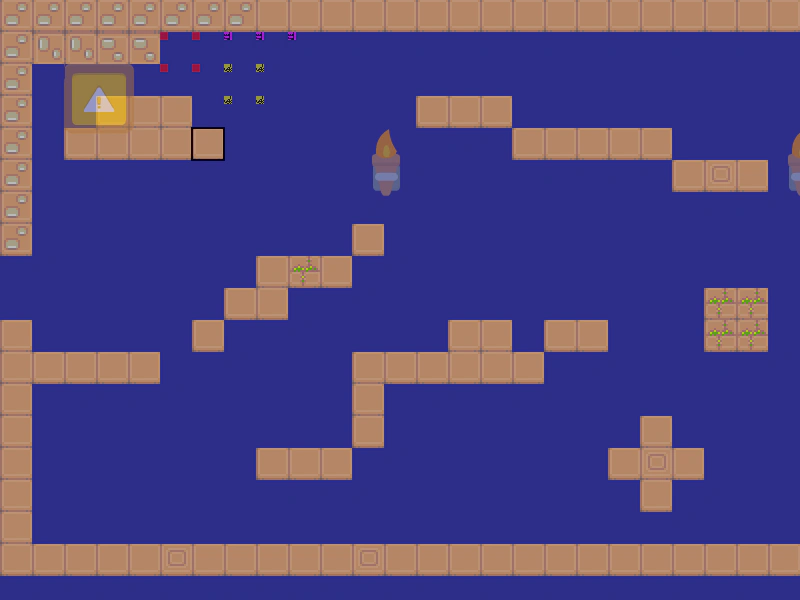
800 × 600
class Example extends Phaser.Scene
{
    smallTileLayer;
    tileLayer2;
    offsetTileLayer;
    tileLayer;
    marker;
    map;
    controls;

    preload ()
    {
        this.load.setBaseURL('https://cdn.phaserfiles.com/v410');
        this.load.tilemapTiledJSON('map', 'assets/tilemaps/maps/features-test.json');

        this.load.spritesheet('coin', 'assets/sprites/coin.png', { frameWidth: 32, frameHeight: 32 });

        this.load.image('ground_1x1', 'assets/tilemaps/tiles/ground_1x1.png');
        this.load.image('walls_1x2', 'assets/tilemaps/tiles/walls_1x2.png');
        this.load.image('tiles2', 'assets/tilemaps/tiles/tiles2.png');
        this.load.image('dangerous-kiss', 'assets/tilemaps/tiles/dangerous-kiss.png');
    }

    create ()
    {
        this.map = this.add.tilemap('map');

        const groundTiles = this.map.addTilesetImage('ground_1x1');
        const tiles2 = this.map.addTilesetImage('tiles2');
        const kissTiles = this.map.addTilesetImage('dangerous-kiss');

        this.tileLayer = this.map.createLayer('Tile Layer 1', groundTiles);
        this.offsetTileLayer = this.map.createLayer('Offset Tile Layer', tiles2);
        this.tileLayer2 = this.map.createLayer('Tile Layer 2', groundTiles);
        this.smallTileLayer = this.map.createLayer('Small Tile Layer', kissTiles);

        this.selectLayer(this.tileLayer);

        this.input.keyboard.on('keydown_ONE', event =>
        {
            this.selectLayer(this.tileLayer);
        });

        this.input.keyboard.on('keydown_TWO', event =>
        {
            this.selectLayer(this.offsetTileLayer);
        });

        this.input.keyboard.on('keydown_THREE', event =>
        {
            this.selectLayer(this.tileLayer2);
        });

        this.input.keyboard.on('keydown_FOUR', event =>
        {
            this.selectLayer(this.smallTileLayer);
        });

        this.marker = this.add.graphics();
        this.marker.lineStyle(2, 0x000000, 1);
        this.marker.strokeRect(0, 0, this.map.tileWidth, this.map.tileHeight);

        this.cameras.main.setBounds(0, 0, this.map.widthInPixels, this.map.heightInPixels);

        const cursors = this.input.keyboard.createCursorKeys();
        const controlConfig = {
            camera: this.cameras.main,
            left: cursors.left,
            right: cursors.right,
            up: cursors.up,
            down: cursors.down,
            speed: 0.5
        };
        this.controls = new Phaser.Cameras.Controls.FixedKeyControl(controlConfig);

        const help = this.add.text(16, 16, '', {
            font: '20px Arial',
            backgroundColor: '#000000',
            fill: '#ffffff'
        });
        help.setScrollFactor(0);
    }

    update (time, delta)
    {
        this.controls.update(delta);

        const worldPoint = this.input.activePointer.positionToCamera(this.cameras.main);

        // Force snapping to base tile size
        const pointerTileX = this.map.worldToTileX(worldPoint.x, true, this.cameras.main, this.tileLayer);
        const pointerTileY = this.map.worldToTileY(worldPoint.y, true, this.cameras.main, this.tileLayer);
        this.marker.x = this.map.tileToWorldX(pointerTileX, this.cameras.main, this.tileLayer);
        this.marker.y = this.map.tileToWorldY(pointerTileY, this.cameras.main, this.tileLayer);

        if (this.input.manager.activePointer.isDown)
        {
            const tile = this.map.getTileAtWorldXY(worldPoint.x, worldPoint.y);
            console.log(tile);
            if (tile)
            {
                tile.flipX = !tile.flipX;
                tile.alpha = tile.alpha ? 0.5 : 1;
            }
        }
    }

    selectLayer (layer)
    {
        this.map.setLayer(layer);
        this.tileLayer.alpha = 0.5;
        this.offsetTileLayer.alpha = 0.5;
        this.tileLayer2.alpha = 0.5;
        this.smallTileLayer.alpha = 0.5;
        layer.alpha = 1;
    }
}

// Visual test to make sure selecting tiles works with a tileset that has multiple tile sizes.
// Expected behavior for tiles bigger than base size: you can only select them if you click on the
// bottom left of the graphic (the origin of where it is placed in the tilemap).

const config = {
    scale: { mode: Phaser.Scale.FIT },
    type: Phaser.CANVAS,
    width: 800,
    height: 600,
    backgroundColor: '#2d2d88',
    parent: 'game-container',
    pixelArt: true,
    scene: Example
};

const game = new Phaser.Game(config);
More in Tests6 examples
 Visual Tile Bleed TestTests for tilemap rendering artifacts and 'bleeding' between tiles while the camera is scrolling with pixel art settings enabled.
 Tilemap Collision Face DebuggingDemonstrates how modifying tilemaps via methods like putTileAt, removeTileAt, copy, and fill affects collision face calculation, visualized using debug rendering.
 Tilemap Culling TestsA visual test to verify tilemap culling works correctly across layers with different offsets, scroll factors, non-uniform scaling, and multiple tileset sizes.
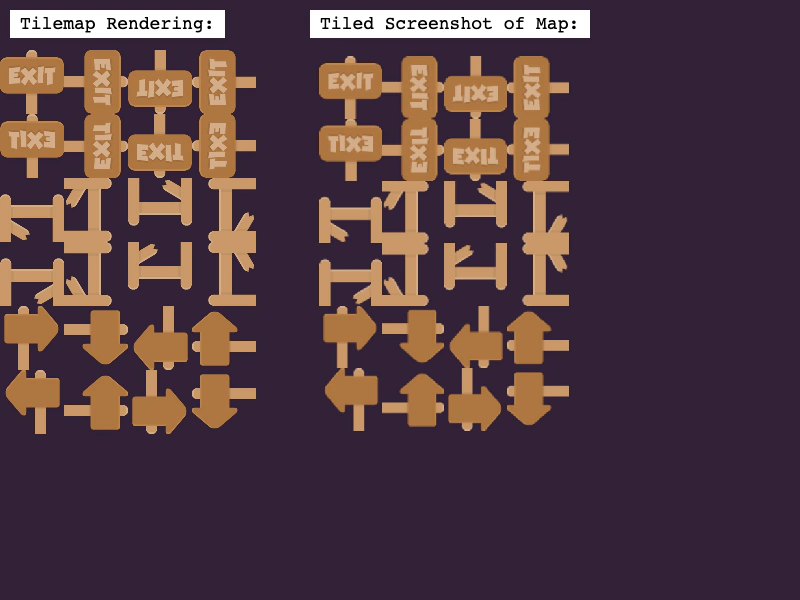 Tilemap Tile Flipping ReferenceA visual comparison demonstrating that tiles flipped or rotated in Tiled render correctly in Phaser by matching them against a reference screenshot.