Get Atlas Custom Frame Data
Demonstrates how to access and use custom data fields defined within a Texture Atlas JSON, such as using custom properties to set sprite tints.
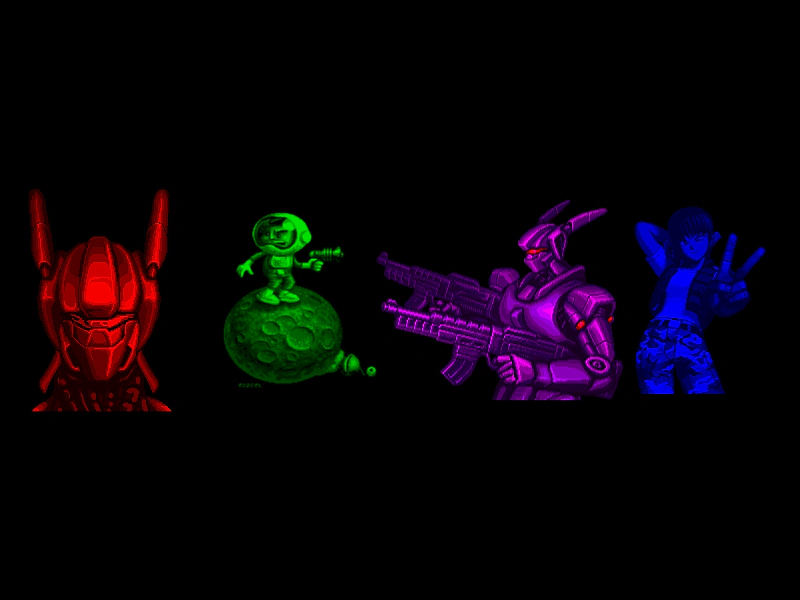
800 × 600
class Example extends Phaser.Scene
{
    atlasJSON = {
        frames: [
            {
                filename: 'contra2',
                frame: {x: 2,y: 316,w: 142,h: 222},
                rotated: false,
                trimmed: false,
                spriteSourceSize: {x: 0,y: 0,w: 142,h: 222},
                sourceSize: {w: 142,h: 222},
                pivot: {x: 0.5,y: 0.5},
                tint: 0xff0000
            },
            {
                filename: 'exocet_spaceman',
                frame: {x: 146,y: 316,w: 153,h: 175},
                rotated: false,
                trimmed: false,
                spriteSourceSize: {x: 0,y: 0,w: 153,h: 175},
                sourceSize: {w: 153,h: 175},
                pivot: {x: 0.5,y: 0.5},
                tint: 0x00ff00
            },
            {
                filename: 'contra3',
                frame: {x: 645,y: 197,w: 246,h: 201},
                rotated: false,
                trimmed: false,
                spriteSourceSize: {x: 0,y: 0,w: 246,h: 201},
                sourceSize: {w: 246,h: 201},
                pivot: {x: 0.5,y: 0.5},
                tint: 0xff00ff
            },
            {
                filename: 'shocktroopers-lulu2',
                frame: {x: 301,y: 337,w: 133,h: 188},
                rotated: false,
                trimmed: false,
                spriteSourceSize: {x: 0,y: 0,w: 133,h: 188},
                sourceSize: {w: 133,h: 188},
                pivot: {x: 0.5,y: 0.5},
                tint: 0x0000ff
            } ],
        meta: {
            app: 'http://www.codeandweb.com/texturepacker',
            version: '1.0',
            image: 'megaset-3.png',
            format: 'RGBA8888',
            size: {w: 1023,h: 691},
            scale: '1',
            smartupdate: '$TexturePacker:SmartUpdate:5e8f90752cfd57d3adfb39bcd3eef1b6:87d98cec6fa616080f731b87726d6a1e:b55588eba103b49b35a0a59665ed84fd$'
        }
    };

    preload ()
    {
        this.load.setBaseURL('https://cdn.phaserfiles.com/v410');
        this.load.atlas('megaset', 'assets/atlas/megaset-3.png', this.atlasJSON);
    }

    create ()
    {
        const atlasTexture = this.textures.get('megaset');

        const frames = atlasTexture.getFrameNames();

        let x = 100;

        for (let i = 0; i < frames.length; i++)
        {
            const img = this.add.image(x, 300, 'megaset', frames[i]);

            x += 200;

            //  The frames have custom data stored in them (see the JSON below) which we can use to tint them:
            img.setTint(img.frame.customData.tint);
        }
    }
}

const config = {
    scale: { mode: Phaser.Scale.FIT },
    type: Phaser.WEBGL,
    width: 800,
    height: 600,
    parent: 'game-container',
    scene: Example
};

const game = new Phaser.Game(config);
More in Texture Atlas Json11 examples
 Load Atlas with JSON ObjectDemonstrates how to load a Texture Packer atlas by passing a local JSON object directly to the loader instead of using an external file.
 Load Atlas With Local JSONThis example demonstrates how to load a Texture Atlas by passing a local JavaScript object as the frame data instead of loading an external JSON file.
 Load Texture Atlas From PayloadDemonstrates how to load a Texture Atlas using a pack object in the Scene configuration, allowing assets to be loaded automatically when the Scene starts.
 Load Texture Atlas via Asset PackDemonstrates how to load a texture atlas by defining it within an external JSON Asset Pack file and then accessing its frames.