Multi-Touch Piano
A demonstration of multi-touch support using a playable piano. It shows how to enable multiple simultaneous pointers and handle interaction events across several objects at once.
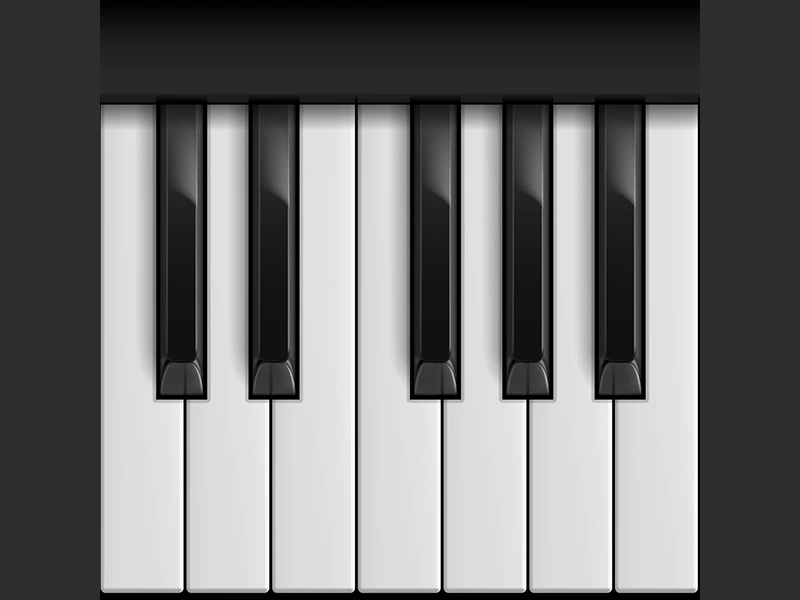
800 × 600
class Example extends Phaser.Scene
{
    preload ()
    {
        this.load.setBaseURL('https://cdn.phaserfiles.com/v410');
        this.load.setPath('assets/tests/piano');

        this.load.atlas('piano', 'piano.png', 'piano.json');

        this.load.audio('C3', 'C3.mp3');
        this.load.audio('Db3', 'Db3.mp3');
        this.load.audio('D3', 'D3.mp3');
        this.load.audio('Eb3', 'Eb3.mp3');
        this.load.audio('E3', 'E3.mp3');
        this.load.audio('F3', 'F3.mp3');
        this.load.audio('Gb3', 'Gb3.mp3');
        this.load.audio('G3', 'G3.mp3');
        this.load.audio('Ab3', 'Ab3.mp3');
        this.load.audio('A3', 'A3.mp3');
        this.load.audio('Bb3', 'Bb3.mp3');
        this.load.audio('B3', 'B3.mp3');
    }

    create ()
    {
        if (this.sound.locked)
        {
            const text = this.add.text(10, 10, 'Tap to unlock audio', { font: '16px Courier', fill: '#00ff00' });

            this.sound.once('unlocked', function ()
            {
                text.destroy();
                this.createPiano();
            }, this);
        }
        else
        {
            this.createPiano();
        }
    }

    createPiano ()
    {
        this.input.addPointer(9);

        const x = 100;
        const y = 0;

        this.add.image(x, y, 'piano', 'panel').setOrigin(0);

        const keys = [
            [ 'key1', 'C3' ],
            [ 'key2', 'Db3' ],
            [ 'key3', 'D3' ],
            [ 'key4', 'Eb3' ],
            [ 'key5', 'E3' ],
            [ 'key6', 'F3' ],
            [ 'key7', 'Gb3' ],
            [ 'key8', 'G3' ],
            [ 'key9', 'Ab3' ],
            [ 'key10', 'A3' ],
            [ 'key11', 'Bb3' ],
            [ 'key12', 'B3' ]
        ];

        const black = [ 'key2', 'key4', 'key7', 'key9', 'key11' ];

        for (let i = 0; i < keys.length; i++)
        {
            const key = keys[i][0];
            const note = keys[i][1];

            const singleKey = this.add.image(x, y, 'piano', key);

            singleKey.setName(note);
            singleKey.setOrigin(0);

            if (black.indexOf(key) !== -1)
            {
                singleKey.setDepth(1);
            }

            const frame = singleKey.frame;

            const hitArea = new Phaser.Geom.Rectangle(frame.x, frame.y, frame.width, frame.height);

            singleKey.setInteractive(hitArea, Phaser.Geom.Rectangle.Contains);

            const sound = this.sound.add(note);

            singleKey.on('pointerdown', (sound =>
            {
                sound.play();

            }).bind(this, sound));

            singleKey.on('pointerover', ((sound, pointer) =>
            {
                if (pointer.isDown)
                {
                    sound.play();
                }
            }).bind(this, sound));
        }
    }
}

const config = {
    scale: { mode: Phaser.Scale.FIT },
    type: Phaser.AUTO,
    parent: 'game-container',
    width: 800,
    height: 600,
    backgroundColor: '#2d2d2d',
    scene: Example
};

const game = new Phaser.Game(config);
More in Multitouch5 examples
 Multi-Touch DragDemonstrates how to enable multi-touch dragging by adding extra input pointers and making multiple Game Objects interactive and draggable simultaneously.
 Multi-Touch Game Object EventsDemonstrates how to enable multiple simultaneous touch pointers and handle pointer events on several Game Objects at once.
 Multi-Touch Hover StatesDemonstrates how multiple pointers can independently trigger 'over' and 'out' events on interactive objects simultaneously, enabling multi-touch hover detection.
 Multi-Touch Input with Multiple PointersDemonstrates how to enable support for multiple simultaneous touch points by adding extra pointers to the input manager and tracking their individual states.