First Game: Part 4 - Static Platforms
Learn how to use Arcade Physics static groups to create platforms and level geometry, including how to scale static bodies.
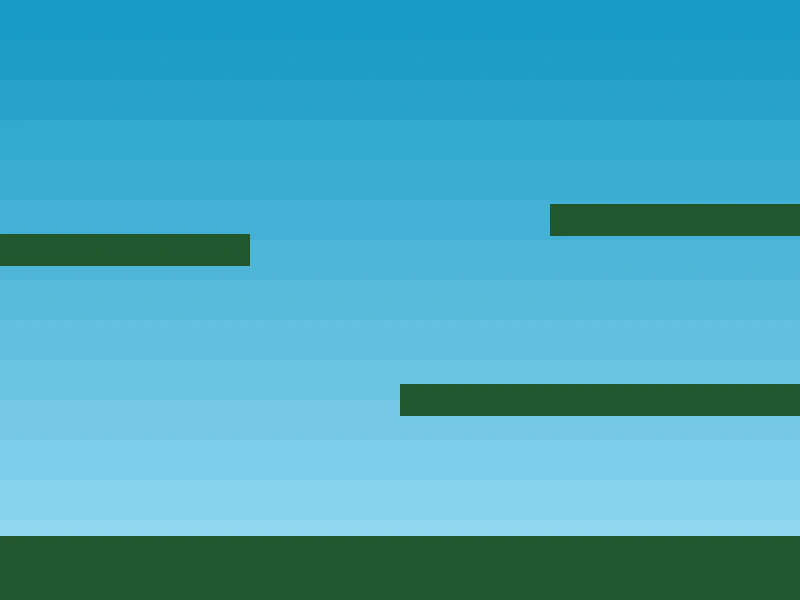
800 × 600
class Example extends Phaser.Scene
{
    platforms;

    preload ()
    {
        this.load.setBaseURL('https://cdn.phaserfiles.com/v410');
        this.load.image('sky', 'src/games/firstgame/assets/sky.png');
        this.load.image('ground', 'src/games/firstgame/assets/platform.png');
        this.load.image('star', 'src/games/firstgame/assets/star.png');
        this.load.image('bomb', 'src/games/firstgame/assets/bomb.png');
        this.load.spritesheet('dude', 'src/games/firstgame/assets/dude.png', { frameWidth: 32, frameHeight: 48 });
    }

    create ()
    {
        this.add.image(400, 300, 'sky');

        this.platforms = this.physics.add.staticGroup();

        this.platforms.create(400, 568, 'ground').setScale(2).refreshBody();

        this.platforms.create(600, 400, 'ground');
        this.platforms.create(50, 250, 'ground');
        this.platforms.create(750, 220, 'ground');
    }

    update ()
    {
    }
}

const config = {
    scale: { mode: Phaser.Scale.FIT },
    type: Phaser.AUTO,
    width: 800,
    height: 600,
    physics: {
        default: 'arcade',
        arcade: {
            gravity: { y: 300 },
            debug: false
        }
    },
    scene: Example
};

const game = new Phaser.Game(config);
More in Firstgame10 examples
 Keyboard Controls and MovementLearn how to move a player character using keyboard input, apply animations based on velocity, and implement jumping with Arcade Physics.
 Making Your First Game: Part 1The initial setup for a Phaser project, featuring the basic Game configuration and an empty Scene template.
 Making your First Game: Part 5Learn how to add a physics-enabled player sprite and define animations for walking left, right, and turning using a spritesheet.
 Making your first Phaser Game: Part 8Demonstrates how to collect items using physics overlaps. It features a callback function that disables star objects when they come into contact with the player.