
What it does
The pack is a bundle. Naming it in a manifest composes twenty-five packs in order: the renderer, a side-on world that can wrap at its edges, screen layers for the HUD, the vector layer with its glow, the vector font, the vector art reader, shatter debris, outline hit tests, vector motion and maths, colour, text, sound, tweens, saving, collisions, pointer events, camera shake, the follow camera and the 2D controls.
On top it adds what a vector game reaches for first. game.shapes.define names a shape from a list of points, or
from several parts that turn together, with a colour, a line width, a glow and an optional fill. Then
game.spawn({ shape: 'rock' }) makes it an ordinary object, so collisions, tags, the roster and leaving the scene
work as they do for a sprite, and rot is always the way it points, whichever way it was drawn. Shapes from the
design's Vector Art page arrive as a vector-art file and need no code: spawn them by name, and any motion drawn into
them runs by itself.
game.shatter breaks a shape into its own lines, which drift, spin and fade, and the object is gone at once: the
death of every rock, ship and shield. game.text is glowing line art by default, in capitals, digits and
punctuation, or ordinary type when you name a font. For what only shows and never collides, a laser, a tractor beam,
a rippling grid, game.vector.seg, poly and arc draw lines for a single frame.
Name the side-on world with a wrap size and the field becomes a torus: positions, collisions and drawing all wrap,
and a shape across the edge shows on both sides, so game code never wraps a coordinate itself.
Features
- One line, twenty-five packs — every pack above, configured and in order, with nothing to wire up.
- Shapes by name — outlines of points, or named parts with their own colour, line width, glow, fill and dashes,
drawn pointing right or marked
facing: 'up'. - Shapes as objects — spawned with tags and data, sized by their outline for collisions and
game.roster.near, and recoloured, scaled, faded and hidden like any sprite. - Vector art files — the design's Vector Art shapes load by themselves the first time one is spawned, sized with
sizeand animated as drawn. - Shatter —
game.shatterwithspeed,spin,lifeanddragfor the debris. - Line-art text — glowing capitals, digits and punctuation with
glowandweight, or sans, serif and mono for long words. - Lines for one frame — segments, polylines and arcs drawn in a
game.frame, gone the frame you stop. - Glow controls —
game.vector.glowandglowSizefor every halo, and a line-art starfield with a warp mode. - Sparks and trails —
game.vector.emitfor bursts of line sparks andgame.vector.trailfor a ribbon behind a ship. - Wrap-around fields — one world option makes the field a torus for positions, collisions and drawing.
- Exact outline hits —
game.shapes.of(wall).contains(x, y)for a thin line or a cave wall, beside box and circle collisions.
Good for
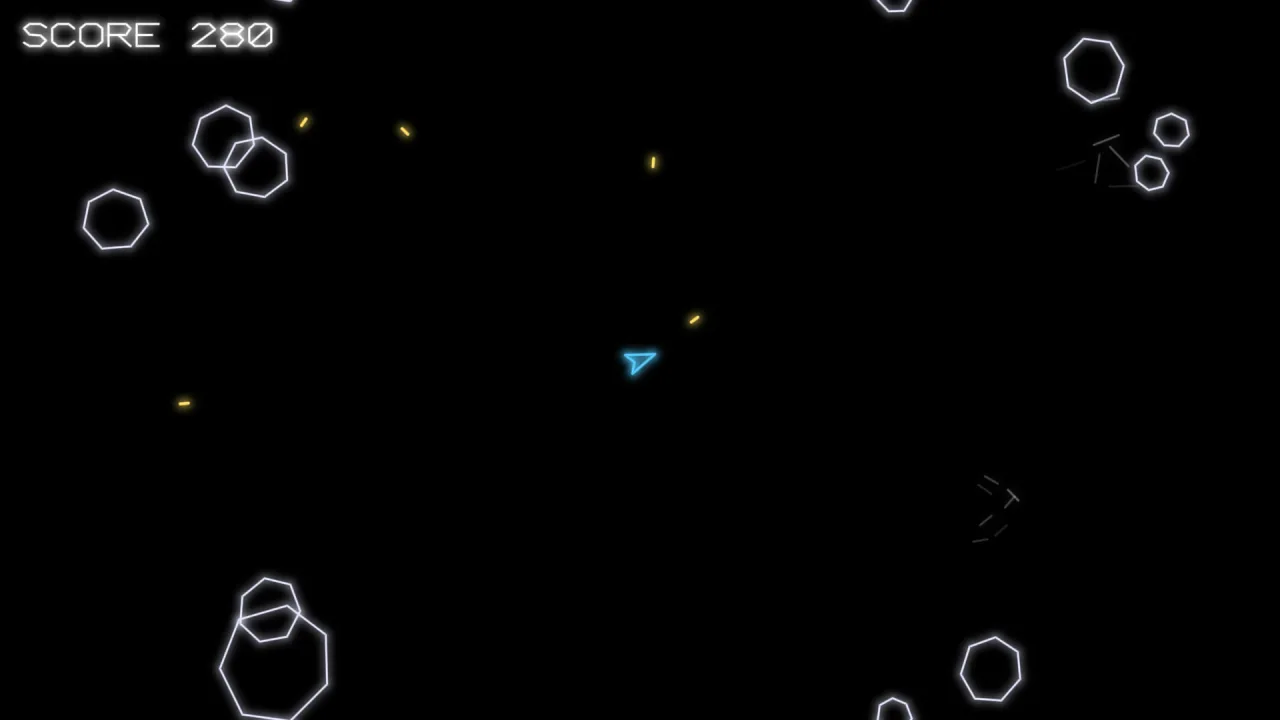
- Asteroid-field shooters — a ship that turns, thrusts and shoots in a wrapping field while rocks shatter into smaller rocks, in the style of Asteroids; the docs' whole example game is one.
- Tube shooters — lanes running to a vanishing point with
vector-tube, in the style of Tempest. - Neon arena shooters — sparks, trails, a warp starfield and strong glow, in the style of Geometry Wars.
- Landers and cave flyers —
thrust-craftand the cratered ground ofvector-terrain, with exact outline hits on the cave walls. - Wireframe 3D — points and edges projected to line segments through a turning camera with
vector-wire, in the style of Battlezone. - The old-monitor look — line art under the bloom of
post-bloomor the CRT ofpost-looks.
Make it yours
The pack has no options of its own; name a pack it composes in the manifest and it takes that pack's place, with your
options. The world is the commonest change: { "id": "world-side", "options": { "wrap": { "w": 1280, "h": 720 } } }
gives a wrapping field. The look is per shape and per part, and the glow is global, through game.vector.glow and
glowSize. Shapes can come from code or from the design's Vector Art page, and the two mix freely.
Two very different uses. A single-screen field that wraps at its edges, black behind it, a ship and rocks defined in
code and every hit ending in game.shatter. And a scrolling cave bigger than the screen, the follow camera on a
craft, vector-art shapes with their own motion, and contains testing the craft against the exact outline of the
walls.
A quick look
A ship and a rock defined in code, spawned as objects, and a hit that shatters the rock:
game.shapes.define('ship', [[16, 0], [-12, -10], [-6, 0], [-12, 10]], { color: '#5cf', width: 2.5, glow: 1 });
game.shapes.define('rock', [[30, 0], [20, 22], [-4, 28], [-26, 14], [-28, -10], [-8, -26], [18, -22]], { color: '#e8e8ff', width: 2, glow: 0.8 });
game.spawn({ id: 'ship', shape: 'ship', x: W / 2, y: H / 2, rot: -Math.PI / 2, tags: ['ship'], collide: { shape: 0 } });
game.spawn({ id: 'rock', shape: 'rock', x: 100, y: 100, tags: ['rock'], collide: { shape: 0 } });
game.text('SCORE 0', 24, 24, { size: 22, align: 'left', baseline: 'top' });
game.collide.on('shot', 'rock', (shot, rock) => { shot.destroy(); game.shatter(rock); });
Works with
post-bloomandpost-looks— bloom, scanlines and a CRT over the line art.vector-tube,vector-terrainandvector-wire— tube playfields, cratered ground and wireframe 3D.asteroid-fieldandthrust-craft— genre rules for rock fields and for landers and cave flyers.controls-touch— a thumb stick and buttons for phones.bars— health, timers and meters on the HUD.core-2d— the start for a 2D game drawn with sprites rather than lines.
Good to know
- It has no options itself: change a part by naming its pack in the manifest.
- Line-art text has capitals, digits and punctuation only; lower case is drawn as capitals, and
font: 'sans'sets long words as ordinary type. - Shapes collide by the box their outline fills, or a circle; for the exact outline, test it with
contains. - Things that move and collide are shapes; lines drawn in a
game.frameonly show, and have no collisions.