
What it does
game.bars.create makes a bar or a ring from a config and returns it. You set its value, or add to it, and the
fill eases to the new amount; to moves it steadily over a number of seconds, which is a countdown, a loader or a
cooldown in one line. A hit can flash the fill, and the optional ghost holds the lost chunk for a moment and then
drains it, as fighting games do. Callbacks fire when a bar empties or fills.
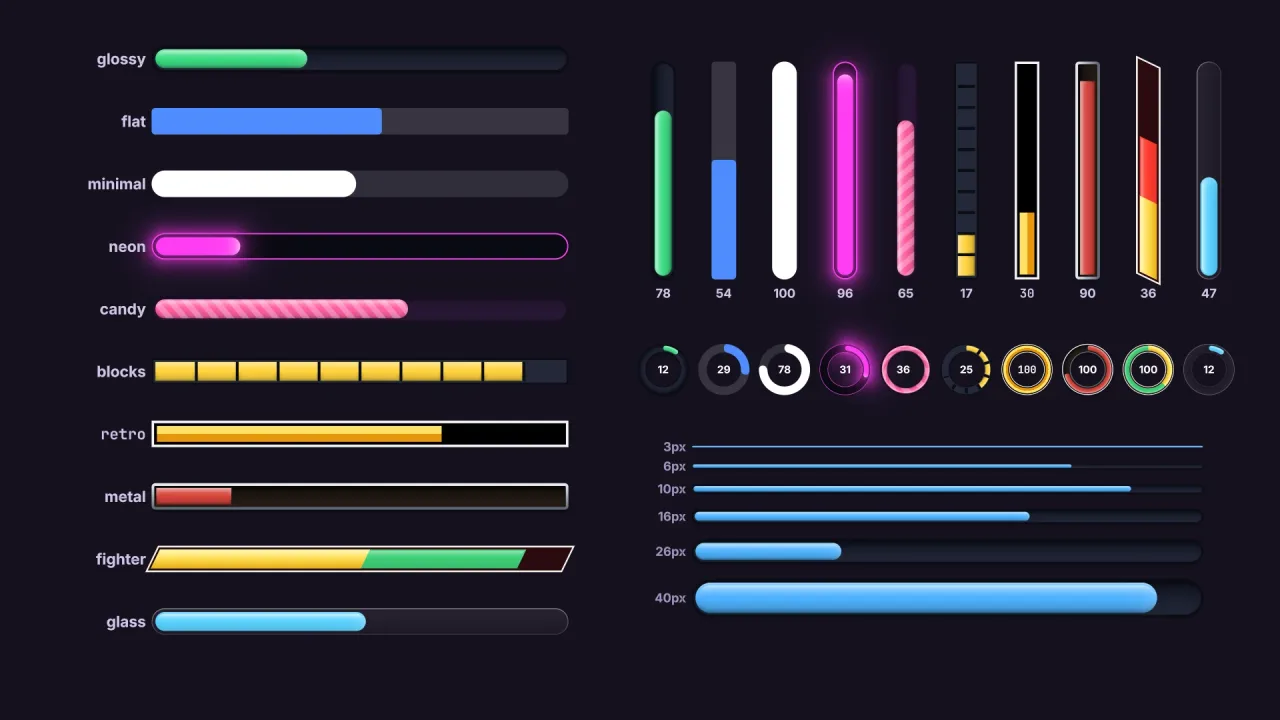
Each bar is a single quad drawn by a distance-field shader. That is why a 3 px hairline and a gauge the height of the screen are equally sharp, at any zoom and pixel ratio, and why the look can be rich without any images: corners, slants, borders, grooves, gradients, gloss, bevels, glow, sweeping shine, scrolling stripes, shadows, cells, marks and zones are all fields of one look. Lighting is computed from the fill colour, so any colour looks right in any style.
A bar can sit anywhere. Anchor it to a corner or edge of the screen and it stays there, inside the safe area, when the screen resizes. Let it follow a sprite and it rides above it, sorts with it and dies with it, which is a health bar on every enemy for one line each. Labels sit in the middle, ride the fill's edge or sit outside, and can change colour exactly where the fill ends.
Features
- Bars and rings — straight bars that fill in any direction or out from the middle, and rings with a start angle and sweep, so a three-quarter gauge is a ring too.
- Ten styles —
glossy,flat,minimal,neon,candy,blocks,retro,metal,fighterandglass, plus house styles of your own withdefineStyle, which can inherit another. - Easing and the ghost — the fill settles over a time you choose, and a lost chunk can hold then drain, while a gain shows at once.
- Fills and lighting — a colour or a gradient of two to four colours across the bar, along the track or over the filled part, with shading, gloss, bevels, a leading-edge glint, glow and a periodic shine.
- Shapes and ends — corner radius or a pill, round or cut corners, slanted ends, and a round or flat leading edge.
- Segments and marks — cells, pips, a battery or dividers, filling whole cells if you like, and up to four marks for a target or a boss's phases.
- Zones — colour, glow and pulse that change below or above a fraction, such as amber below half and red and pulsing below a quarter.
- Labels — templates with
{value},{max},{left},{percent}and{time}, in eight positions, with a second colour over the fill. - HUD or world — anchored to the screen, or following an object in a 2D world and zooming with the camera.
Good for
- Action and arcade HUDs — health, energy and a countdown that turns red and pulses as time runs out.
- Fighting games — a slanted pair of health bars with a red ghost chunk on every hit.
- RPGs — XP strips, framed metal bars and boss bars with phase marks.
- Enemy health bars that follow each sprite and vanish with it.
- Loading and progress screens, with a bar or ring that fills over time.
- Cooldowns and gauges — ability rings that refill, ammo cells, and a speedometer sweep.
Make it yours
Every look field can be set on a style, on create, or later with restyle, so a bar can change its look as the
game goes on. The pack's own options set house styles in the manifest, the default style for bars that name none,
and the label font. A bar's position, size, rotation, direction, layer, range and label are all live.
Two very different bars: a tall glossy timer anchored to the left edge, filling upward in an orange-to-red gradient, turning red and pulsing below a fifth and labelled with the time left underneath; and a neon cooldown ring with a thin band that refills over four seconds after each use. A third is a tiny flat health bar with a ghost, following every enemy in a 2D world.
A quick look
A countdown bar, a fighting-game health bar and a cooldown ring:
const time = game.bars.create({ style: 'glossy', anchor: 'left', x: 24, width: 26, height: 300, direction: 'up',
  fill: { colors: ['#ffb36b', '#ff4b2b'] }, max: 106, zones: [{ below: 0.2, fill: '#ff2b2b', pulse: 3 }],
  label: { text: '{time}', position: 'below' } });
time.to(0, 106, () => gameOver());
const hp = game.bars.create({ style: 'fighter', anchor: 'top-left', x: 16, y: 16, width: 360, height: 28, max: 120 });
hp.value -= 12; hp.flash('#ff6a5a');
const cooldown = game.bars.create({ shape: 'ring', style: 'neon', x: 600, y: 680, width: 60, thickness: 7, value: 0 });
cooldown.to(1, 4);
Works with
typography— required, composed before it, for the labels.render-auto— the WebGPU or WebGL2 backend the shader runs on.ui— its progress widget is the one to use for a bar inside a menu layout.nine-slice— for a bar made from painted art, with a sprite fill.
Good to know
- A bar holds at most four fill colours, four marks and 256 cells; asking for more throws.
- Labels stay upright on a rotated bar, and the two-colour label split is for straight, unrotated bars.
- A bar placed by
anchororfollowis positioned every frame, so move it throughxandyas offsets. - Bars are drawn by their own drawer, so they sort by layer and depth but take no per-object effects.
- It needs a WebGPU or WebGL2 backend, and draws on the screen layer or in a 2D world.