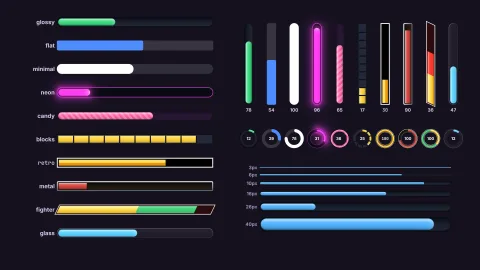

The pack
bars
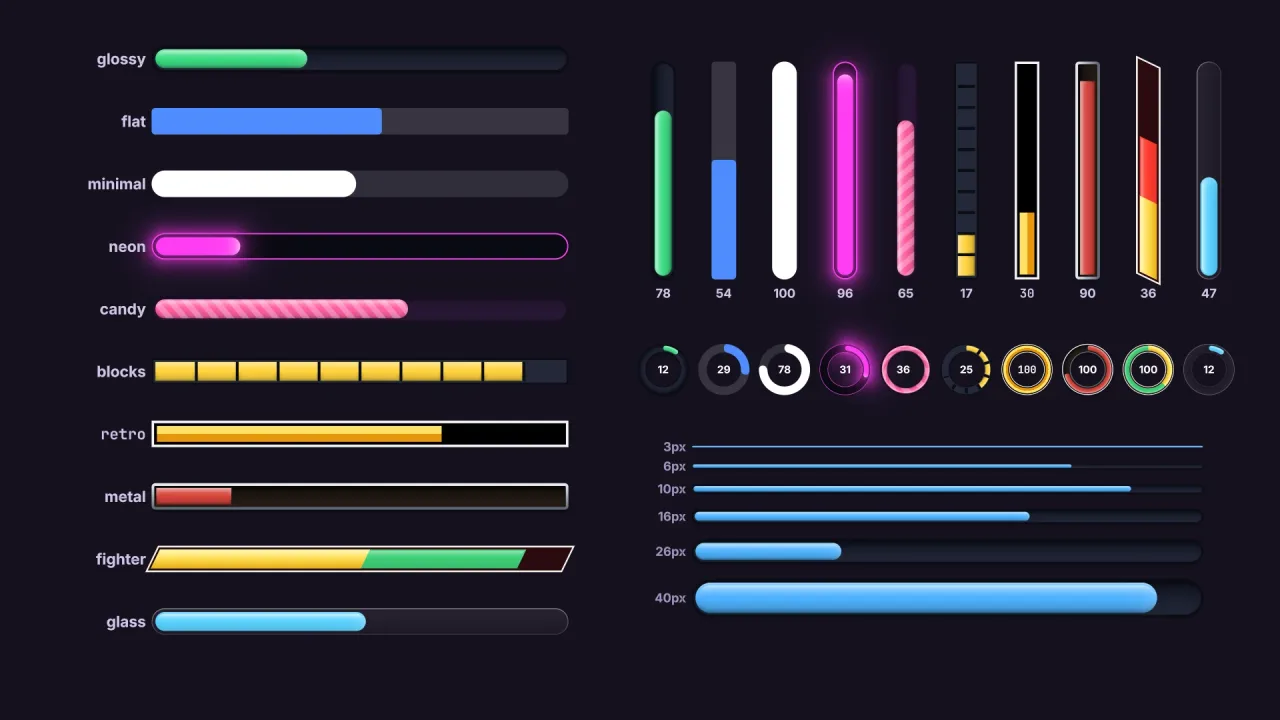
function bars(options: BarsOptions = {}): Pack<{ bars: BarsApi }>The bars pack: game.bars.create({...}) makes a progress, health, timer, loading or cooldown bar, straight or
round, styled by data (ten built-in styles, defineStyle for more), with gradients, gloss, glow, shine, stripes,
segments, marks, zones that recolour it as it empties, a ghost chunk after a change, and a label. The returned
Bar animates to whatever value it is given. Requires the typography pack (composed first) for labels.
Functions
formatBarLabel
function formatBarLabel(template: string, v: BarTemplateValues): stringFill a label template: {value}, {min}, {max}, {left} (max - value) to decimals places, {percent} (the
fraction as 0..100, rounded) and {time} (the value as m:ss). An unknown field is left as written.
formatBarTime
function formatBarTime(seconds: number): stringSeconds as m:ss (or h:mm:ss from an hour), rounded UP so a countdown reads 0:01 until it is truly over.
Constants
BAR_DEFAULT_LOOK
const BAR_DEFAULT_LOOK: Readonly<BarLook>The look every style starts from: a plain rounded bar. Presets name only what they change.
BAR_STYLES
const BAR_STYLES: Readonly<Record<string, BarLook>>The built-in styles. Every one takes any fill; their lighting (shade, gloss, bevel, tip) is computed from the fill
colour, so a style stays good-looking in whatever colour a game gives it.
BARS_DRAWER_ID
const BARS_DRAWER_ID: 8The id this pack registers its drawer under; a bar's roster object carries it in drawBy.
Types
Bar
interface BarA live bar. Set value and it animates there; everything else can change at any time.
readonly id: string— Its name.readonly handle: Handle— The roster object it draws as: position, layer and scene lifetime are the object's.readonly alive: boolean— False once killed, or once the object it follows has gone.value: number— The value, min..max. Setting it starts the shown fill (and the ghost) moving there; a non-finite value throws in dev.fraction: number— The value as a fraction of min..max, 0..1.readonly shown: number— The fraction the bar is showing this frame, eased and snapped.min: number— The value at empty. Changing it keeps the value.max: number— The value at full. Changing it keeps the value.readonly empty: boolean— True atmin.readonly full: boolean— True atmax.set(value: number, opts?: { instant?: boolean }): void— Set the value;instantjumps the shown fill (and clears the ghost) instead of animating.add(delta: number): void— Add to the value (subtract with a negative), clamped to min..max.to(target: number, seconds: number, done?: (bar: Bar) => void): void— Move the value steadily totargetoverseconds, then calldone— a timer, a loading bar, a cooldown. A newset,addortoreplaces it.stop(): void— Stop atowhere it is.flash(color?: string, seconds?: number): void— Flash the fill (a hit, a pickup): a colour, default white, fading overseconds(default 0.25).x: number— Centre x (or the offset from the anchor, or from the followed object).y: number— Centre y (or the offset).width: number— Width.height: number— Height.rot: number— Rotation, radians.alpha: number— Opacity 0..1, on top of the style's.visible: boolean— Shown.anchor: BarAnchor | null— The screen anchor, or null to place by centre.follow: Handle | null— The object followed, or null.direction: BarDirection— Which way it fills.thickness: number— A ring's band thickness, px (the default's value until set).start: number— Where a ring starts, radians from +x, clockwise on screen.sweep: number— How far round a ring goes, radians, up to 2π.style: string— The style name it started from. Setting it re-resolves the look, keeping this bar's own overrides.readonly look: Readonly<BarLook>— The resolved look this frame, read-only.restyle(look: Omit<BarLook, 'base'> | null): void— Change look fields on this bar only:bar.restyle({ fill: '#ff4d4d', glow: 10 }). Merges with earlier calls;nulldrops them all, back to the style and thecreatefields. Throws on a bad field and changes nothing.text: string | ((bar: Bar) => string) | null— The label text template or function; setting it creates a label if the bar has none.readonly labelText: string— The label's current text, or '' without one.get label(): BarLabelSpec | null— The label's settings (a copy), or null without one. Replace the label — true, a template, or settings — or remove it with null:bar.label = { ...bar.label, color: '#ffd23f' }.set label(spec: boolean | string | BarLabelSpec | null)— The label's settings (a copy), or null without one. Replace the label — true, a template, or settings — or remove it with null:bar.label = { ...bar.label, color: '#ffd23f' }.kill(): void— Remove the bar and its label.
BarAnchor
type BarAnchor = 'top-left' | 'top' | 'top-right' | 'left' | 'center' | 'right' | 'bottom-left' | 'bottom' | 'bottom-right'The screen point a bar is placed from: its own point of the same name sits there, offset by x and y.
BarDirection
type BarDirection = /** Left to right; the default for a bar wider than it is tall. */ | 'right' /** Right to left (mirrored, skew included). */ | 'left' /** Bottom to top; the default for a bar taller than it is wide. */ | 'up' /** Top to bottom. */ | 'down' /** From the middle out to both ends, along the longer side. */ | 'center' /** A ring: clockwise (default). */ | 'cw' /** A ring: anticlockwise. */ | 'ccw'Which way a bar fills.
BarGhost
interface BarGhostThe ghost chunk — a fighting game's health bar. When the value drops, the part just lost stays visible in the
loss colour for delay seconds, then drains away at speed. When it rises, the part just gained shows at
once in the gain colour and the fill grows into it.
loss?: string— Colour of a just-lost chunk. Default '#ffffffd9'.gain?: string— Colour of a just-gained chunk. Default '#b6ffcf'.delay?: number— Seconds the chunk holds before it moves. Default 0.45.speed?: number— How fast it then catches up, fraction of the bar per second. Default 0.9.
BarGlow
interface BarGlowLight around the fill — the neon look.
size?: number— Falloff distance, px. Default 8.strength?: number— 0..1 at the fill's edge. Default 0.8.color?: string— The glow's colour. Default the fill's first colour (a zone's fill, while one applies).
BarGradient
interface BarGradientA gradient fill: two to four colours, and what they run along.
colors: ReadonlyArray<string>— Two to four CSS colours, first to last. Throws on one or five.stops?: ReadonlyArray<number>— Where each colour sits, 0..1, one per colour, ascending. Default evenly spaced. Two equal stops make a hard band.along?: 'across' | 'track' | 'fill'— What the colours run along.'across'(default) runs from the lit side to the shaded side: top to bottom on a horizontal bar, left to right on a vertical one, outer to inner edge on a ring.'track'runs the whole length from the empty end to the full end, so filling reveals it (red at the empty end, green at the full end).'fill'stretches over the filled part only, so the whole range always shows.
BarLabelLook
interface BarLabelLookHow a label looks: its colours, size, outline and font.
color?: string— Text colour. Default '#ffffff'.fillColor?: string— Text colour where it lies over the fill (a centred label turns from one colour to the other as the fill passes under it). Defaultcolor.size?: number— Font size, px. Default 60% of the bar's thickness for a label inside it (at least 9), 15 outside.outline?: string | false— An outline round the letters: a colour, or false for none. Default '#000000b0'.outlineWidth?: number— Outline width as a fraction of the font size. Default 0.08.family?: string— A shared UI family: 'sans', 'sans-bold' (default), 'serif', 'serif-bold', 'mono', 'mono-bold', or one registered withtypography.registerFamily.
BarLabelPosition
type BarLabelPosition = /** In the middle of the bar. */ | 'center' /** Inside the bar at its empty end. */ | 'start' /** Inside the bar at its full end. */ | 'end' /** Riding the fill's leading edge: inside the fill while it fits, just past it when it does not. */ | 'follow' /** Outside, before the bar's empty end. */ | 'before' /** Outside, after the bar's full end. */ | 'after' /** Outside, centred above the bar. */ | 'above' /** Outside, centred below the bar. */ | 'below'Where a label sits.
BarLabelSpec
interface BarLabelSpec extends BarLabelLookA label on a bar.
font?: TypographyFace— A face fromgame.typography.face(), instead offamilyandsize.text?: string | ((bar: Bar) => string)— The text: a template, or a function of the bar. Template fields:{value}(rounded todecimals),{max},{min},{percent}(0..100, rounded),{time}(the value as seconds,m:ss, rounded up so a countdown shows 0:01 until it is truly over) and{left}(max - value, rounded). Default '{percent}%'.position?: BarLabelPosition— Where it sits. Default 'center' (a ring's middle).gap?: number— Gap between the bar and an outside label, px. Default 6.decimals?: number— Decimal places for{value},{max},{min}and{left}. Default 0.
BarLook
interface BarLookA bar's look: every field optional. Missing fields come from base (a named style), then from the style the bar
names, then from 'glossy'. Sizes are px (world units on a world layer), angles radians, times seconds.
base?: string— A named style to start from.radius?: number | 'pill'— Corner radius, px, or 'pill' for fully round ends. A ring: 'pill' gives round caps, 0 flat ones.corners?: 'round' | 'cut'—'round'(default) or'cut'— chamfered corners, the sci-fi look;radiusis the cut's size.skew?: number— Slant the ends, radians: a parallelogram bar. A'left'bar mirrors it, as a player-two health bar should. Default 0.edge?: 'round' | 'flat'— The fill's leading edge:'round'(default) follows the frame's rounding,'flat'is a straight cut.track?: string— Colour of the empty track.trackTo?: string— A second track colour, for a gradient across the bar. Defaulttrack.innerShadow?: number— Depth of the groove the track sits in: a shadow under its lit edge, 0..1.border?: number— Border width, px; 0 for none.borderColor?: string— Border colour.borderColorTo?: string— A second border colour, across the bar (a metal frame). DefaultborderColor.padding?: number— Space between the border and the fill, px; the track shows in it.fill?: BarPaint— The fill: one colour, or a gradient of two to four.shade?: number— Automatic shading across the fill and ghost, lit side lighter, the other darker, 0..1. Works on any colour.gloss?: number— A glossy highlight along the lit side, 0..1.glossHeight?: number— How far across the bar the gloss reaches, 0..1. Default 0.5.bevel?: number— Lit and shaded rims on the fill, 0..1.tip?: number— A bright glint at the fill's leading edge, 0..1.highlight?: string— Colour of the gloss, shine and tip. Default '#ffffff'.glow?: number | BarGlow | false— Light around the fill: a size in px, settings, or false.shine?: number | BarShine | false— A highlight sweeping along the fill: seconds between sweeps, settings, or false.stripes?: boolean | BarStripes— Diagonal stripes over the fill: true for the defaults, settings, or false.shadow?: boolean | BarShadow— A drop shadow under the bar: true for the defaults, settings, or false.ghost?: boolean | BarGhost— The ghost chunk after a change: true for the defaults, settings, or false.segments?: number | BarSegments— Cells: a count, settings, or 0 for none.marks?: ReadonlyArray<number>— Up to four marks across the bar at these fractions, 0..1 — a target line, a boss's phase thresholds.markColor?: string— Mark colour. Default '#ffffffcc'.markWidth?: number— Mark width, px. Default 2.zones?: ReadonlyArray<BarZone>— Looks for low (below) and high (above) fractions; the matching zone nearest the end it guards applies.zoneBlend?: number— Blend each zone's fill in over this much of the bar before its threshold, 0..1; 0 (default) switches at the threshold.ease?: number— Seconds the shown fill takes to settle on a new value (a time constant); 0 jumps.alpha?: number— Opacity of the whole bar, 0..1. Default 1.labelStyle?: BarLabelLook— How labels on bars of this style look.
BarPaint
type BarPaint = string | BarGradientA fill colour: one CSS colour, or a gradient of two to four.
BarsApi
interface BarsApigame.bars.
create(spec?: BarSpec): Bar— Make a bar. Throws on an unknown style, a gradient of the wrong size,min >= maxor a non-finite number.defineStyle(name: string, look: BarLook): void— Register a style by name:defineStyle('hp', { base: 'glossy', fill: '#ff4d6d', ghost: true }). Defining a name again REPLACES it, live: every bar wearing it, or a style based on it, takes the new look; an identical definition does nothing. Throws on a built-in's name.readonly styles: ReadonlyArray<string>— Every style name, built-ins first.style(name: string): Readonly<BarLook>— A style's look with itsbasechain resolved; throws on an unknown name.readonly all: ReadonlyArray<Bar>— Live bars, in creation order.of(handle: Handle): Bar | null— The bar drawn as this roster object, or null.
BarSegments
interface BarSegmentsSplitting the bar into equal cells: blocks, pips, a battery, notches.
count: number— Number of cells, 2..256.style?: 'gaps' | 'lines'—'gaps'(default) cuts the bar into separate cells;'lines'keeps it whole and draws a divider at each boundary.gap?: number— Gap between cells, or the divider's width, px. Default 2 (gaps) / 1 (lines).radius?: number— Corner radius of each cell, px; 0 (default) keeps cells square and lets the frame round the two ends.snap?: boolean— Fill whole cells only, rounding up, so a cell shows while any of it is left. Default true for gaps, false for lines.color?: string— The gaps' colour (default the border colour when there is a border, else see-through) or the dividers' (default '#00000059').
BarShadow
interface BarShadowA drop shadow under the whole bar.
x?: number— Offset right, px on screen. Default 0.y?: number— Offset down, px on screen. Default 3.blur?: number— Blur, px. Default 6.color?: string— Shadow colour; its alpha is the strength. Default '#00000080'.
BarShine
interface BarShineA soft highlight that sweeps along the fill now and then.
every?: number— Seconds from one sweep to the next. Default 2.5.duration?: number— Seconds one sweep takes to cross the bar. Default 0.9.width?: number— Width of the highlight, px. Default 1.4 × the bar's thickness.strength?: number— 0..1. Default 0.55.
BarsOptions
interface BarsOptionsThe manifest options.
styles?: Record<string, BarLook>— House styles, by name, defined before the game starts — the same asdefineStylefor each.defaultStyle?: string— The style a bar takes when it names none. Default 'glossy'.font?: string— The family labels use when their style names none. Default 'sans-bold'.
BarSpec
interface BarSpec extends Omit<BarLook, 'base'>What game.bars.create takes: where the bar is, what it measures, and its look (any BarLook field).
style?: string— A named style to start from: 'glossy' (default), 'flat', 'minimal', 'neon', 'candy', 'blocks', 'retro', 'metal', 'fighter', 'glass', or one fromdefineStyle.shape?: 'bar' | 'ring'—'bar'(default) or'ring', a circular meter.id?: string— A name forinspectand the bar list. Default 'bar'.x?: number— Centre x, or the offset fromanchor. Default the middle of the screen.y?: number— Centre y, or the offset fromanchor.width?: number— Width, px (world units on a world layer). Default 200 (20 for an upright bar, 64 for a ring).height?: number— Height. Default 20 (200 for an upright bar, the width for a ring).rot?: number— Rotation, radians. Default 0. Labels stay upright.anchor?: BarAnchor— Place from a screen anchor instead of a centre:anchor: 'top-left', x: 16, y: 16puts the bar's top-left corner 16 px in from the screen's, inside the safe area, and keeps it there when the screen resizes.follow?: Handle— Ride above an object: the bar follows it, sorts above it, and dies with it.offsetX?: number— Offset from the followed object's centre. Default 0.offsetY?: number— Offset from the followed object's centre. Default just above it.layer?: string— Roster layer. Default the followed object's, else 'hud' when there is one.z?: number— Depth within the layer. Default 0 (above the followed object when following).visible?: boolean— Start hidden. Default true (shown).direction?: BarDirection— Which way it fills. Default by shape: 'right' when wider than tall, 'up' when taller, 'cw' for a ring.thickness?: number— A ring's band thickness, px. Default 18% of its diameter.start?: number— Where a ring starts, radians from +x, clockwise on screen. Default -π/2 (the top).sweep?: number— How far round a ring goes, radians, up to 2π (default, a full circle); 1.5π makes a gauge.min?: number— The value at empty. Default 0.max?: number— The value at full. Default 1.value?: number— The starting value. Defaultmax: a new bar is full.label?: boolean | string | BarLabelSpec— A label: true for the percentage, a template string, or settings.onEmpty?: (bar: Bar) => void— Called when the value reachesmin.onFull?: (bar: Bar) => void— Called when the value reachesmax.
BarStripes
interface BarStripesDiagonal stripes over the fill — the barber-pole loading bar.
width?: number— Stripe period (one stripe plus one gap), px. Default the bar's thickness, at least 8.angle?: number— Lean from upright, radians; positive leans the top forward. Default 0.6.speed?: number— Scroll speed along the bar, px per second; 0 holds them still. Default 24.color?: string— The stripes' colour; its alpha is their strength. Default '#ffffff38'.
BarTemplateValues
interface BarTemplateValuesWhat a template is filled from.
value: number— The value.min: number— The value at empty.max: number— The value at full.decimals: number— Decimal places for value, min, max and left.
BarZone
interface BarZoneA look the bar takes while its fraction is low (below) — a health bar going amber, then red and pulsing — or high
(above) — a heat or overload meter. Give exactly one of the two.
below?: number— The zone applies while the bar's fraction is at or below this, 0..1. When several match, the lowestbelowwins.above?: number— The zone applies while the bar's fraction is at or above this, 0..1. When several match, the highestabovewins.fill?: BarPaint— The fill while in the zone.glow?: string— The glow colour while in the zone (only with a glow).pulse?: number— Pulse the fill this many times a second while in the zone; 0 (default) for none.pulseColor?: string— Colour the fill pulses towards. Default the highlight colour.labelColor?: string— The label's colour while in the zone.