
What it does
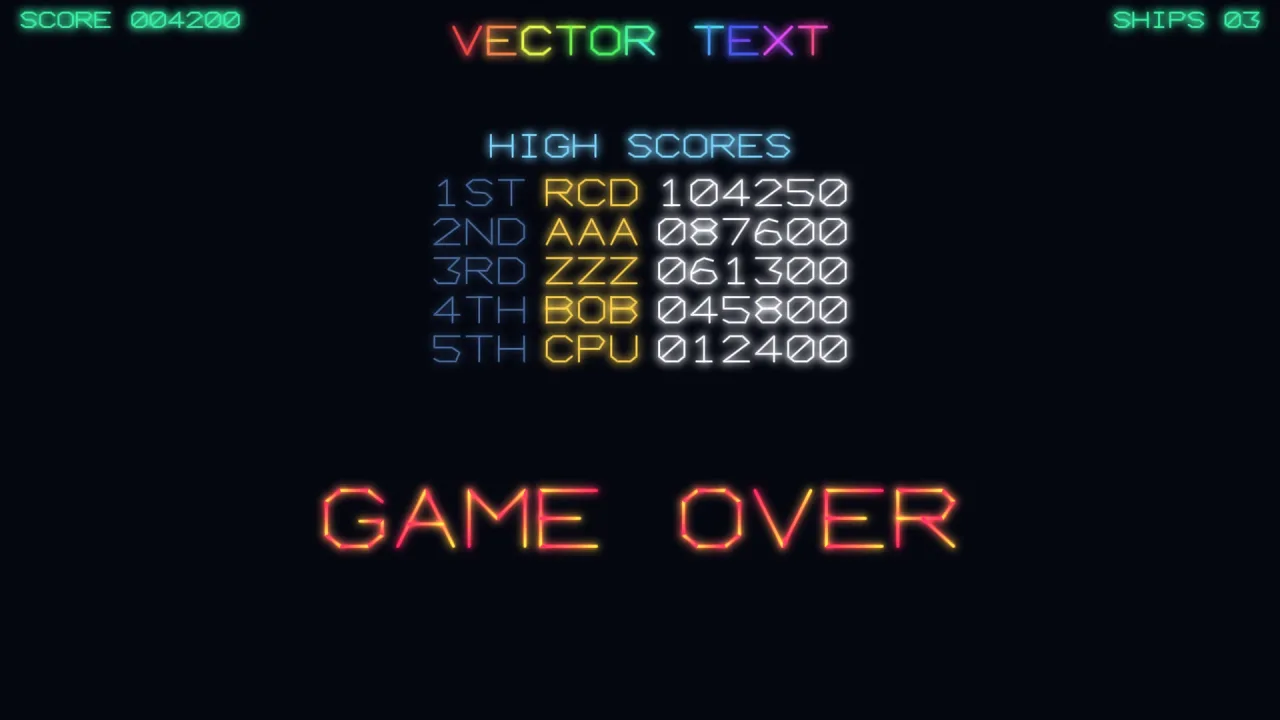
Each glyph is a set of polylines in a square em box from 0 to 1, y down: 0 is the cap line and 1 the baseline. It is the same kind of geometry as every other shape on a vector screen, and that is the point. It scales to any size with no resolution and no filtering; it takes the phosphor glow and the beam dwell for free, so text burns at its corners as a ship's outline does; and it can be shattered, tumbled or deformed, because it is an outline.
For text drawn fresh every frame, vector-2d's game.vector.text is built on this face and takes the same options.
This pack is for the text as geometry. textOutline lays a string out, aligned left, centre or right and across
several lines, and returns its strokes in world units, ready to become retained shapes that fly, spin and break apart.
textWidth measures a string without building it, for right-aligned score columns and centred titles. The pack is
pure data and maths with no imports, so it runs headless.
The built-in face is capitals, digits and the common symbols, from punctuation and brackets to $, %, & and @.
Lower case folds to upper case unless you supply lower-case glyphs, and the face is monospaced unless you supply
advance widths.
Features
- Glyphs as polylines — every character is strokes in an em box, so it draws, glows and dwells like any line.
- Layout to geometry —
textOutlinereturns a string's strokes in world units, anchored on the first line's cap line. - Alignment and lines —
alignof'left','center'or'right'for each line, and\nfor a new line spaced bylineGap. - Measuring —
textWidthgives the widest line's width without building anything. - Extra glyphs per call —
glyphsadds characters or replaces built-in ones, an accented letter, a heart, a lower-case alphabet, for one call only. - Proportional faces —
advancessets per-character widths, so two faces can coexist without touching the built-in table. - The character set —
VECTOR_CHARSETlists every character the built-in face draws, andglyphOutlinegives one character's strokes.
Good for
- Vector arcade games — the score, the high-score table and the game-over message drawn in the same beam as the playfield.
- Titles and attract screens — a logo whose letters fly in, spin and glow.
- Shattering text — a title or a word that breaks into fragments like a destroyed ship.
- HUD labels in line-art games — readouts and warnings drawn as strokes.
- Marquees — text coloured stroke by stroke.
Make it yours
textOutline and textWidth take a size (the cap height in world units, default 24), spacing between glyphs
(0.28 of the size), lineGap between lines (1.6 of the size), align, and the two per-call tables. A glyphs entry
is a list of strokes, each a flat run of x, y pairs in the em box, and an accent may reach a little outside it; an
advances entry is the pen's movement as a fraction of size.
Two different uses: a score drawn every frame with game.vector.text, right-aligned by subtracting its textWidth;
and a GAME OVER built once with textOutline, each stroke turned into a retained shape that then tumbles apart. A
third face is just a table: an accented É, a ♥ and narrower I and 1, passed as glyphs and advances, make a
small proportional face for one screen.
A quick look
Retained text that can fly apart, and a right-aligned score:
import { textOutline, textWidth } from '@phaser-ae/vector-font';
const runs = textOutline('GAME OVER', game.screen.width / 2, 300, { size: 48, align: 'center' });
const letters = runs.map(points => game.vector.shape(points, { closed: false, color: '#ff4060', glow: 1 }));
const w = textWidth('000000', { size: 20 });
game.vector.text(String(score).padStart(6, '0'), 900 - w, 24, { size: 20 });
Works with
vector-2d— draws the strokes, and its per-frame text call is built on this face.core-vector— includes this pack, so most vector games have it already.vector-fx— breaks a word's strokes into drifting fragments.typography— the alternative for body text, Unicode, real fonts and paragraphs.ui— captions on buttons and panels.
Good to know
- It is a display face, deliberately: straight strokes, no kerning pairs, no bidirectional text, no shaping and no hinting.
- A character outside
VECTOR_CHARSETadvances the pen and draws nothing, so check player-entered text or supply the glyphs. - Text is laid out from its cap line down, with no vertical alignment option, and a combining accent written as two code points takes two slots: supply the accented letter as one glyph.
textOutlinebuilds polylines each time it runs, so build retained text once, not every frame.