
What it does
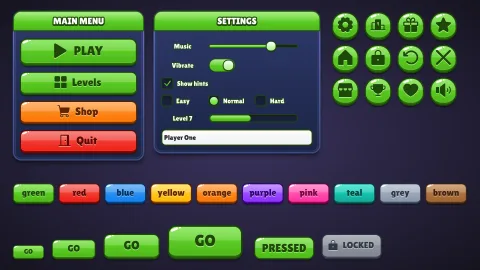
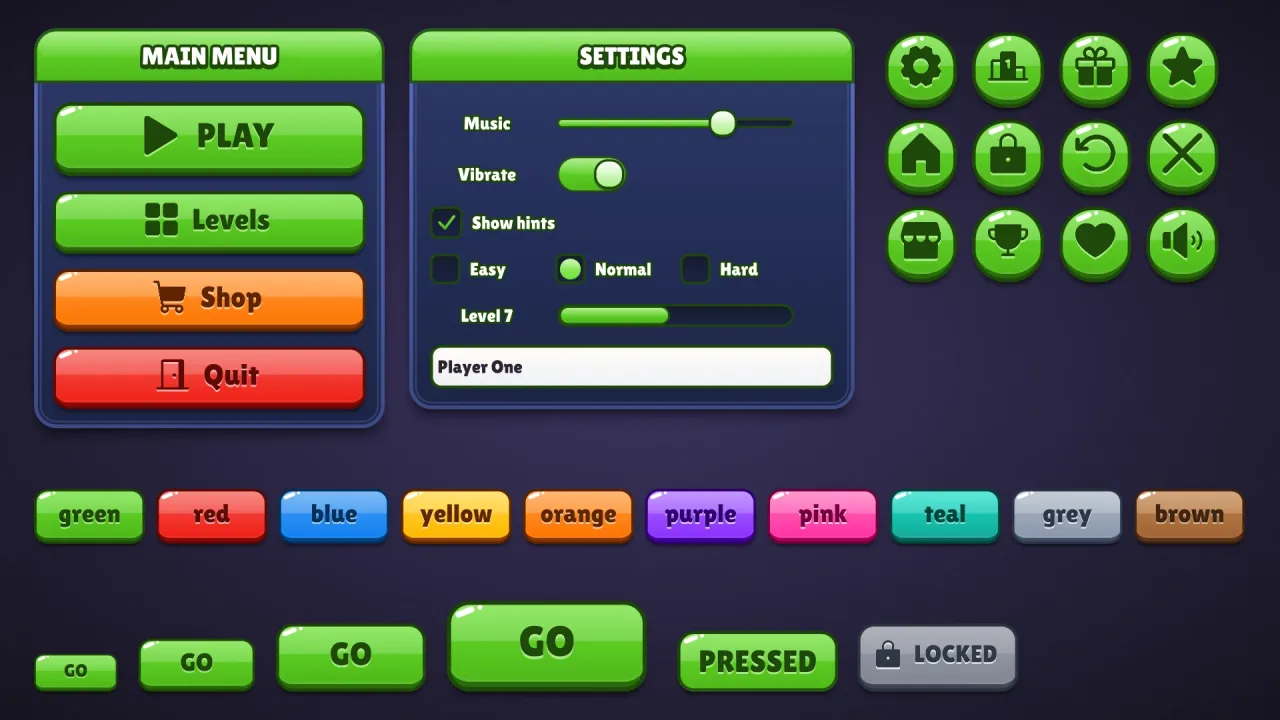
Set game.ui.theme = 'jelly' and every widget the ui pack draws wears it: buttons in every colour, round icon
buttons, windows and title bars, sliders, toggles, progress bars, checkboxes, radios, text fields and lists. A
button's upper half is lightened by a straight gloss band, so the face reads in two tones; it is outlined in its
colour's darkest shade, bevelled softly, sparkled with glints and set on a lip. Rather than a white stroked caption,
its Lilita One caption is the dark ink with a light shadow just below, debossed into the face. It is style data, not
images, and one button style fits every height.
Features
- The two-tone face — a
bandgloss that lightens the face above a straight cut. - Outlined in its own hue — a dark outline in a deep shade of the button's colour, with a soft bevel.
- Debossed captions — Lilita One in dark ink, with a light edge beneath.
- A button per colour —
default,good,warn,bad,flatand ten named colours, with a matching speech box.
Good for
- Match-3 games that want the classic mobile front end.
- Casual puzzle games with a colour for every kind of button.
- Kids' games that want friendly, readable buttons.
- Casual mobile games that want the classic look rather than a themed one.
Make it yours
The options are color (green by default), surface for the windows (a blue), accent, radius (16, or 'pill'),
depth (7), roles, extra colors and designHeight; the material has no trim. Keep green buttons on blue windows
for a fresh green look, or make pink pills with yellow accents and a mint colour added for a sweeter one.
A quick look
// manifest: … typography, ui, ui-skins, ui-skin-jelly
game.ui.theme = 'jelly';
game.ui.button({ text: 'PLAY', style: 'good', icon: 'play', onClick: start });   // sized to its caption and icon
game.ui.button({ h: 72, icon: 'settings', style: 'icon' });                     // the round icon button
game.skins.use({ material: 'jelly', color: 'pink', name: 'pink-jelly' });     // another colour, live
Works with
ui-skins— required; the generator andgame.skins, overuiandtypography.ui-skin-glossy— glossy pills with white stroked captions instead.ui-skin-candy— pills with a white rim and a passing shine.
Good to know
- The options recolour and reshape the look but do not change it; for another, compose another skin.
- Lilita One comes from the CDN when the skin is first chosen, and covers Latin, Greek and Cyrillic.
- Stroked labels and headings redraw the text behind itself: fine for titles, wasteful on a label rewritten every frame.
Changes
3.0.0-2 (2026-10-21)
- Fixed: the skin's font, Lilita One, loads a re-baked copy with fewer specks at sharp corners and where strokes cross, which showed in large titles and buttons.