
What it does
You create a player at a size, and it owns one texture in the shared atlas. The browser decodes the clip out of sight
and each new frame is copied into that texture. A sprite shows it through the player's frame, a 3D mesh through its
texture, and both stay the same when the clip changes, so nothing needs re-pointing. Because the video is just a
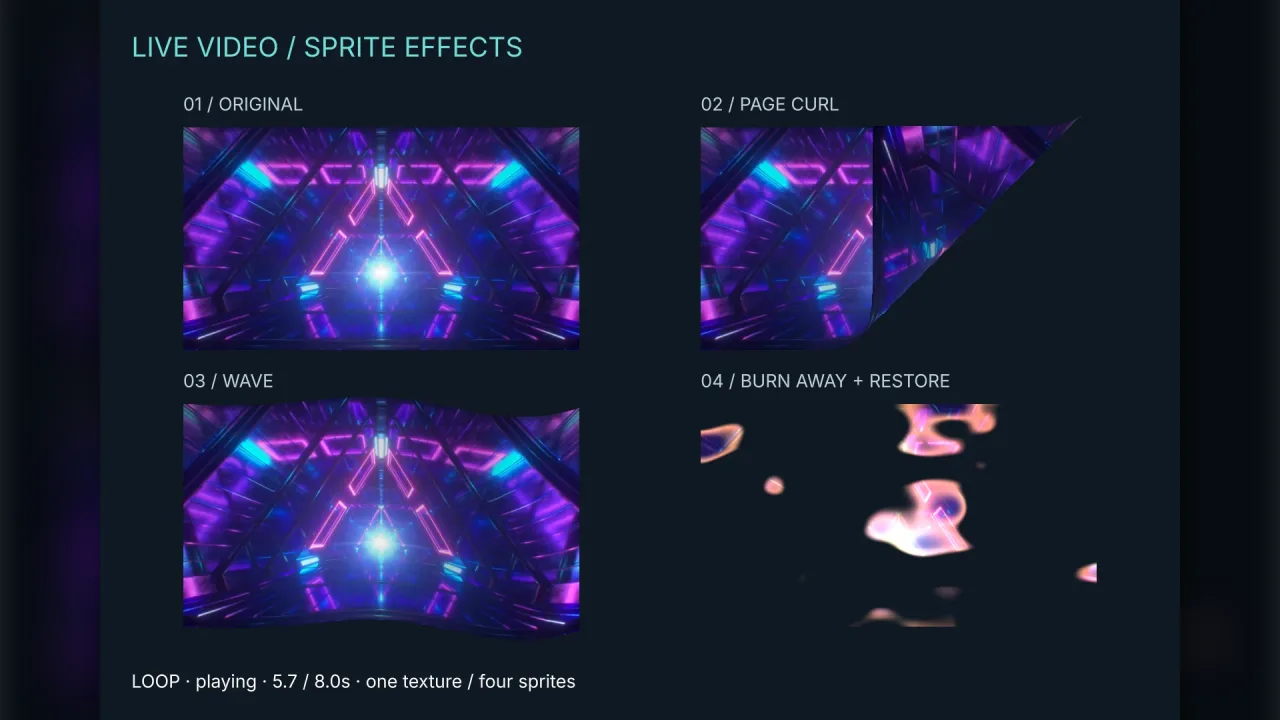
texture, it sorts, scales and deforms with the rest of the scene, sits on any layer, and several objects can show one
player without decoding it twice.
Clips are prepared under keys. prepare resolves once a clip has its first drawable frame, not once the whole file
has downloaded, and while the game is preloading it shows on the loading screen. switchTo plays a clip from its
start, holding the old picture until the new one is ready, and queue names the clip to follow when this one ends.
Prepare the branches ahead and a filmed story becomes a choice of key.
Playback follows the game. A player pauses while the clock is paused, at a time scale of zero, while the tab is hidden
and while the game is stopped, and resumes what was playing afterwards; a positive time scale sets the playback rate.
Clips are silent by default, so they may start without a tap. An audible clip waits for the player's first gesture,
and with the audio pack composed its sound plays through the mix, on the effects or the music bus, so the volume
sliders and mute cover it too.
Features
- Video on sprites and meshes —
framefor a sprite,texturefor a 3D mesh, in 2D and 3D worlds alike. - One player, many screens — several objects show the same player with no extra decoding.
- Three fits —
containwith black bars,coverto fill and crop, orstretch. - Clips by key —
preparefrom an HTTP(S) URL, absolute or relative, with looping clips and preloading on the loading screen. - Branching and queues —
switchToa branch at once,queuethe next clip,releasethe ones no longer needed. - Playback control —
play,pause,resume,seekand a per-playervolume; a pause the player asked for survives a game pause and resume. - State to build on —
state,time,duration,progress, andbufferedandseekableranges, for a progress bar, a skip button or a tap-to-play prompt. - Follows the game — pauses with the clock, a hidden tab and a zero time scale; a positive time scale sets the rate, from 1/16 to 16.
- Sound in the mix — silent by default; audible clips wait for the first gesture and, with
audio, play on thesfxormusicbus. - Headless-safe — tests and replays report
unavailableand fetch nothing.
Good for
- Intros, outros and cutscenes — one player sized to the screen, shown by a sprite on the HUD layer.
- Interactive films and FMV adventures — the next clip depends on a choice, prepared in advance and switched at once.
- Screens in a 3D world — a jumbotron, a TV or a portal, shown on an unlit quad or any other mesh.
- Screens in a 2D world — a billboard or a TV set drawn as a sprite, scaled and layered with the scene.
- Animated title and menu backgrounds — a silent looping clip behind the buttons.
Make it yours
The pack has no manifest options: each player is set up when you create it and each clip when you prepare it. A
player takes a width and height in pixels and a fit. A clip takes its URL, whether it is silent or audible, which
bus an audible clip plays through, and whether it loops. Sprites and meshes showing the player are yours to place,
scale, layer and deform.
Two very different uses: a full-screen story in which an intro plays, the player picks left or right and the matching
clip plays at once, with a skip button that seeks to the end and a progress bar from progress; and a 3D living room
whose television is an unlit quad showing a silent looping clip, while the same player also feeds a second screen
across the room.
A quick look
A player on the HUD, with an intro, two branches and an idle loop:
const movie = game.video.create({ width: 640, height: 360, fit: 'contain' });
game.spawn({ id: 'movie', frame: movie.frame, x: 480, y: 270, width: 960, height: 540, layer: 'hud' });
await Promise.all([
    movie.prepare('intro', { url: 'https://cdn.example.com/intro.mp4' }),
    movie.prepare('left', { url: 'https://cdn.example.com/left.mp4' }),
    movie.prepare('right', { url: 'https://cdn.example.com/right.mp4' }),
    movie.prepare('idle', { url: 'https://cdn.example.com/idle.webm', loop: true }),
]);
await movie.switchTo('intro');
movie.queue('idle');                                   // plays when intro ends
onChoice(side => void movie.switchTo(side));           // a branch, at once
Works with
audio— an audible clip's sound joins its mix, so the master and bus volumes and its mute apply.core-2dandcore-3d— the renderer and world a player's texture is shown in.world-screen— the screen layer for a full-screen cutscene over the game.
Good to know
- Clips always stream from an HTTP(S) server that sends the right media type and allows anonymous CORS; data: and blob: URLs are refused, and video cannot be bundled into the game.
- Each new frame is a texture upload, not a zero-copy texture, and costs more at large sizes: size a player for the display, reuse players, and release clips you no longer need. Atlas space lasts for the game.
- Switches and queues are not sample-accurate or gapless; for unbroken continuity, encode one continuous file.
- Codec support is the browser's own: H.264 and AAC in MP4 is the widest, WebM with VP9 or AV1 smaller where supported.
- It is not for sprite-sheet animation or a short looping effect a particle or shader could draw.