Phaser 4 Dev Log: Simplex Noise, Tiling, Flow & HashSimplex
Tales from the Pixel Mines by Ben Richards — Phaser World Issue 231

In today's instalment of Tales from the Pixel Mines: Simplex Noise! Building on what we learned about noise in the previous instalment, we'll look at the new NoiseSimplex family of game objects and Phaser.Math.HashSimplex. These provide smooth variation across space, suited to a wide range of naturalistic phenomena.

From Perlin Noise to Simplex Noise: A Brief History
Back in 1982, Ken Perlin had a problem. Computer graphics were chunky and artificial-looking. His current project, the movie Tron, was using hand painted effects and black-and-white photography in many places, just because the rendering technology wasn't very good. So he invented gradient noise as a way to get nicer textures.
Gradient noise is a technique for rendering smooth textures with random data. It works by dividing space up into a grid, assigning a random vector to each grid point, and interpolating nearby points to find the value at any coordinate on the grid. This creates a smoothly changing value across space, perfect for many natural objects which change shape or color randomly yet smoothly.
The original algorithm, widely known as Perlin Noise, won him an Academy Award in 1997. But he wasn't satisfied. Perlin noise used a square grid, which gave it visible artifacts in the grid axis directions. The square nature also scaled poorly into higher dimensions. As we discussed last time, it's often advantageous to sample noise from a 3 or 4 or 5 dimensional space, as a way to evolve the noise without scrolling it in any visible dimension.
So in 2001 he invented Simplex Noise. This is named after the new grid he picked, based on the simplex, the family of shapes based on triangles. (In 2D, a simplex is a triangle. In 3D, it's a tetrahedron. In 4D, it's... no, let's leave hyperspace alone this time.) Simplex noise was cheaper and had less obvious directional artifacts. With a few further enhancements, simplex noise became the state of the art.
The Cutting Edge: Tiling and Flow
Some aspects of simplex noise did not lend themselves to the needs of game technology. It was hard to make the noise tile properly, because the grid was not square. And animating the noise required complex higher-dimensional coordinates.
Perlin came up with a solution for animating noise: flow. Recall that gradient noise is based on random vectors at grid points. What if we just rotated those vectors around the grid points? Turns out that creates perfectly reasonable animation. It's cyclic - it repeats, given enough time - but that's easily forgiven in games, where repeating textures and animations are a common motif.
It's easy to picture a vector rotating in 2D, but what about 3D? The method we employ simply generates a second random vector, orthogonal to the gradient vector, and uses that as the axis of rotation.
Tiling was not so easily implemented. We've selected a method described by Gustavson and McEwan, 2021, which transforms coordinates in and out of simplex space to achieve proper tiling. In fact, they published their shader code and we've used most of it in our shaders, because there's no need to reinvent the wheel! Note how recent this work is, just the last few years; this is a field where research work is ongoing.
NoiseSimplex Game Objects in Phaser 4
We have added the NoiseSimplex2D and NoiseSimplex3D game objects for rendering 2D and 3D simplex noise. These extend Shader and inherit its methods.
Unlike cellular noise, we don't provide a 4D variety. There doesn't seem to be a good tiling solution for that dimension, and with the flow parameter, we don't need to scroll in hyperspace to animate the texture. There are also issues with simplex noise in higher dimensions; due to the way geometry works, huge holes begin to open up in the patterns.
NoiseSimplex objects have many configuration options. You can set their start and end colors; control the number of cells in the grid; and set scroll and flow values to move and animate the texture. You can also choose to output the result as a normal map, instead of arbitrary colors.
These all have their place; for example, you can use alpha in the colors to create transparent clouds, or control the cells to generate wave-like outputs.

But there are more aspects of NoiseSimplex objects which deserve more explanation: value, iteration and warp.
Noise Value
By default, the noise is emitted in the range -1,1. This is a problem for shader output, which is in the range 0,1. So we adjust it into the color range.
This adjustment is configurable. It is of the form (value * factor + addition) ^ power. By default, factor and addition are 0.5 and power is 1, which maps to the range 0,1. If you adjust these parameters, you can alter the output. For example, altering the power will promote lighter or darker shades. Or reducing the addition will result in more values below 0, which are clamped to 0 and create flat regions - useful if you want to render just a few clouds in an open sky, for example.
If you observe flat regions in your output even with default settings, it may be that Gustavson and McEwan's solution is not sufficiently normalizing the result. Their research paper indicates that the normalization factor is "empirical" - which I think means they tried numbers until they got one that looked like it worked. In this case, lower the factor slightly, to bring their results into the expected range.
Noise Iteration
Like cellular noise, simplex noise can be rendered at different levels of detail. A common technique is to combine several levels of detail into a single output. This is enabled via the noiseIterations setting.
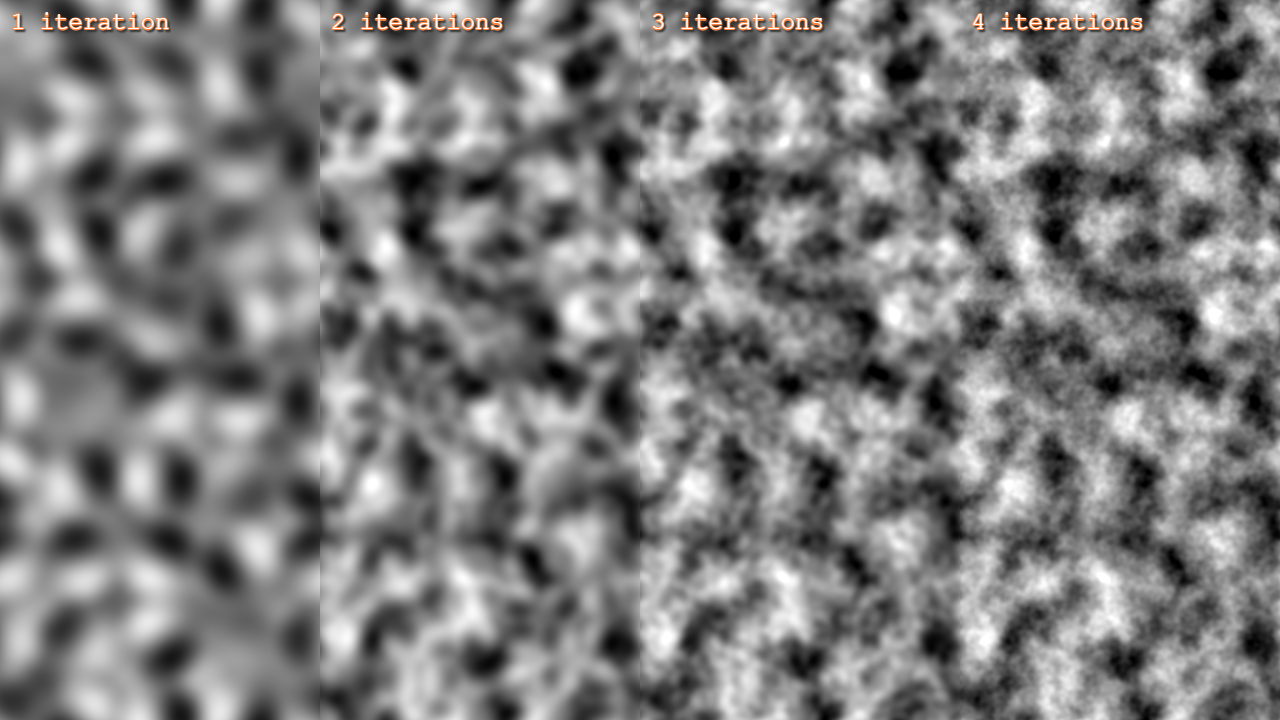 Pictured: different "octaves" of simplex noise, adding an extra iteration of detail every time. Note that the noise is set to tile, so the differences between iterations quickly become hard to spot.
Because iteration is such a fundamental way to work with simplex noise, we've added several parameters to control it. By default, each octave multiplies detail by 2 and divides contribution (the strength of this octave) by 2. It also multiplies the flow advance by 2 if the texture is animated. But you can change all of these, giving you finer control over how quickly detail is added.
Noise Warp
In nature, phenomena may be turbulent, dominated by swirls and vortices rather than smooth waves. We can approximate this by distorting the noise with more noise!
Use the warp options to control noise warp. This basically generates a second set of noise with which to distort the first set. You can control it just like iteration, including all the octave parameters.
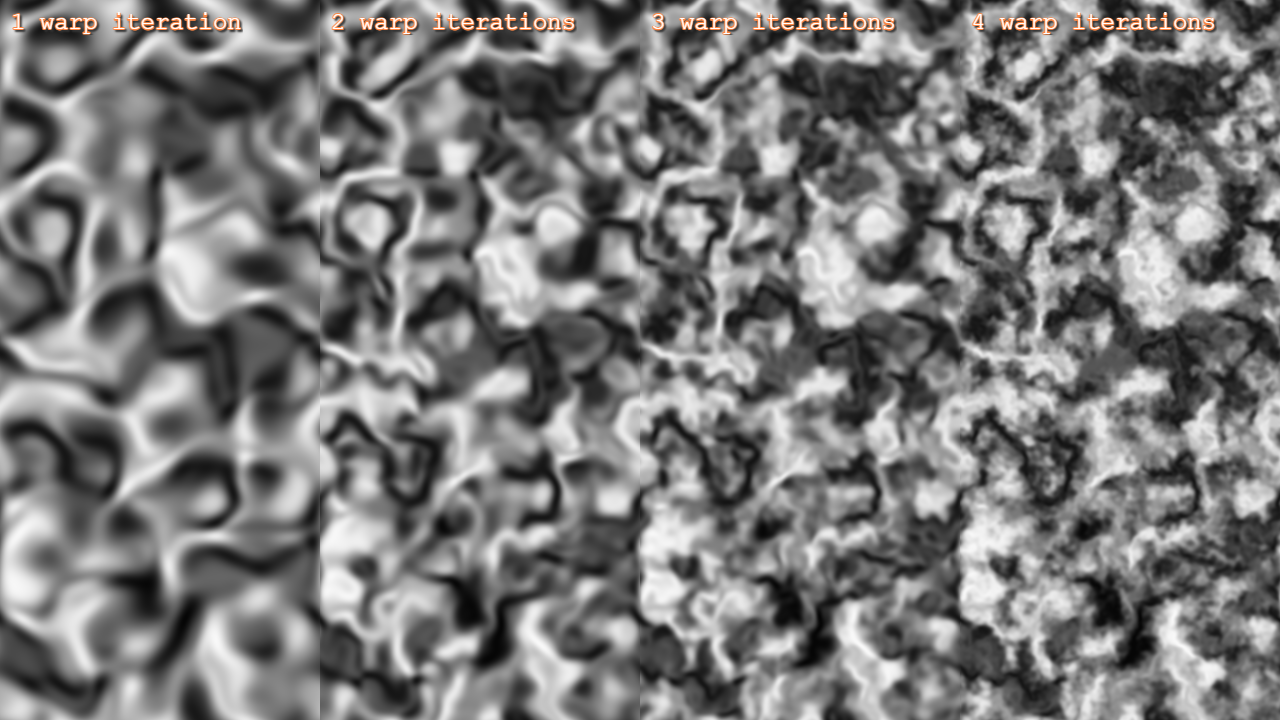 Pictured: different levels of warp iteration, applied to the same single-octave noise. Observe how it approaches an almost lichen-like texture.
Math.HashSimplex: Simplex Noise in JavaScript
We have copied the NoiseSimplex shader into JavaScript, so you can use all these properties to generate game objects and other non-texture phenomena. Use the Phaser.Math.HashSimplex() method to create a predictable hash for 1, 2, or 3 number inputs.
You could use this to control motion of particles in a turbulent airflow, or generate world features in a smooth but random fashion.
Note that the output of HashSimplex() is still in the approximate range -1,1. You can easily scale it to whatever values you see fit.
Here's an example of using HashSimplex to generate a landscape using IsoBox shapes. (I've turned the detail level up to frankly inadvisable levels; there's a lot of overdraw here. But it's awesome, isn't it?)
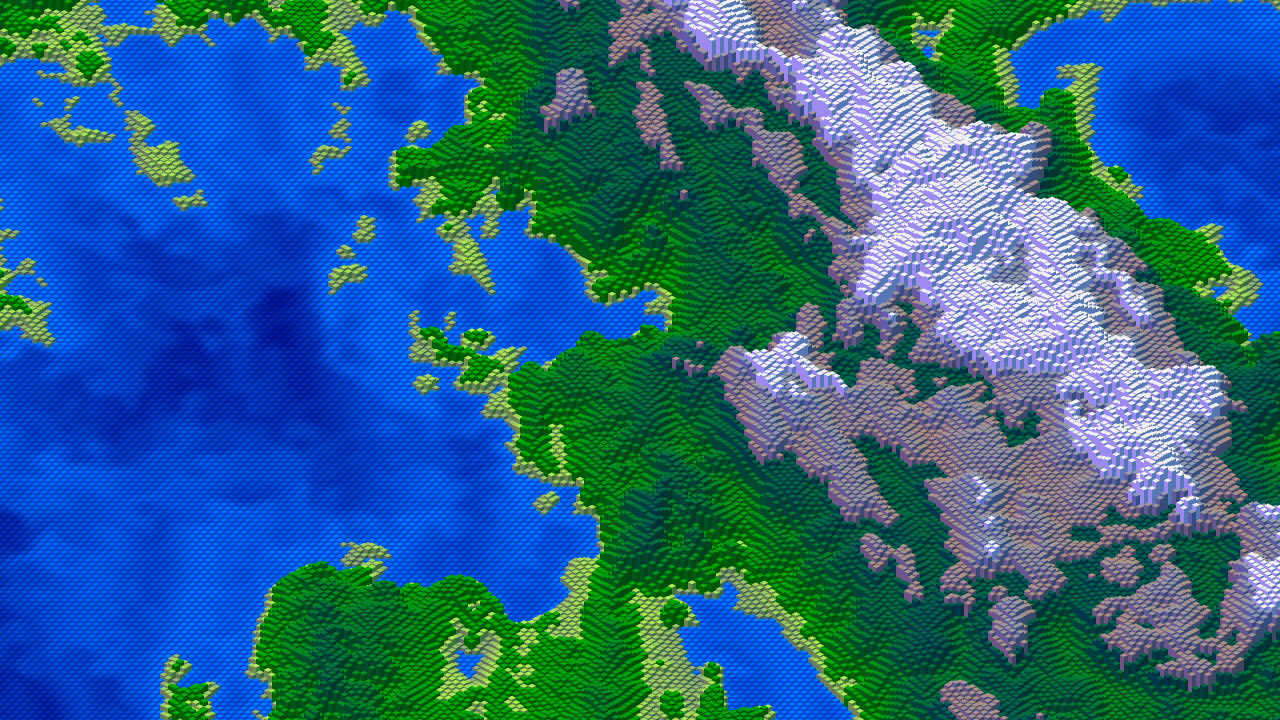 Pictured: A landscape generated using simplex noise techniques. Play with the code yourself here.
That One Problem Character
I converted the simplex noise algorithm from GLSL to JavaScript with an automatic process. It was almost perfect... but it didn't work. So I spent more time than I saved, looking through pages and pages of code, really boring down into the precise function of the code. There was a lot to cover, because JS isn't built to handle vectors the way GLSL is, and the code got a lot bigger in the conversion.
Finally I found the problem: a misplaced < symbol. It should have been >.
Which is an error I'm sure everybody has made, right? I once tried to write a company style guide that banned > so nobody would get confused again. It didn't catch on, but you can see the temptation.
Overall, this matches my experience of experimenting with LLM tools. For boilerplate tasks involving simple text patterns (e.g. copy-pasting variants of some process, or writing yet another React website), they're typically OK. But so far they aren't great at the kind of highly optimized, graphical results we want in gaming technology. I asked one to make a simplex noise shader with tiling, and it copied an older shader that didn't tile, and it couldn't see that it didn't tile and kept insisting that everything was fine. Still needs some time in the oven.
Example: Fire
Here's an example which uses simplex noise to generate a fire sprite. See this example live here.
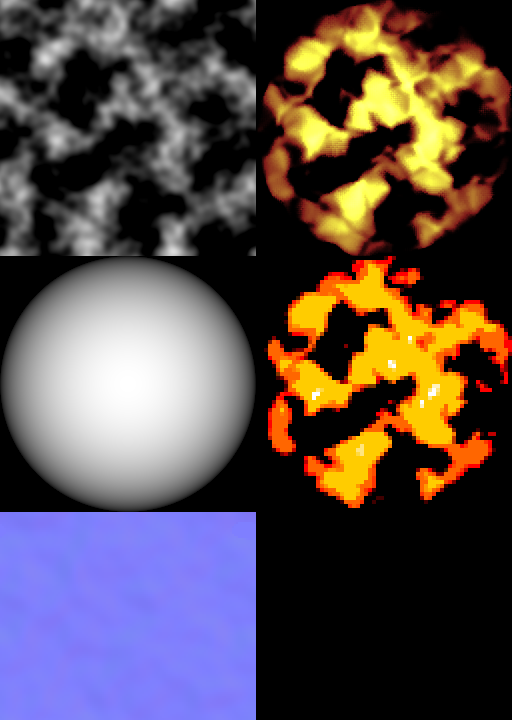
On the left, you can see the source textures.
- Simplex noise, tuned to have several voids to separate "flames".
- Gradient to mask the sprite.
- Another simplex noise, this time with a subtle normal map to displace the flames and make them flicker.
On the right, we combine the source textures. We mask the flames and displace them. Combined with scrolling coordinates, this creates the impression of rising fire. Then we use a GradientMap filter to change the colors to something properly fiery. This would probably be used with additive blending in a real game scene.
Below the first composite, I've used Blocky and Quantize filters to further stylize the fire effect. This has a more cartoonish appearance.
You could stretch the flame or use different masks or displacement textures to achieve different styles.
In many cases, you should probably just use a pre-rendered flame sprite. But when that isn't practical, such as for large dynamic effects, maybe this approach will come in handy!
Wrapping Up
Simplex noise is an extremely useful new tool. It provides naturalistic detail to your scenes. People have been using gradient noise for decades at the highest levels of graphics - it's a super useful tool, and I've only scratched the surface of what you can do with it here.
I'm looking forward to seeing what you can come up with!
That's all for now. By the time you read this, maybe Phaser 4 will be out, and we'll have some idea of what comes next!
Ben Richards, Senior WebGL Developer, Phaser Studios Inc