
What it does
You create a grid with game.fog.create, mark which cells block light, and add lights with a position and a radius.
compute() runs recursive shadowcasting from every light, so a torch lights a room but not the corridor behind the
door, and each cell gets a brightness between 0 and 1. Brightness fades towards the edge of a light by a falloff you
choose.
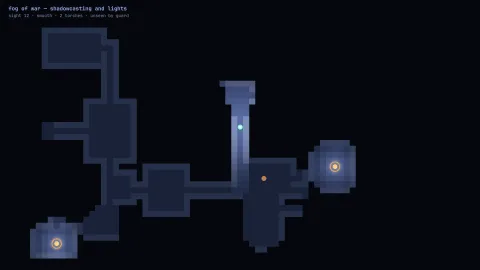
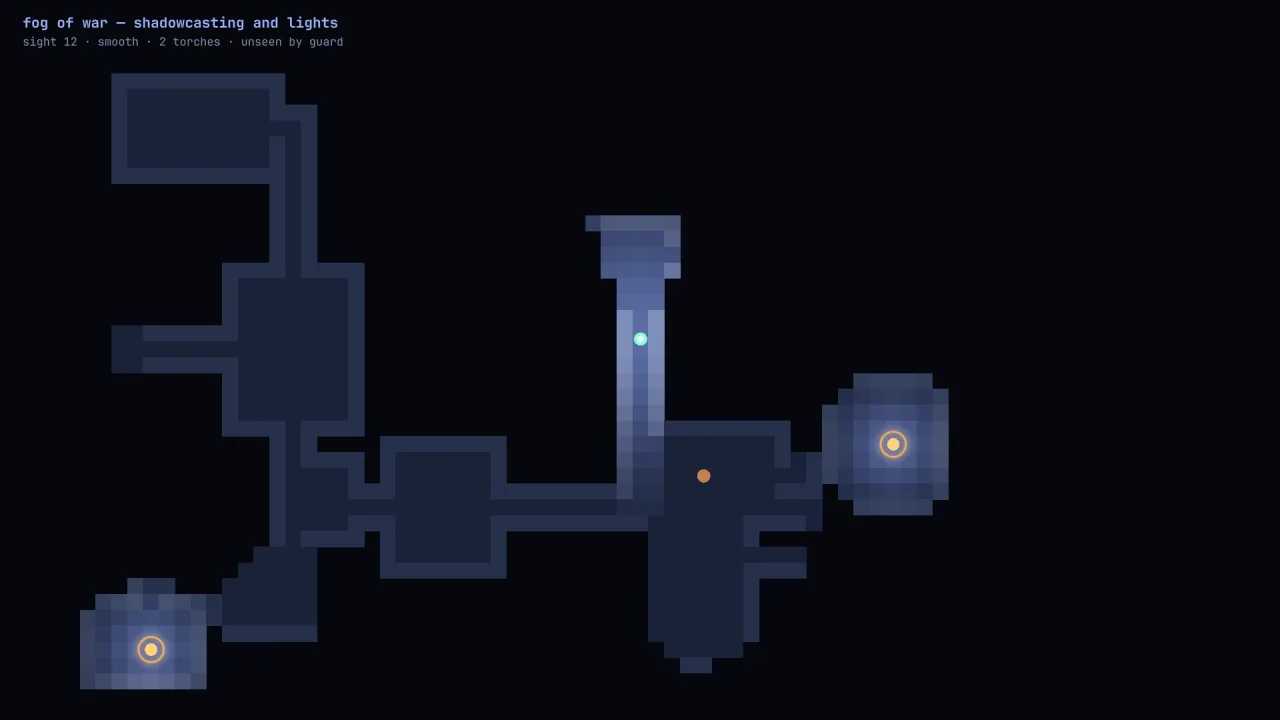
With memory on, any cell that has ever been lit stays explored after the light moves on. That gives a map its three
regions: black where nobody has been, dimmed where the player has been, and lit where they can see now. state(c, r)
returns 'unseen', 'explored' or 'visible', and lightAt(c, r) gives an alpha for a dark overlay.
The same grid answers the questions game logic asks. canSee traces a line of sight between two cells within a
range, which suits a guard spotting the player or a turret choosing a target. reveal marks an area explored without
lighting it, and revealAll is the map item that uncovers the whole level.
Features
- Shadowcast lights — any number of lights, each with a radius, an intensity and its own falloff if you want one.
- Four falloffs —
none,linear,smooth(the default) andquadratic. - Explored memory — cells remember being lit, and
resetMemoryforgets them for a new floor. - Line of sight —
canSeebetween two cells through open cells, with an optional range. - Reveals —
revealaround a point for a scroll or a flare, andrevealAllfor a full map. - Walls from your map —
blockFromreads a 2D array of your level, or set cells one at a time. - Headless and standalone — the
FogGridclass is exported, so it runs without a game and in tests.
Good for
- Roguelikes and dungeon crawlers, where the player sees only what their torch reaches and remembers the rest.
- Turn-based tactics, where units have sight ranges and enemies hide behind walls.
- Real-time strategy and base-builders with a fog that lifts as units explore.
- Stealth on a grid, using
canSeefor guards and the fog for what the player knows. - Exploration puzzles where a map item or a flare uncovers part of the level.
Make it yours
The grid's size, its default falloff and whether it remembers explored cells are set when you create it. Each light
can have its own radius, intensity and falloff, and you move a light by changing its col and row and calling
compute() again. How the fog looks is entirely yours: black tiles, a soft alpha from lightAt, a dimmed tint for
explored cells, or nothing at all for cells in view.
Two very different uses: a dungeon crawler with one smooth torch on the player, memory on and explored cells drawn
at 60 per cent dark; and a tactics game with memory off and a flat none falloff on every unit, so the board shows
only what the squad can see this turn.
A quick look
A grid with walls from the level and a torch that follows the player:
const f = game.fog.create({ cols: 40, rows: 30, falloff: 'smooth', memory: true });
f.blockFrom(mapRows, 1);                 // walls from a 2D array
const torch = f.addLight(5, 5, 6, { intensity: 1 });
torch.col = 6; f.compute();              // after anything moves
f.state(c, r);                           // 'unseen' | 'explored' | 'visible'
f.lightAt(c, r);                         // 0..1, an alpha for the dark overlay
f.canSee(c0, r0, c1, r1, 8);             // line of sight within 8 cells
Works with
tiles-2d— the tile map the fog covers.grid-move— the units that walk the grid and carry the lights.lighting-2d— coloured 2D lights; draw the fog layer above the lit layers so a torch does not shine through it.visibility-2d— the choice for a continuous world rather than a tiled one.
Good to know
compute()recomputes every light, at a cost of lights times radius squared cells, so call it when something has moved rather than every frame of a still scene.- Overlapping lights take the brighter value, not the sum.
- Everything outside the grid counts as opaque.
- The grid has no world units of its own:
cellAttakes the cell size and origin you give it.