
The pack
crawlerArt
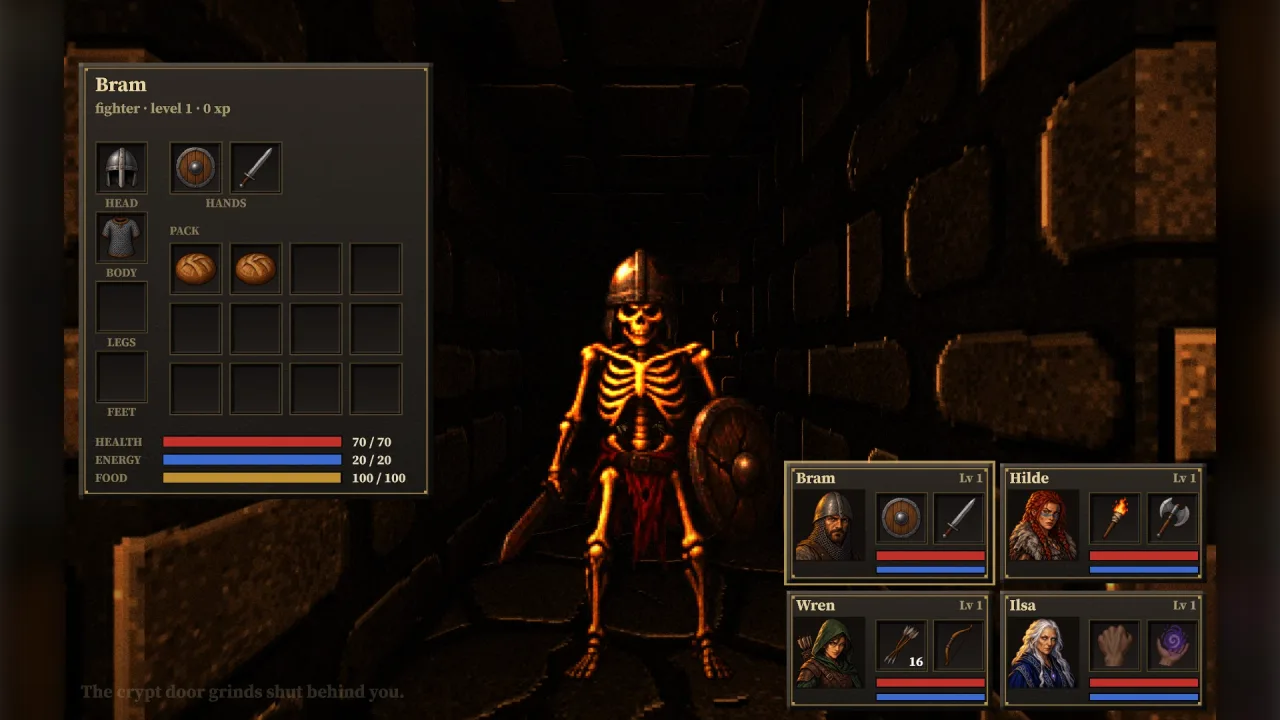
function crawlerArt(): Pack<{ crawlerArt: CrawlerArtApi }>The crawler-art pack: game.crawlerArt, ready-made pixel-art monsters in seven poses, party portraits, item icons
and runes for first-person dungeon crawlers, matched to grid-crawler's dungeons by id. No options.
Helpers
findIconArt
function findIconArt(id: string, kind?: string): string | nullThe icon an item wears; see CrawlerArtApi.findIcon.
findMonsterArt
function findMonsterArt(id: string): string | nullThe art a monster id wears; see CrawlerArtApi.findMonster.
findPortraitArt
function findPortraitArt(name: string, role?: string, index = 0): stringThe portrait a character wears; see CrawlerArtApi.findPortrait.
ICON_ART
const ICON_ART: Readonly<Record<string, string>>Item and panel icons, 64 × 64, by item kind (and fist, spell, pack, rest).
MONSTER_ART
const MONSTER_ART: Readonly<Record<string, MonsterArtEntry>>Every monster's seven poses as 256-colour PNGs in base64, standing on the bottom edge of frames of one size, by kind.
MONSTER_FRAMES
const MONSTER_FRAMES: readonly ["front", "back", "left", "right", "walk1", "walk2", "attack", "hurt"]The frames a monster is painted with, in this order: its key's frame 0 is front.
monsterArtFrame
function monsterArtFrame(info: MonsterArtInfo, m: MonsterArtPose, eye: MonsterArtEye, options: MonsterFrameOptions = {}): numberThe frame (within a painted monster's key) to show for a monster seen from an eye: its front, back or side by
where it faces against the eye (the side mirrored when it faces the screen's right), its walking steps while it
walks toward the eye, its attack pose for the first part of an attack and its flinch just after a hit (both only
when it faces the eye). Yaw is the engine's: forward is (−sin yaw, cos yaw).
PORTRAIT_ART
const PORTRAIT_ART: Readonly<Record<string, string>>Party portraits, 128 × 128, by name.
RUNE_ART
const RUNE_ART: Readonly<Record<string, string>>The rune grid's runes, 64 × 64, by name.
Types
ArtStrip
interface ArtStripPictures painted as one strip: its key, each picture's size, and which frame of the key each id is.
readonly key: string— The atlas key.readonly size: number— One picture's size in pixels (square).readonly frames: Readonly<Record<string, number>>— Each id's frame withinkey.
CrawlerArtApi
interface CrawlerArtApigame.crawlerArt.
readonly monsters: readonly string[]— Every monster's art, by id:skeleton,crawler,skeleton-archer,wisp,lich,leech,drowned,crab.readonly portraits: readonly string[]— Every portrait, by name:bram,hilde,wren,ilsa,mara.readonly icons: readonly string[]— Every icon, by item id (andfist,spell,pack,rest).readonly runes: readonly string[]— Every rune, by name:fire,life,air,spirit,balance,body,earth,death,water.findMonster(id: string): string | null— The art a monster id wears: the id itself, else a guess from its words ('skeleton-guard'a skeleton,'zombie'the drowned one). Null when nothing fits.findIcon(id: string, kind?: string): string | null— The icon an item wears: its id, else a guess from its id and kind ('long-sword'a sword, a'potion'the red flask). Null when nothing fits.findPortrait(name: string, role?: string, index?: number): string— The portrait a character wears: its name, else its role (fighter,barbarian,rogue,mage,explorer), else one by its place in the party.loadMonsters(ids: ReadonlyArray<string | { id: string; art?: string }>, options?: MonsterArtLoadOptions): Promise<Record<string, MonsterArtInfo>>— Paint monsters into the atlas: each id (or{ id, art }to choose the art) gets its eight frames (MONSTER_FRAMES) atprefix + id. Ids with no art are left out. Async, because a browser decodes the pictures; headless, the frames exist with the right count and size but blank. Throws on anartthat is not one.loadIcons(key: string, ids: ReadonlyArray<string | { id: string; art?: string; kind?: string }>): Promise<ArtStrip>— Paint item icons (64 × 64) as one strip atkey: ids (or{ id, art }); ids with no icon are left out.loadPortraits(key: string, names: ReadonlyArray<string | { id: string; art?: string; role?: string }>): Promise<ArtStrip>— Paint portraits (128 × 128) as one strip atkey: names (or{ id, art }); each name finds its portrait asfindPortraitdoes.loadRunes(key: string, names: ReadonlyArray<string>): Promise<ArtStrip>— Paint runes (64 × 64) as one strip atkey, by name; a name with no rune is left out.frame(info: MonsterArtInfo, monster: MonsterArtPose, eye: MonsterArtEye, options?: MonsterFrameOptions): number— The frame (withininfo.key) to show for a monster seen fromeye; seemonsterArtFrame.
MonsterArtEntry
interface MonsterArtEntryOne monster's pictures, as the pack ships them.
readonly name: string— What it is, in words.readonly size: readonly [number, number]— Each frame's size in pixels,[width, height]; every pose has the same, standing on the bottom edge at one scale.readonly front: readonly [number, number]— The front pose's own drawn size in pixels,[width, height]: what its usualheightmeasures.readonly height: number— Its usual height in world units (a grid crawler's cell is 2), for a presenter's billboards.readonly float: boolean— It floats above the floor (a wisp).readonly frames: Readonly<Record<MonsterPose, string>>— The poses, each a 256-colour PNG in base64.
MonsterArtEye
interface MonsterArtEyeThe eye a monster is seen from: a camera's position and yaw.
readonly x: number— Position, world units.readonly z: number— Position, world units.readonly yaw: number— The camera's yaw.
MonsterArtInfo
interface MonsterArtInfoA monster as it was painted.
readonly id: string— The monster id it was painted for.readonly art: string— The art it wears.readonly key: string— The atlas key of its frames.readonly width: number— One frame's size in pixels.readonly height: number— One frame's size in pixels.readonly units: number— World units per frame pixel at its usual height: a billboard iswidth × unitsbyheight × units.readonly size: number— Its usual height in world units (the front pose's drawn height).readonly float: boolean— It floats above the floor.readonly frames: Readonly<Record<MonsterFrame, number>>— Which frame ofkeyis which.
MonsterArtLoadOptions
interface MonsterArtLoadOptionsOptions for loadMonsters.
prefix?: string— Atlas keys are this plus the monster id. Default'cm-'.res?: number— Atlas pixels per frame pixel, 1 to 4: 2 keeps pixel art crisp when a billboard is magnified. Default 2.
MonsterArtPose
interface MonsterArtPoseWhere a monster stands and what it is doing, as grid-crawler's view().monsters gives it.
readonly x: number— Position, world units.readonly z: number— Position, world units.readonly yaw: number— The engine's yaw it faces (forward is(−sin yaw, cos yaw)).readonly action: string—'idle','step','turn'or'attack'(anything else counts as idle).readonly progress: number— How far through its action, 0 to 1.readonly walk: number— Cells walked, fractional: the walking steps alternate twice a cell.readonly hurt: number— Seconds since it was last hurt.
MonsterFrame
type MonsterFrame = (typeof MONSTER_FRAMES)[number]One of a painted monster's frames: left is the side pose as drawn (facing the picture's left), right it mirrored.
MonsterFrameOptions
interface MonsterFrameOptionsOptions for monsterArtFrame.
hurtTime?: number— Seconds after a hit that the flinch shows, facing the eye. Default 0.25.attackShare?: number— The share of an attack, from its start, that shows the attack pose. Default 0.85.
MonsterPose
type MonsterPose = 'front' | 'back' | 'side' | 'walk1' | 'walk2' | 'attack' | 'hurt'A monster's poses as the pack ships them: front, back, side (facing the picture's left), two walking steps toward the viewer, an attack and a flinch.