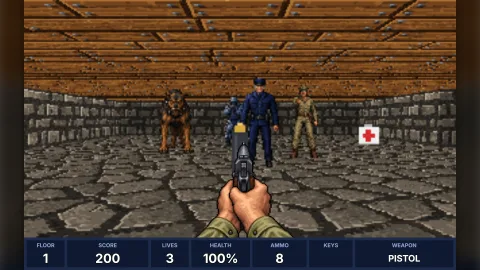

The pack
raycastView
function raycastView(): Pack<{ raycastView: RaycastViewApi }>Compose the raycast view under game.raycastView. No options; each view takes its own.
Helpers
castColumns
function castColumns(map: RaycastMap, camera: RaycastCamera, options: CastOptions = {}): RaycastColumnsCast one ray per screen column from camera across map and report what each hit: the distance along the view
direction (perpendicular, the depth buffer), the face, the cell, the picture and where across the face. Column i's
ray leaves at camX = 2 (i + 0.5) / width − 1 of the way from the centre to the edge of the field of view, right
positive. A door is hit on its cell's mid-plane where its panel still covers (the panel slides by open along its
axis into the wall beyond); a pushed wall is drawn where it is, progress of the way along dx, dz. Throws on a
non-finite camera or an option out of range.
createRaycastRenderer
function createRaycastRenderer(options: RaycastOptions = {}, target?: Uint32Array): RaycastRendererMake a renderer: new RaycastRenderer(options, target). Throws, naming the field, on an option out of range.
DEFAULT_FOV
const DEFAULT_FOV: numberThe default horizontal field of view, radians (66°).
projectSprite
function projectSprite(camera: RaycastCamera, sprite: RaycastSprite, screen: SpriteScreen): SpriteProjection | nullProject a sprite through the camera onto the screen the walls are drawn on: the same field of view, eye height and
horizon, so a sprite standing on the floor meets the floor where a wall at the same distance does. Null when it is
behind the eye or nearer than near. Off-screen sprites are still projected; their columns fall outside the image.
RAYCAST_HIT
const RAYCAST_HIT: { readonly none: 0; readonly wall: 1; readonly door: 2; readonly push: 3; readonly jamb: 4 }The codes RaycastColumns.hit holds, by kind.
spriteColumns
function spriteColumns(p: SpriteProjection, width: number): [number, number]The first and last screen columns whose centres a projection covers, clipped to 0..width-1; first > last when none.
spriteSpans
function spriteSpans(p: SpriteProjection, depth: ArrayLike<number>): Array<[number, number]>The runs of columns where a projected sprite is in front of the walls, as [first, last] pairs left to right:
column i shows when p.depth < depth[i] (the walls' RaycastColumns.dist). What the renderer clips each sprite by.
Classes
RaycastColumns
class RaycastColumnsEvery column's hit from one cast, as typed arrays so a frame allocates nothing. Index i is screen column i, left
to right. Reuse one by passing it as out to castColumns.
readonly width: number— How many columns.readonly dist: Float64Array— Perpendicular distance per column, world units;Infinitywhere nothing was hit. This is the depth buffer sprites clip against.readonly side: Uint8Array— Face per column: 0 for a face along x, 1 for a face along z.readonly cellX: Int32Array— Cell column hit per column.readonly cellZ: Int32Array— Cell row hit per column.readonly u: Float64Array— Across-the-face coordinate per column, 0 to 1, as the viewer sees it.readonly hit: Uint8Array— What each column hit, as aRAYCAST_HITcode.readonly texture: string[]— Picture name per column ('' where nothing was hit).constructor(width: number)— Room forwidthcolumns, a whole number from 1 to 8192. Throws on any other.column(i: number): RaycastColumn— Columnias an object (a copy), for a test or a one-off question. Throws for a column outside0..width-1.
RaycastRenderer
class RaycastRendererA raycaster that draws into a buffer of pixels, with no canvas: the part of a raycast view that does the work, made
on its own for a test, a worker or a custom presenter. render casts the columns from the camera, draws the walls
textured and shaded (faces along x by sideShade), the floor and ceiling flat or textured, everything faded toward
the fog colour with distance, then the sprites far to near, each column clipped by the walls in front of it.
readonly width: number— Image width in pixels.readonly height: number— Image height in pixels.readonly pixels: Uint32Array— The image,width × heightpixels row by row from the top-left, 0xAABBGGRR and opaque after a render.readonly columns: RaycastColumns— The last render's columns: what each hit and how far away (the depth buffer).constructor(options: RaycastOptions = {}, target?: Uint32Array)— Make one withoptions.target, when given, is the buffer drawn into (a view passes its canvas's pixels): at leastwidth × heightlong. Throws, naming the field, on an option out of range or a target too short.get settings(): RaycastSettings— Every option's value now.configure(options: RaycastOptions): void— Change options from the next render; anything left out keeps its value. Throws on a value out of range, or on a newwidthorheight.addTexture(name: string, w: number, h: number, rgba: ArrayLike<number>, frames = 1): RaycastTexture— Add or replace a texture from RGBA bytes (an ImageData'sdata):framesframes ofw×hside by side, so the bytes holdw × frames × h × 4. Throws on a size out of range (1 to 4096 pixels a side, 1 to 1024 frames) or bytes of the wrong length.texture(name: string): RaycastTexture | undefined— A texture by name, or undefined.has(name: string): boolean— Whether a texture of that name has been added.get textureNames(): string[]— Every texture name, in the order added.render(map: RaycastMap, camera: RaycastCamera, sprites: readonly RaycastSprite[] = []): RaycastColumns— Drawmapfromcamera, withsprites(default none), intopixels, and return the columns. Every pixel is written. Throws (whenstrict) on a non-finite camera, a name with no texture, or a sprite frame outside its strip.
Types
CastOptions
interface CastOptionsHow castColumns casts.
width?: number— Columns, a whole number from 1 to 8192; default 320 (orout's width).fov?: number— Horizontal field of view, radians, 0.1 to 3.1; default 66° (66 * Math.PI / 180).maxDistance?: number— How far a ray goes, world units, 1 to 1024; default 64. A column with nothing nearer reports'none'.jamb?: string | null— A picture for the wall faces either side of a door, seen from inside the door's cell (the door's frame); default none, the wall's own.textureOf?: ((name: string, x: number, z: number, kind: RaycastHitKind) => string) | null— Choose the picture per hit (an animated wall, a used switch, a palette per floor): given the map's name, the cell and the kind of hit, return the name to draw. Called once per column, so keep it cheap. Default: the map's name.out?: RaycastColumns— Columns to fill in place of new ones; its width wins overwidth.
RaycastCamera
interface RaycastCameraWhere the eye is. World units: cells are 1 unit, cell (x, z) spans x..x+1 and z..z+1. The engine's yaw:
forward is (−sin yaw, cos yaw), so 0 faces +z and turning right adds to it.
x: number— Eye position across the map, world units.z: number— Eye position down the rows, world units.yaw: number— Facing, radians: 0 faces +z, π/2 faces −x.height?: number— Eye height above the floor, world units; default the view'seyeHeight(half a wall). Kept inside the walls' height.bob?: number— A small vertical offset added to the eye height (a walking bob), world units; default 0.
RaycastColumn
interface RaycastColumnOne column's hit as an object, from RaycastColumns.column(i).
dist: number— Distance to the hit along the view direction (perpendicular, so walls do not bow), world units;Infinitywhen nothing is within range.side: 'x' | 'z'—'x'when the face hit faces along x (crossing a vertical x boundary),'z'when it faces along z.x: number— The cell hit (a pushed wall reports the cell it started this step in).z: number— The cell row hit.texture: string— The picture name to draw ('' when nothing was hit).u: number— 0 to 1 across the face, left to right as the viewer sees it, so pictures are never mirrored. A door's runs with its panel.kind: RaycastHitKind— What was hit.door: boolean— Whether a door panel was hit.
RaycastHitKind
type RaycastHitKind = 'none' | 'wall' | 'door' | 'push' | 'jamb'What a column's ray stopped on: nothing within range, a wall cell's face, a door panel, a pushed wall, or a wall face beside a door seen from the doorway.
RaycastMap
interface RaycastMapThe map a raycaster draws: what cell-dungeon's CellDungeon provides. Any grid of square cells with the same
four questions can be drawn, so a game with its own map type adapts it here rather than converting.
kindAt(x: number, z: number): CellKind— The kind of a cell; off the map is a wall.textureAt(x: number, z: number): string— The picture name on a wall, door or switch cell.doors(): readonly CellDoor[]— Every door with its axis and how far open it is; read once per draw.pushing(): readonly CellPushWall[]— The walls sliding now, with their direction and progress; read once per draw.
RaycastOptions
interface RaycastOptionsHow a raycast view looks. Every field is optional; configure changes any of them later except the resolution.
width?: number— Image width in pixels, a whole number from 8 to 2048; default 320. Fixed once made.height?: number— Image height in pixels, a whole number from 8 to 2048; default 200. Fixed once made.fov?: number— Horizontal field of view, radians, 0.1 to 3.1; default 66°.sideShade?: number— Brightness of faces that face along x, against 1 for faces along z, 0 to 1; default 0.7.fog?: string | null— The CSS colour distance fades toward, or null for no fading; default'#000000'.fogStart?: number— Distance where fading starts, world units, 0 or more; default 4.fogEnd?: number— Distance where everything is the fog colour, world units, beyondfogStart; default 24.floor?: string— Floor colour, CSS, where there is no floor texture; default'#707070'.ceiling?: string— Ceiling colour, CSS, where there is no ceiling texture; default'#383838'.floorTexture?: string | null— A texture name for the floor, cast row by row, or null for the flat colour; default null.ceilingTexture?: string | null— A texture name for the ceiling, or null for the flat colour; default null.floorScale?: number— How many times the floor and ceiling textures repeat per cell, 0.05 to 64; default 1.wallHeight?: number— How tall walls are drawn, world units (a cell is 1 across), 0.1 to 16; default 1. The ceiling sits on top of them.eyeHeight?: number | null— Eye height above the floor, world units, between 0 andwallHeight; default half ofwallHeight. A camera'sheightoverrides it.maxDistance?: number— How far rays go, world units, 1 to 1024; default 64. Beyond, the floor and ceiling run on to the horizon.pixelAspect?: number— How tall a pixel shows relative to its width, 0.25 to 4; default 1 (square). 1.2 for 320 × 200 shown at 4:3.jamb?: string | null— A texture name for the wall faces either side of a door, seen from the doorway; default null (the walls' own).fallback?: string | null— A texture name drawn wherever a name has no texture; default null.textureOf?: ((name: string, x: number, z: number, kind: RaycastHitKind) => string) | null— Choose the picture per hit (an animated wall, a used switch):(name, x, z, kind) => name; default null. Called once per column.strict?: boolean— Throw on a name with no texture (and nofallback), a sprite frame outside its strip or a non-finite camera; default true (a view takes the game's dev mode). When false these draw flat grey, wrap or skip the frame.
RaycastSettings
interface RaycastSettingsEvery option with its value now, as settings reports them.
readonly width: number— Image width in pixels.readonly height: number— Image height in pixels.readonly fov: number— Horizontal field of view, radians.readonly sideShade: number— Brightness of faces along x.readonly fog: string | null— The fog colour, or null.readonly fogStart: number— Where fading starts, world units.readonly fogEnd: number— Where fading ends, world units.readonly floor: string— Floor colour.readonly ceiling: string— Ceiling colour.readonly floorTexture: string | null— Floor texture name, or null.readonly ceilingTexture: string | null— Ceiling texture name, or null.readonly floorScale: number— Floor and ceiling texture repeats per cell.readonly wallHeight: number— Wall height, world units.readonly eyeHeight: number— Eye height in use, world units.readonly maxDistance: number— Ray range, world units.readonly pixelAspect: number— Pixel aspect.readonly jamb: string | null— Door frame texture name, or null.readonly fallback: string | null— Fallback texture name, or null.readonly textureOf: ((name: string, x: number, z: number, kind: RaycastHitKind) => string) | null— The per-hit texture chooser, or null.readonly strict: boolean— Whether mistakes throw.
RaycastSprite
interface RaycastSpriteA flat picture that always faces the eye: an enemy, an item, a shot. World units.
x: number— Position across the map, world units.z: number— Position down the rows, world units.y?: number— Height of the picture's centre above the floor, world units; default half its height, so it stands on the floor.texture: string— The picture's name, as given totexture,textureFromortexturePixels.frame?: number— Which frame of the picture's strip, a whole number from 0; default 0.scale?: number— Height in world units (a wall is 1); default 1. The width follows the frame's shape.tint?: string— A CSS colour multiplied into the picture; default white (none).bright?: boolean— Drawn at full brightness, ignoring fog (a muzzle flash, a glowing shot); default false.
RaycastTexture
interface RaycastTextureA picture the renderer samples: a strip of frames frames of width × height side by side.
readonly name: string— Its name.readonly width: number— One frame's width in pixels.readonly height: number— Height in pixels.readonly frames: number— How many frames, side by side.readonly pixels: Uint32Array— The pixels, 0xAABBGGRR, row by row across the whole strip (width × framesa row).
RaycastView
interface RaycastViewA raycast view: one picture of width × height pixels that draw repaints from a map, a camera and sprites. Show
it with a sprite: game.spawn({ texture: view.key, x, y, width, height, layer }). Textures are added by name before
they are drawn.
readonly key: string— The asset key of the picture.readonly frame: number— The picture's frame index, for a sprite'sframe.readonly width: number— Image width in pixels.readonly height: number— Image height in pixels.readonly live: boolean— False headless (no canvas pixels): draws and paints do nothing.readonly drawn: number— Frames drawn so far (0 headless).readonly destroyed: boolean— Whetherdestroyhas run.readonly renderer: RaycastRenderer— The renderer underneath: itspixelsafter a draw, its textures,configure.readonly columns: RaycastColumns— The last draw's columns: each one's hit and distance (the depth buffer).readonly settings: RaycastSettings— Every option's value now.texture(name: string, w: number, h: number, draw: (ctx: PaintContext, frame: number) => void, frames?: number): RaycastView— Paint a texture with the ordinary 2D canvas, as the kernel'spaintdoes:framesframes ofw×hpixels side by side,draw(ctx, i)once for each on its ownw×h, translated and clipped to it. The pixels are read once. A name painted again is replaced. Headless the texture is registered blank anddrawnever runs. Throws on a size out of range (1 to 4096, 1 to 1024 frames) or afterdestroyin dev. Returns the view.textureFrom(name: string, source: CanvasImageSource, frames?: number): RaycastView— A texture from an existing image, canvas or bitmap:framesequal frames across its width (which must divide byframes). Read once. Headless it is registered blank at the source's size. Returns the view.texturePixels(name: string, w: number, h: number, rgba: ArrayLike<number>, frames?: number): RaycastView— A texture from RGBA bytes:framesframes ofw×hside by side (w × frames × h × 4bytes). Works headless too. Returns the view.has(name: string): boolean— Whether a texture of that name has been added.configure(options: RaycastOptions): void— Change any option but the resolution from the next draw. Throws on a value out of range.draw(map: RaycastMap, camera: RaycastCamera, sprites?: readonly RaycastSprite[]): void— Drawmapfromcamerawithsprites(default none) and show it from this frame. Throws in dev on a non-finite camera, a name with no texture (unlessfallbackis set) or a sprite frame outside its strip, and afterdestroy.destroy(): void— Stop drawing and give the canvas back for the next view of this size. The scene that made the view does this when it exits.
RaycastViewApi
interface RaycastViewApigame.raycastView: live views, and the pure maths and renderer underneath them.
create(options?: RaycastViewOptions): RaycastView— Make a view: a picture ofwidth×heightpixels (default 320 × 200) registered as a live canvas, repainted by eachdraw. Show it withgame.spawn({ texture: view.key, … }). Made in a scene, it is destroyed when the scene exits and its canvas is reused by the next view of that size. Throws, naming the field, on an option out of range.castColumns: typeof castColumns— Cast one ray per column and report each hit:castColumns(map, camera, { width, fov, maxDistance, jamb, textureOf, out }).projectSprite: typeof projectSprite— Where a sprite lands on the screen:projectSprite(camera, sprite, screen).spriteColumns: typeof spriteColumns— The first and last columns a projected sprite covers.spriteSpans: typeof spriteSpans— The runs of columns where a projected sprite is in front of the walls.createRaycastRenderer: typeof createRaycastRenderer— A renderer with no canvas, drawing into a buffer of pixels.RaycastRenderer: typeof RaycastRenderer— The renderer's class.RaycastColumns: typeof RaycastColumns— The columns' class.RAYCAST_HIT: typeof RAYCAST_HIT— The codesRaycastColumns.hitholds.
RaycastViewOptions
interface RaycastViewOptions extends RaycastOptionsWhat create takes: how the view looks, and the asset key its picture goes under.
key?: string— The key the picture is registered under, forspawn({ texture: key }); default'raycast-view-1','raycast-view-2', …
SpriteProjection
interface SpriteProjectionWhere a sprite lands on the screen, in pixels from the top-left corner (column i spans i..i+1).
depth: number— Distance along the view direction, world units: compared with the walls'RaycastColumns.dist.x: number— Screen x of its centre.left: number— Screen x of its left edge.right: number— Screen x of its right edge.top: number— Screen y of its top edge.bottom: number— Screen y of its bottom edge.
SpriteScreen
interface SpriteScreenThe screen a sprite is projected onto: the view's resolution, field of view and eye.
width: number— Image width in pixels.height: number— Image height in pixels.fov: number— Horizontal field of view, radians.eyeHeight: number— Eye height above the floor when the camera gives none, world units.pixelAspect?: number— How tall a pixel shows relative to its width; default 1 (square).frameAspect?: number— The frame's width over its height; default 1 (square).near?: number— Nearest depth drawn, world units; default 0.05. Anything nearer, or behind the eye, is not projected.