
The pack
fpsEnemyArt
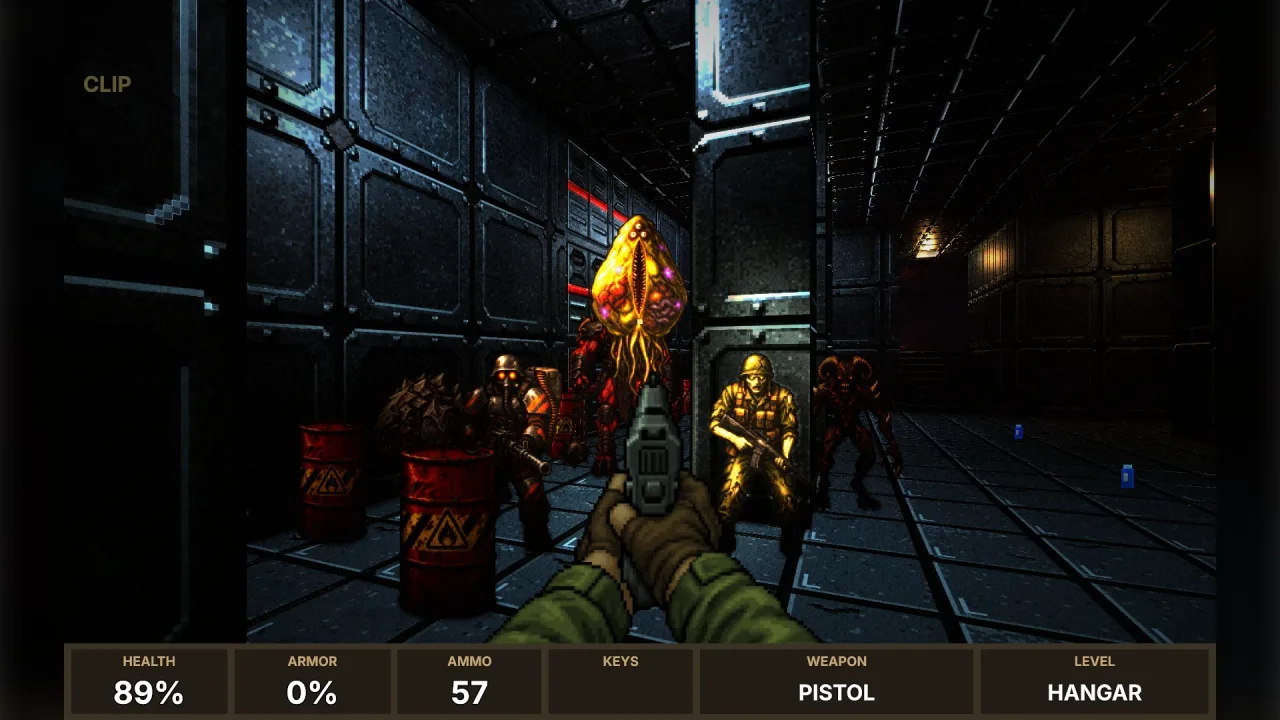
function fpsEnemyArt(): Pack<{ enemyArt: EnemyArtApi }>The fps-enemy-art pack: game.enemyArt, ready-made enemy sprites in fourteen frames for the four FPS preset sets,
matched to any enemy id. No options.
Helpers
ENEMY_ART
const ENEMY_ART: Readonly<Record<string, EnemyArtEntry>>Every enemy's ten poses as 256-colour PNGs in base64, on frames of one size per enemy, by set/id.
ENEMY_FRAMES
const ENEMY_FRAMES: { readonly walk: 0; readonly aim: 8; readonly fire: 9; readonly pain: 10; readonly fall: 11; readonly dead: 13; readonly count: 14; }The fourteen frames of every painted enemy, as the shooters number them. Frames walk to walk + 7 are four
facings of two walking steps, walk + facing * 2 + step, with facings as fps-enemies' facing(…, 4) gives them:
0 toward the eye, 1 its left side, 2 its back, 3 its right side. Then aiming, firing, a flinch, two falling frames
(fall, fall + 1) and the body (dead).
findEnemyArt
function findEnemyArt(id: string, set?: string): string | nullThe art an enemy id should wear; see EnemyArtApi.find.
Types
EnemyArtApi
interface EnemyArtApigame.enemyArt.
readonly names: readonly string[]— Every enemy's art, byset/id.readonly sets: readonly string[]— The sets:classic(Sector Assault, Facility),modern(Overdrive),corridor(Corridor Raid),crypt(Crypt Crawl).find(id: string, set?: string): string | null— The art an enemy id should wear:set/idas it is, the id inset, the id in any set, or a guess from its words ('zombie-soldier'the possessed trooper,'guard-dog'the hound,'ghost'the wraith). Null when nothing fits.load(enemies: ReadonlyArray<string | { id: string; art?: string }>, options?: EnemyArtLoadOptions): Promise<Record<string, EnemyArtInfo>>— Paint enemies into the atlas: each id (or{ id, art }to choose the art) gets its fourteen frames (ENEMY_FRAMES) atprefix + id. Ids with no art are left out. Async, because a browser decodes the pictures; headless, the frames exist with the right count and size but blank. Throws on anartthat is not one, or aresoutside 1 to 4.draw(ctx: CanvasRenderingContext2D, info: EnemyArtInfo, frame: number, w: number, h: number): boolean— Draw frameframe(ENEMY_FRAMES) of a loaded enemy into a 2D context, fitted intow × hwith its shape kept, standing on the bottom edge: for a renderer that keeps textures of its own. False where nothing could be drawn (headless, or an enemy not loaded).
EnemyArtEntry
interface EnemyArtEntryOne enemy's pictures, as the pack ships them.
readonly name: string— What it is, in words.readonly size: readonly [number, number]— Each frame's size in pixels,[width, height]; every pose has the same, at one scale.readonly front: readonly [number, number]— The front pose's own drawn size in pixels,[width, height]: what its usualheightmeasures.readonly height: number— Its usual height in world units, for a presenter's billboards.readonly float: boolean— It floats or flies: its standing poses are centred on the front's middle; dying and dead lie on the bottom edge.readonly frames: Readonly<Record<EnemyPose, string>>— The poses, each a 256-colour PNG in base64.
EnemyArtInfo
interface EnemyArtInfoAn enemy as it was painted.
readonly id: string— The enemy id it was painted for.readonly art: string— The art it wears,set/id.readonly key: string— The atlas key of its fourteen frames (ENEMY_FRAMES).readonly width: number— One frame's width in pixels.readonly height: number— One frame's height in pixels.readonly units: number— World units per frame pixel at its usual height: a billboard iswidth × unitsbyheight × units, standing where its feet are.readonly size: number— Its usual height in world units (the front pose's drawn height).readonly front: readonly [number, number]— The front pose's own drawn size in pixels,[width, height]: to stand ithworld units tall, scale the frame byh / front[1]units a pixel.readonly float: boolean— It floats or flies: its standing poses are centred on the front's middle height; dying and dead lie on the bottom edge.
EnemyArtLoadOptions
interface EnemyArtLoadOptionsOptions for load.
set?: string— The set to look in first:'classic','modern','corridor'or'crypt'. Default none (any set).prefix?: string— Atlas keys are this plus the enemy id. Default'ea-'.res?: number— Atlas pixels per frame pixel, 1 to 4: 2 keeps the pixels crisp when a billboard is magnified. Default 2.
EnemyPose
type EnemyPose = 'front' | 'step' | 'side' | 'sidestep' | 'back' | 'aim' | 'fire' | 'pain' | 'dying' | 'dead'An enemy's poses as the pack ships them: front, a walking step, its left side (facing the picture's left), a side step, its back, aiming, firing, flinching, dying and dead.